Unlock a world of possibilities! Login now and discover the exclusive benefits awaiting you.

- Qlik Community
- :
- All Forums
- :
- Qlik NPrinting
- :
- NPrinting Pixel Perfect Report – cannot add object...
- Subscribe to RSS Feed
- Mark Topic as New
- Mark Topic as Read
- Float this Topic for Current User
- Bookmark
- Subscribe
- Mute
- Printer Friendly Page

 bdunsmoor
- Mark as New
- Bookmark
- Subscribe
- Mute
- Subscribe to RSS Feed
- Permalink
- Report Inappropriate Content
NPrinting Pixel Perfect Report – cannot add objects?
I'm able to create other types of reports (Excel, Word) with NPrinting 17.2 Designer, but not Pixel Perfect Reports.
When I create a new Pixel Perfect report from NPrinting 17.2 Designer, edit the template, and try to add an object (i.e. a Table), I get the following error message:
QlikView NPrinting can’t find a supported reporting output producer for the file C:\Users\Bdunsmoor\AppData\Local\Temp\e9fa76be8094dc1bc26394a5efc740e\Tables
When I click the Cancel button, I get another error message:
Unhandled exception has occurred in a component in your application. If you click Continue, the application will ignore this error and attempt to contine.
Value cannot be null.
Parameter name: source.
If I click “Continue”, the screen returns to the Template Editor, but I can’t add any objects.
Here's a screen shot:

Accepted Solutions
bdunsmoor
- Mark as New
- Bookmark
- Subscribe
- Mute
- Subscribe to RSS Feed
- Permalink
- Report Inappropriate Content
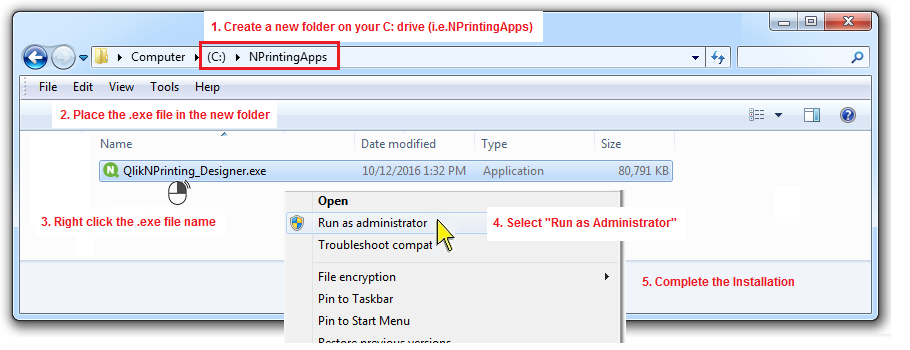
We were able to resolve this problem with help from Qlik Support. I had to uninstall the Qlik NPrinting Designer 17.2 software from my PC, and re-install it as administrator. These are the steps I followed after uninstalling the Qlik NPrinting Designer 17.2 software.
*** Uninstall Qlik NPrinting Designer 17.2 software before proceeding.
1. Create a new folder on your C: drive (I named my folder NPrintingApps)
2. Place the QlikNPrinting_Designer.exe file in the new folder (by saving it or copying and pasting it to this new folder)
3. Right click the QlikNPrinting_Designer.exe file name
4. Select "Run as Administrator"
5. Complete the Installation
bdunsmoor
- Mark as New
- Bookmark
- Subscribe
- Mute
- Subscribe to RSS Feed
- Permalink
- Report Inappropriate Content
We were able to resolve this problem with help from Qlik Support. I had to uninstall the Qlik NPrinting Designer 17.2 software from my PC, and re-install it as administrator. These are the steps I followed after uninstalling the Qlik NPrinting Designer 17.2 software.
*** Uninstall Qlik NPrinting Designer 17.2 software before proceeding.
1. Create a new folder on your C: drive (I named my folder NPrintingApps)
2. Place the QlikNPrinting_Designer.exe file in the new folder (by saving it or copying and pasting it to this new folder)
3. Right click the QlikNPrinting_Designer.exe file name
4. Select "Run as Administrator"
5. Complete the Installation
