Unlock a world of possibilities! Login now and discover the exclusive benefits awaiting you.

- Qlik Community
- :
- All Forums
- :
- Qlik NPrinting
- :
- Nprinting Feb 2018 Create html report template
- Subscribe to RSS Feed
- Mark Topic as New
- Mark Topic as Read
- Float this Topic for Current User
- Bookmark
- Subscribe
- Mute
- Printer Friendly Page

 andrewmo
- Mark as New
- Bookmark
- Subscribe
- Mute
- Subscribe to RSS Feed
- Permalink
- Report Inappropriate Content
Nprinting Feb 2018 Create html report template
Hello
I need to create an individualized HTML report with levels that gets sent to each individual user (200+ unique recipients). How do I use the first report that I created to be the template for the next 199 that I need to create? I can see how to upload the HTML, but it appears the objects are not added, just the HTML. Does anyone have a method to create a template with the objects and html included?
Thank you
Andrew
- Tags:
- nprinting
Accepted Solutions

 Lech_Miszkiewic
- Mark as New
- Bookmark
- Subscribe
- Mute
- Subscribe to RSS Feed
- Permalink
- Report Inappropriate Content
Hi.
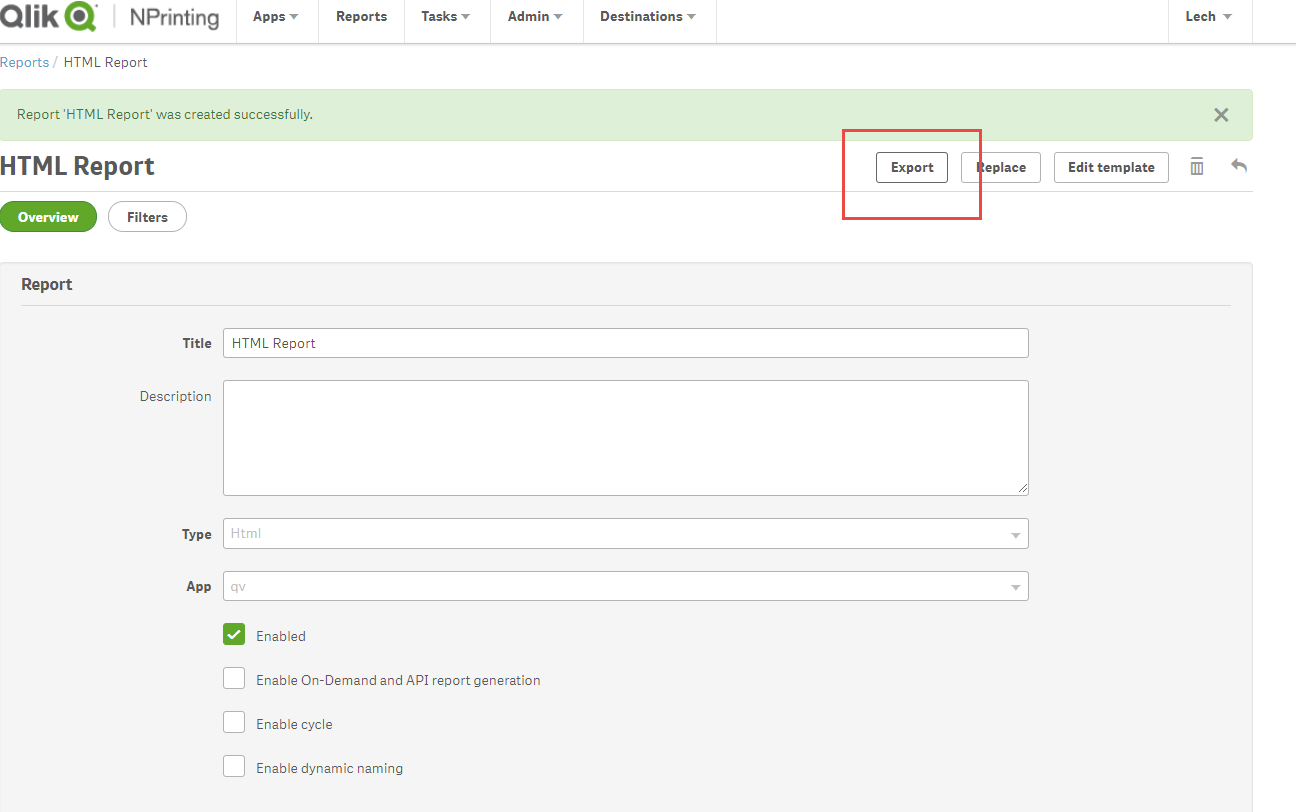
- Go to your first HTML Report and Export it to ZIP file ( have exported HTML Report)
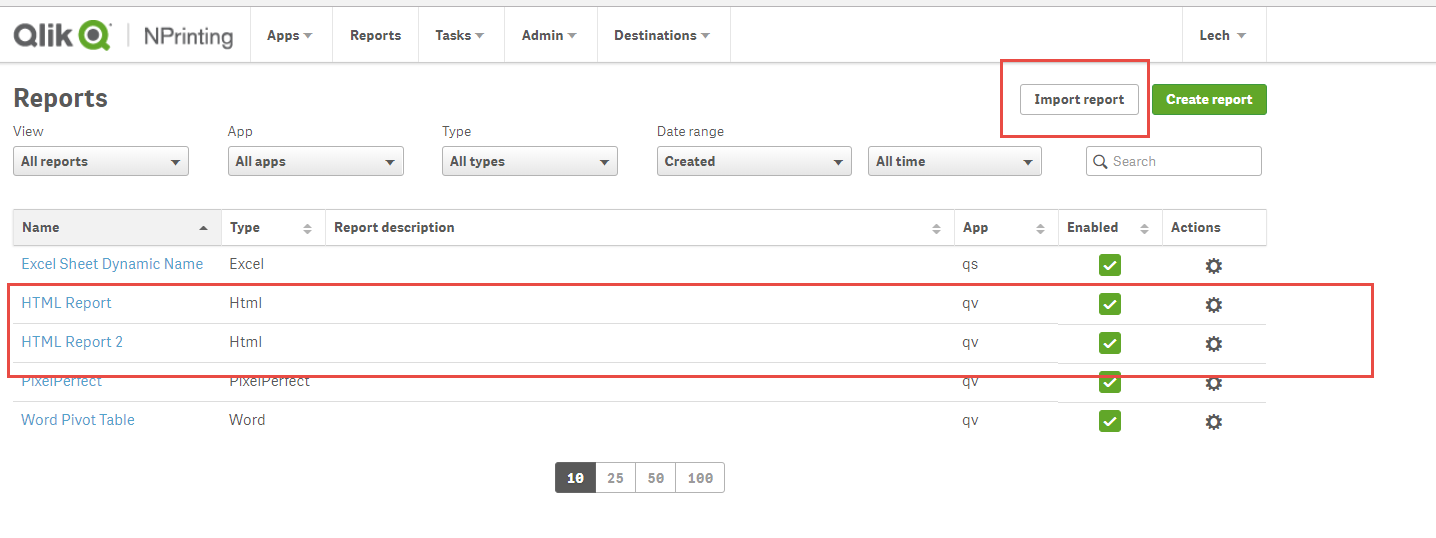
- Go back to Reports and use IMPORT button to point to z Zip file
- When prompted point to a Zip you just exported, change nameof the new report (I have called it HTML Report 2) and follow rest of the wizard steps
- New report gets created on the list with all object in it and you can modify it as you wish.
thats it!!!
cheers
Lech
---------------------------------------------
When applicable please mark the appropriate replies as CORRECT. This will help community members and Qlik Employees know which discussions have already been addressed and have a possible known solution. Please mark threads as HELPFUL if the provided solution is helpful to the problem, but does not necessarily solve the indicated problem. You can mark multiple threads as HELPFUL if you feel additional info is useful to others.
Lech_Miszkiewic- Mark as New
- Bookmark
- Subscribe
- Mute
- Subscribe to RSS Feed
- Permalink
- Report Inappropriate Content
Hi.
- Go to your first HTML Report and Export it to ZIP file ( have exported HTML Report)
- Go back to Reports and use IMPORT button to point to z Zip file
- When prompted point to a Zip you just exported, change nameof the new report (I have called it HTML Report 2) and follow rest of the wizard steps
- New report gets created on the list with all object in it and you can modify it as you wish.
thats it!!!
cheers
Lech
---------------------------------------------
When applicable please mark the appropriate replies as CORRECT. This will help community members and Qlik Employees know which discussions have already been addressed and have a possible known solution. Please mark threads as HELPFUL if the provided solution is helpful to the problem, but does not necessarily solve the indicated problem. You can mark multiple threads as HELPFUL if you feel additional info is useful to others.
andrewmo
- Mark as New
- Bookmark
- Subscribe
- Mute
- Subscribe to RSS Feed
- Permalink
- Report Inappropriate Content
Works like a charm, thanks much!
