Unlock a world of possibilities! Login now and discover the exclusive benefits awaiting you.

- Qlik Community
- :
- All Forums
- :
- Qlik NPrinting
- :
- NPrinting Nov 2017 - HTML is weirdly formatted
- Subscribe to RSS Feed
- Mark Topic as New
- Mark Topic as Read
- Float this Topic for Current User
- Bookmark
- Subscribe
- Mute
- Printer Friendly Page

 JustinDallas
- Mark as New
- Bookmark
- Subscribe
- Mute
- Subscribe to RSS Feed
- Permalink
- Report Inappropriate Content
NPrinting Nov 2017 - HTML is weirdly formatted
Hello Folks,
I'm using the HTML output function in NPrinting. For whatever reason, for certain tables, NPrinting will print rows ABOVE the header row of the table, and then commence printing the rest of the rows. Below is an example that I'm Boss Battling right now.
NPrinting Template:
<h3>Snacks - Late Delivery</h3>
     <table id="snacksLateDelivTable" style="width:100.0%;border-collapse:collapse;mso-yfti-tbllook:1184;text-align:start">
     <tr>
        <th style="%%frTableGreenHeaderCSS%%">
            Order Origin Point Id
        </th>
        <th style="%%frTableGreenHeaderCSS%%">
            Origin Header Number
        </th>
        <th style="%%frTableGreenHeaderCSS%%">
            Stop City/State
        </th>
        <th style="%%frTableGreenHeaderCSS%%">
            Stop Arrival Time
        </th>
        <th style="%%frTableGreenHeaderCSS%%">
            Minutes Late Arrival
        </th>
        <th style="%%frTableGreenHeaderCSS%%">
            Delay Reason
        </th>
        <th style="%%frTableGreenHeaderCSS%%">
            Stop Type
        </th>
      </tr>

      <tr>
        <td style="%%frTableWhiteRowCSS%%">
           %%Order Origin Point Id_2%%
        </td>
      </tr>
     </table>
    <h3>Snacks - Late Departure</h3>
Output:
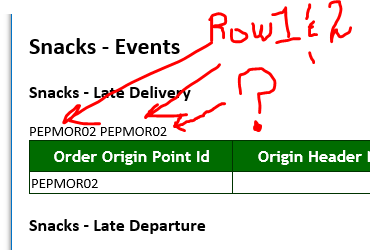
It does this no matter what I try. I've seen it happen before, especially when running the Preview, but that's about it. Now, it' spitting it out into the emailed report.
Any help is greatly appreciated.
