Unlock a world of possibilities! Login now and discover the exclusive benefits awaiting you.

- Qlik Community
- :
- All Forums
- :
- QlikView
- :
- Re: Performance issues: your advices
- Subscribe to RSS Feed
- Mark Topic as New
- Mark Topic as Read
- Float this Topic for Current User
- Bookmark
- Subscribe
- Mute
- Printer Friendly Page

- Mark as New
- Bookmark
- Subscribe
- Mute
- Subscribe to RSS Feed
- Permalink
- Report Inappropriate Content
Performance issues: your advices
Hello,
I am building a qv application which deals with invoices. My fact table is having around 45 millions of records (for 36months). Number of records will only grow smoothly, as I have been told to expose 36months maximum. My problem is not on the loading steps, as i have followed a multi-tier architecture with several qvw files to handle incremental qvd. I have also avoided synthetic keys, and kept my data model as a star schema. I am not far from the recommendations mentioned in the following topic http://community.qlik.com/message/111448#111448
My problem is more on the frontend, with a single user connected to the application, I find that navigation and selection are not that fast.
Details of the server:
Windows 2003 R2 / Entreprise x64 Edition / Service Pack 2
CPU: Intel Xeon E5320 @ 1.86GHz with 8GB of RAM
On the task manager, I can see 8 CPU running.
My QVW Frontend is 1.9GB. It takes few minutes for 1 end-user to open the document through IE6 with QV plugin; and for every user action, all 8 CPU run at 100% till data are returned to the client. Definitely, when concurrent users will start using the application, it will worsen the performance even more.
I wanted to aggregate the data even more, to reduce drastically the number of records. An easy approach would have been to remove the invoiceID, and group by all other dimensions. Problem is that functional team want to keep this dimension... We are migrating from OLAP technologies, where they used to have the feature 'Drill Through' to access the very detailed data. So, invoiceID would not be used for pivoting, but more for identifying a specific record.
So, would it be possible that I build 2 qlikview frontends:
- the first one, faster, with the very aggregated data (without the invoicedID)
- the second one, slower, with the detailled data (including the invoiceID)
End-user will mainly use the first frontend, but when they want to access the detail (drill through), it will direct them to another qlikview file (while keeping the selection made on the 1st file). The 2nd qlikview frontend will have only a single table box.
Is this architecture possible? Feel free to share your advices.
Is the capacity of the server too low for my requirements? Later, I will need to deploy the same application for other subsidiaries, which will definitely increase the number of users and the workload on the server.
Thanks in advance,
Nicolas
- « Previous Replies
-
- 1
- 2
- Next Replies »

 danielrozental
- Mark as New
- Bookmark
- Subscribe
- Mute
- Subscribe to RSS Feed
- Permalink
- Report Inappropriate Content
Qvw Optimizer looks good, you should look into adding more memory or building different applications with data aggregated at different levels.
If you can, try removing as many fields as possible from the invoices table since it's quite big with 89 fields, removing 8 fields would probably cause around a 10% decrease in memory needed.
- Mark as New
- Bookmark
- Subscribe
- Mute
- Subscribe to RSS Feed
- Permalink
- Report Inappropriate Content
Hi Daniel,
I am working closely with the functional team to review their requirements. From the 89 fields, we have removed 12 of them, mostly dimensions. Therefore, it has affected the result of my aggregation.
For 1month, I used to have 2.1millions records (QVD = 200MB); with this operation I have reduced my records by 50% (1million records / QVD = 75MB)
At the very begining, I was avoiding Synthetic Key with a simple selection/concatenation of fields.
FieldA & FieldB & FieldC as TableKey
Now, I am experiencing the function Autonumberhash128; I hope it will remain accurate (through QVD).
I am not sure what is the best between:
Autonumberhash128(FieldA &'|'& FieldB &'|'& FieldC) as TableKey
or
Autonumberhash128(FieldA, FieldB, FieldC) as TableKey
I have tried both, it does not make any difference regarding the storage of the QVD on the disk. One of the field is a date field (with timestamp / let's say FieldC); I am not sure if I should make any operation on the date before building the TableKey.
I may have reduced drastically the number of records, but I will face soon or later other performance issues as my server configuration is not optimal, and few deployment of my application will be done on the same server, and multiplication of users will occur.
I will keep updating this thread with my progress. Feel free to share further advices.
Thanks,
- Mark as New
- Bookmark
- Subscribe
- Mute
- Subscribe to RSS Feed
- Permalink
- Report Inappropriate Content
Quickly gave up on the AutoNumberHash* as I need the id to be persistent within several qvw scripts...
So, I will make use of Hash128 or Hash256 despite the output is String...
- Mark as New
- Bookmark
- Subscribe
- Mute
- Subscribe to RSS Feed
- Permalink
- Report Inappropriate Content
Hi,
I am still trying to optimize my qlikview file. Here are few scenario/measure:
Remarks
> ProcessingTime = Time to load all my qvd in my "Frontend.qvw" Enduser will then access this file through IE Plugin
> For now, I have no idea about the response time offered the enduser. Later, a team will be in charge of doing some benches of my application (accessing the app through IE plugin / re-run several times pre-defined scenario / tests with concurent users,...) but I can't wait for the result to optimize my application,
1st try: All dimensions / No aggregation / Star schema
Records: 66.5M (=33months) / Filesize: 2.6Gb(Compression:High) / ProcessingTime: 9-10min
2nd try: 1st selection of dimension / 1st aggregation / Star schema
Records: 44.5M (=36Months) / Filesize: 1.85Gb(Compression:High)
3nd try: Final selection of dimensions + aggregation / Star schema
Records: 33.5M (=36months) / Filesize: 1.32Gb(Compression: High) or 2.95Gb(Compression:None) / ProcessingTime: 5-6min
4th try: Final selection of dimensions + aggregation / Left join of all satelite tables (except Customer & Product Referentials)
Records: 33.5M (=36months) / Filesize: 730Mb(Compression: High) or 3.2Gb(Compression:None) / ProcessingTime: ~40min
5th try: Final selection of dimensions + aggregation / Left join of all satelite tables (including Customer & Product Referentials) = 1 single table
Records: 33.5M (=36months) / Filesize: 880Mb(Compression: High) / ProcessingTime: ~1h20min
We would all agree that adjusting data model has huge impacts on the filesize (at least the compressed one) and the time processing. Between scenario #3 and #4, the processing time is multiplied by 8 whereas storage on the disc is divided by 2. In my opinion, I would not mind to explain my project team that we are going to increase the processing time so end-users can enjoy better performance. But would it be the case? Would scenario #4 be faster then #3?
My data model is quite simple; I do have 1 fact table: Invoices, 2 main referentials (Customer: 38k records & Product: 5k records) and other satellite referential (usually 2 columns: Code + Label, <100 records). For the satellites tables, I would have prefered to use Mapping than LeftJoin, but I am stuck with the scenario mentioned in this thread http://community.qlik.com/message/138537#138537. I am looking forward to see how mapping would affect the processing time in my scenario #3
For all scenario mentioned above (except the 1st one), I have retrieved the statistic file and loaded them in the attached Optimizer file. Apart from the recommendation given in the Optimizer file ("Take a close look at "bytes" column in Actual Usage tab to find out which object or field is costing the most memory"); what else should we look for? Anyone could explain the meaning of each Class (ex: State Space) and SubType (State, Symbols,...)
From what I have read:
- Once the file will be accessed by the 1st user, RAM consumption will be equal of the filesize with no compression. Is it true? Or should I refer to the tab 'Comparison' (from the Qlikview Optimizer)?
- Then for every additional user, add 10-15% RAM consumption
Feel free to share your experience and give me some advise.

 johnw
johnw
- Mark as New
- Bookmark
- Subscribe
- Mute
- Subscribe to RSS Feed
- Permalink
- Report Inappropriate Content
Would it be practical to map in the labels during the CREATION of the QVD instead of when you read it in? I often take that approach. End user applications usually show the descriptions or instead of or in addition to the codes, so to make things simple and let them do an optimized load, I often add descriptions to the main QVDs. Mapping during creation of the QVD won't break an optimized load, and won't hit the bug you found in the linked thread. I typically keep product and customer data on their own tables, though, but again, would have the descriptions on those tables in addition to the codes.
I suspect that having the descriptions on your three main tables will give a slightly faster user experience than keeping them on separate tables. I do think only slightly, though. Testing, of course, will tell you for sure, but if you can't wait for that, then I'd aim for putting the descriptions on the main tables and just trying to do that as efficiently as possible.
- Mark as New
- Bookmark
- Subscribe
- Mute
- Subscribe to RSS Feed
- Permalink
- Report Inappropriate Content
Hi John,
Mapping the label during the creation of qvd, would mean that everytime I initiate the batch (daily or monthly, I do not know yet; but at least whenever referential has changed), I re-process all my historic of data (36months x 1million records/month), and this would be quite costly for the processing time. I tried it at the very begining (before filtering, fields selection, and aggregation), it tooks 3h for 66millions records. Now that I am left with 36millions records, the processing should be below 2h (quick estimation).
I would definitely save some time on loading those qvd (containing labels) into my frontend (right now, I am more into the scenario #4 = 40min), but over all, I would require 1 extra hour (which is precious for the maintenance team, when functionals are asking for a quick refresh after they have modified referentials.
Thanks for your suggestion, and sharing your experience! Any help for the understanding of the Optimizer file, and the expected RAM consumption?
johnw
- Mark as New
- Bookmark
- Subscribe
- Mute
- Subscribe to RSS Feed
- Permalink
- Report Inappropriate Content
So do your labels change? Ours generally do not, so we can combine mapping of labels with incremental loads. In that case, mapping during QVD creation saves additional time because we're only mapping a small portion of the records instead of every record and often multiple times as would occur if we did it during the load of the user applications.
If they change, but not routinely, you can also do a full reload only when they change. Of course that requires that you be notified that they've changed in some way, and isn't a very robust procedure.
- Mark as New
- Bookmark
- Subscribe
- Mute
- Subscribe to RSS Feed
- Permalink
- Report Inappropriate Content
Hi John,
Yes, our labels change. So for the moment, I can't follow such recommendation; and with the 2nd option you have suggested, I agree with you that robustness would be difficult to meet.
As I am still waiting for the benchmark of my frontend, I was trying to optimize my data loading process, and there is something i can't figure out.
I am working on my fact data, and trying to prepare my Production environment, so I loop over the last 36months to retrieve data and build all my *.qvds.
Once deployed in Production, process will only take care of the last month. But I have noticed a different behavior,
1/ whether the query is coded within my QV script
SQL Select *
FROM FactTable
WHERE (InvoiceDate >= '5/1/2011' and InvoiceDate < '6/1/2011')
2/ or the query is a Stored Procedure which is called from QV script
SQL EXEC SP @StartDay = '5/1/2011', @EndDay = '6/1/2011'
DB Engine is MS SQL2008, setup on a dedicated server. I have played both scenario twice and made sure that there was no other activity on both servers (QV and DB). Here are my results:
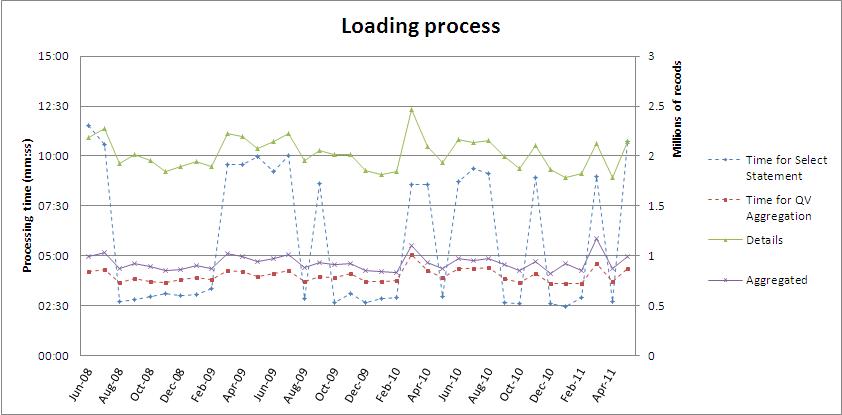
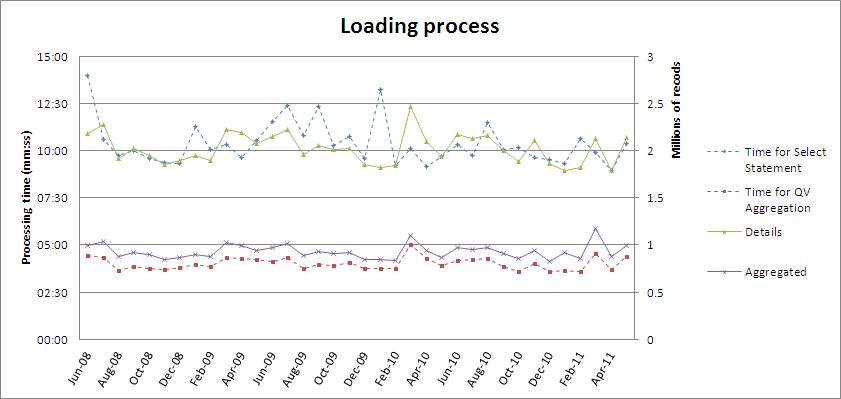
My current implementation:
A/ Retrieve the fact data with a simple query as given above and store into qvd (1 per month)
Number of records retrieved: green continuous line / right axis (around 2millions records/month)
Processing time: blue dotted line / left axis
B/ Aggregate/Filter previous data and select fields as per funtional requirement and stored into separated qvd (1 per month)
(DB connection is no longer needed as data are still within my QV process)
Number of records aggregated: purple contiuous line / right axis (around 1million record/month)
Processing time: red dotted line / left axis
Result of scenario 1 (QV Script: SQL Select)
Result of scenario 2 (QV Script: SQL Execute)
As you can see:
- In scenario 1, the processing time for the query is not stable over the 36months, it varies from 2"30min to 11"30min, to retrieve the same amount of data (avg: 5"48min)
- In scenario 2, the processing time for the same query (now coded in a Stored procedure) is now much more stable, but average time is also higher, as it varies from 9"15min to 14min (avg: 10"22min)
I have not done anything special on the DB side, apart setting up some indexes on the InvoiceDate; Nothing on the StoredProcedure. Have you experience the same? I was expecting the SP to bring better performance. What are your advices on this point?
johnw
- Mark as New
- Bookmark
- Subscribe
- Mute
- Subscribe to RSS Feed
- Permalink
- Report Inappropriate Content
I'm mostly unfamiliar with MS SQL. I can't think of any reason for the stored procedure to take meaningfully longer or be more stable than a straight cursor read assuming you're using the same SQL in both. I'm also not sure why you would expect the stored procedure to have better performance. In DB2, I might be able to use tricks like multi-fetch to save round trips to the DBMS to improve performance in a stored procedure compared to SQL in QlikView, but we mostly don't use stored procedures, so I'm not certain. I guess I'm saying I won't be much help at this point due to lack of relevant experience.
- Mark as New
- Bookmark
- Subscribe
- Mute
- Subscribe to RSS Feed
- Permalink
- Report Inappropriate Content
Hi Nicolas. I think that you should try to use Direct Discovery feature. This feature was first introduced in QlikView 11.20. It allows to create the data model with aggregated data which will be used by most of users. When somebody needs to get detailed information (in your case functional team) for each separate invoice this data will be queried directly from the database according to current selections in QlikView application. In my opinion Direct Discovery can be used if detailed data is required rather rarely in other case it will cause high load on your RDBMS. I have attached some documents to this reply.
- « Previous Replies
-
- 1
- 2
- Next Replies »