Unlock a world of possibilities! Login now and discover the exclusive benefits awaiting you.

- Qlik Community
- :
- Forums
- :
- Analytics & AI
- :
- Products & Topics
- :
- App Development
- :
- Alternate State Selections
- Subscribe to RSS Feed
- Mark Topic as New
- Mark Topic as Read
- Float this Topic for Current User
- Bookmark
- Subscribe
- Mute
- Printer Friendly Page

 alexis
- Mark as New
- Bookmark
- Subscribe
- Mute
- Subscribe to RSS Feed
- Permalink
- Report Inappropriate Content
Alternate State Selections
Hi
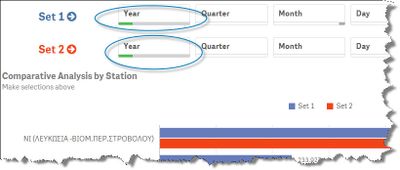
I am using Alternate States in Qlik Sense via Filter Panes and I need to show the selections that the use has made in each of the filter panes as part of the heading of a chart.
In the example below, you can see 2 sets of filter panes ones for each Alternate State ("Set 1" and "Set 2"). In this example take the "Year" for example its a dimension called "DispatchDate" for both sets, the top is Set 1 and the bottom Set 2. Once I have made my selections (for example 2018 for Set 1 and 2017 for Set 2) the user cannot see what the bars in the chart below represent - it would be great to include the selections of each set as part of a heading or in a text box alongside the chart, e.g. "Comparative Analysis by Station (2018 vs. 2017) in this example - does anyone know how I can extract the selections made in each set?
Accepted Solutions

 agigliotti
- Mark as New
- Bookmark
- Subscribe
- Mute
- Subscribe to RSS Feed
- Permalink
- Report Inappropriate Content
=GetCurrentSelections(',',',',',','10','Set 1')
i hope it can help.
Follow me on my LinkedIn | Know Gamma Informatica at gammainformatica.it
agigliotti
- Mark as New
- Bookmark
- Subscribe
- Mute
- Subscribe to RSS Feed
- Permalink
- Report Inappropriate Content
=GetCurrentSelections(',',',',',','10','Set 1')
i hope it can help.
Follow me on my LinkedIn | Know Gamma Informatica at gammainformatica.it
alexis
- Mark as New
- Bookmark
- Subscribe
- Mute
- Subscribe to RSS Feed
- Permalink
- Report Inappropriate Content
Dear Agigliotti
EXCELLENT response. Based on your reply I fine-tuned the code a little to:
= GetCurrentSelections('>'&chr(10),': <',',','10','Set 1')
to produce this which is EXACTLY what I wanted - THANKS!
 agigliotti
- Mark as New
- Bookmark
- Subscribe
- Mute
- Subscribe to RSS Feed
- Permalink
- Report Inappropriate Content
Follow me on my LinkedIn | Know Gamma Informatica at gammainformatica.it

 Arvinffernandez
- Mark as New
- Bookmark
- Subscribe
- Mute
- Subscribe to RSS Feed
- Permalink
- Report Inappropriate Content
