Unlock a world of possibilities! Login now and discover the exclusive benefits awaiting you.

- Qlik Community
- :
- Forums
- :
- Analytics & AI
- :
- Products & Topics
- :
- App Development
- :
- Re: Assigning colors to dimension created using va...
- Subscribe to RSS Feed
- Mark Topic as New
- Mark Topic as Read
- Float this Topic for Current User
- Bookmark
- Subscribe
- Mute
- Printer Friendly Page

 Aspiring_Develo
- Mark as New
- Bookmark
- Subscribe
- Mute
- Subscribe to RSS Feed
- Permalink
- Report Inappropriate Content
Assigning colors to dimension created using value list
Hello All,
I created pie chart using value list dimensions.
Dimensions:-=valuelist('Unlimited Contracts N-1','Fixed Term Contracts N-1','Total Temps N-1')
Right now the colors of the dimensions are coming automatically as i have opted Colors Auto in Qliksense
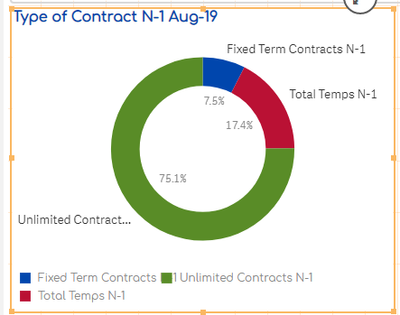
I want to assign same colors to the dimensions like below:
Unlimited Contract N-1 = Blue
Fixed term Contract N-1= Red
Total Temps N-1= Green
I tried to make assign the colors in measures like below but it did not worked .
=if( valuelist('Unlimited Contracts N-1','Fixed Term Contracts N-1','Total Temps N-1')='Unlimited Contracts N-1',
num(sum({<Indicateur.Code = {'PO.1.131b'},[Site.isYFPO]={'$(vChange)'},[Site.Participe]={'49|50'},Date.Year = , Date.MonthName = , Date.Quarter =, Date.Month =, Date.MonthEnd =, MonthYear=,Date=,NewTestvb1=,Addmonths_Date={'$(= Date(addmonths(MonthStart(max(Addmonths_Date)),-11),'DD/MM/YYYY'))'} >} [Indicateur.Value])
/
sum({<Indicateur.Code = {'PO.1.137b'},[Site.isYFPO]={'$(vChange)'},[Site.Participe]={'49|50'},Date.Year = , Date.MonthName = , Date.Quarter =, Date.Month =, Date.MonthEnd =, MonthYear=,Date=,NewTestvb1=,Addmonths_Date={'$(= Date(addmonths(MonthStart(max(Addmonths_Date)),-11),'DD/MM/YYYY'))'} >} [Indicateur.Value])
,'###.#%', blue())
Can anyone please help me on this as i am not able to find anything on community ??
- « Previous Replies
-
- 1
- 2
- Next Replies »
Aspiring_Develo- Mark as New
- Bookmark
- Subscribe
- Mute
- Subscribe to RSS Feed
- Permalink
- Report Inappropriate Content
Can anyone please help me on this ? I am not able to find the solution . Please help 😞

- « Previous Replies
-
- 1
- 2
- Next Replies »