Unlock a world of possibilities! Login now and discover the exclusive benefits awaiting you.

- Qlik Community
- :
- Forums
- :
- Analytics & AI
- :
- Products & Topics
- :
- App Development
- :
- Re: CALCULATE VALUE FROM RANK SELECTION
- Subscribe to RSS Feed
- Mark Topic as New
- Mark Topic as Read
- Float this Topic for Current User
- Bookmark
- Subscribe
- Mute
- Printer Friendly Page

 philgood34
- Mark as New
- Bookmark
- Subscribe
- Mute
- Subscribe to RSS Feed
- Permalink
- Report Inappropriate Content
CALCULATE VALUE FROM RANK SELECTION
Hi
I want to calculate the quota of the TOP FIVE sectors for the margin indicator in a KPI
Dimension SECTORS
Measures : SALES
COST
and MARGIN = SALES - COST
so in my KPI i 'm waiting for
SUM( top five (SALES-COST)) / SUM (TOTAL (SALES - COST))
Can you help me to find the right syntax using RANK ?
thank's in advance
Philippe
Accepted Solutions
philgood34
- Mark as New
- Bookmark
- Subscribe
- Mute
- Subscribe to RSS Feed
- Permalink
- Report Inappropriate Content
hI
I finaly found a correct syntax without "IF" (i didn't understood why IF without THEN in the Anand suggestion ...)
so i apply
=Sum({<SECTORS_LIB = {"=Rank(Sum(SALES-COST))<=2"}>} (SALES-COST))/Sum(TOTAL (SALES-COST))
(see the result below with few changes)
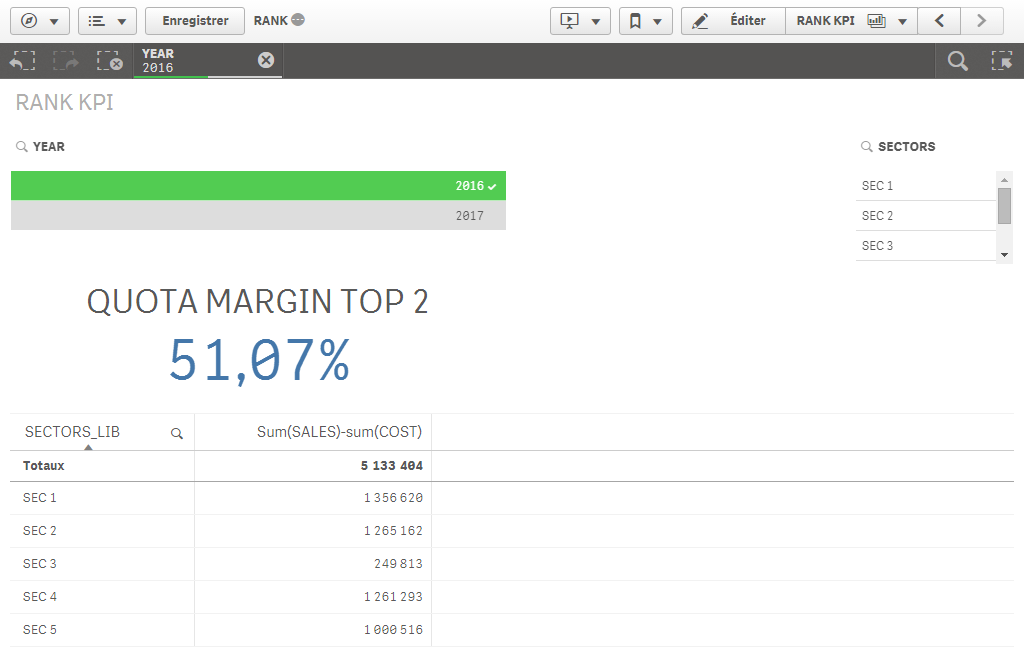
regards
Philippe

 its_anandrjs
- Mark as New
- Bookmark
- Subscribe
- Mute
- Subscribe to RSS Feed
- Permalink
- Report Inappropriate Content
Try with Rank function for finding top 5 Margin Sales
=if( Rank(SUM (SALES-COST) ) <= 5, SUM (SALES-COST) )
/
SUM (TOTAL (SALES - COST))
philgood34
- Mark as New
- Bookmark
- Subscribe
- Mute
- Subscribe to RSS Feed
- Permalink
- Report Inappropriate Content
Hi Anand
Thank's for your answer, but unfortunetly, the result is 100 % (i tested in 2 of my apps )
Regards
Philippe
philgood34
- Mark as New
- Bookmark
- Subscribe
- Mute
- Subscribe to RSS Feed
- Permalink
- Report Inappropriate Content
as shown below

the SUM(TOTAL(SALES-COST)) is the total for the top five and not the total of the all selection ...
philgood34
- Mark as New
- Bookmark
- Subscribe
- Mute
- Subscribe to RSS Feed
- Permalink
- Report Inappropriate Content
hI
I finaly found a correct syntax without "IF" (i didn't understood why IF without THEN in the Anand suggestion ...)
so i apply
=Sum({<SECTORS_LIB = {"=Rank(Sum(SALES-COST))<=2"}>} (SALES-COST))/Sum(TOTAL (SALES-COST))
(see the result below with few changes)
regards
Philippe
its_anandrjs
- Mark as New
- Bookmark
- Subscribe
- Mute
- Subscribe to RSS Feed
- Permalink
- Report Inappropriate Content
That's right Phillipe but it is working at my end may be some typo or maybe dimension issue there in your chart kidly check this.
This is the expression
=SUM( {<Dim1 = {"Rank(SUM (SALES-COST) ) <= 5"}>} SALES-COST)
/
SUM (TOTAL (SALES - COST))
