Unlock a world of possibilities! Login now and discover the exclusive benefits awaiting you.

- Qlik Community
- :
- Forums
- :
- Analytics & AI
- :
- Products & Topics
- :
- App Development
- :
- Re: Compare same text in three columns and count a...
- Subscribe to RSS Feed
- Mark Topic as New
- Mark Topic as Read
- Float this Topic for Current User
- Bookmark
- Subscribe
- Mute
- Printer Friendly Page

 Daniel1908
- Mark as New
- Bookmark
- Subscribe
- Mute
- Subscribe to RSS Feed
- Permalink
- Report Inappropriate Content
Compare same text in three columns and count a different one
Hello Together,
I am looking for a solution to compare the same text in three columns and count a different one.
For example:
If= Supplier A is equal to Supplier B and Product Key is "TH" count Material
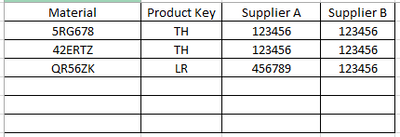
Thanks for your help.
Kind Regards,
Daniel
Accepted Solutions

 MayilVahanan
- Mark as New
- Bookmark
- Subscribe
- Mute
- Subscribe to RSS Feed
- Permalink
- Report Inappropriate Content
HI Daniel,
You can add another value with comma separator.
=Count({<Prod={'TH'}, SupC -={698758, 698452} >} If(SupA=SupB, Mat))
Please close the thread by marking correct answer & give likes if you like the post.
 rubenmarin
- Mark as New
- Bookmark
- Subscribe
- Mute
- Subscribe to RSS Feed
- Permalink
- Report Inappropriate Content
Hi, you can try with =Count({<Prod={'TH'}>} If(SupA=SupB, Mat))
Daniel1908
- Mark as New
- Bookmark
- Subscribe
- Mute
- Subscribe to RSS Feed
- Permalink
- Report Inappropriate Content
Hi,
that worked, thanks for your help.
How can I exclude a text from a column?
For example exclude 698758 from column Supplier C.
Kind Regards,
Daniel
MayilVahanan
- Mark as New
- Bookmark
- Subscribe
- Mute
- Subscribe to RSS Feed
- Permalink
- Report Inappropriate Content
HI @Daniel1908
Try like this
=Count({<Prod={'TH'}, SupC -={698758} >} If(SupA=SupB, Mat))
Please close the thread by marking correct answer & give likes if you like the post.
Daniel1908
- Mark as New
- Bookmark
- Subscribe
- Mute
- Subscribe to RSS Feed
- Permalink
- Report Inappropriate Content
Hi Mayil,
Thanks for your help.
How can I exclude another SupC? 698758 and 698452?
Kind Regards,
Daniel
MayilVahanan
- Mark as New
- Bookmark
- Subscribe
- Mute
- Subscribe to RSS Feed
- Permalink
- Report Inappropriate Content
HI Daniel,
You can add another value with comma separator.
=Count({<Prod={'TH'}, SupC -={698758, 698452} >} If(SupA=SupB, Mat))
Please close the thread by marking correct answer & give likes if you like the post.
Daniel1908
- Mark as New
- Bookmark
- Subscribe
- Mute
- Subscribe to RSS Feed
- Permalink
- Report Inappropriate Content
Hi Mayil,
Thanks for your help.
Kind Regards,
Daniel
