Unlock a world of possibilities! Login now and discover the exclusive benefits awaiting you.

- Qlik Community
- :
- Forums
- :
- Analytics & AI
- :
- Products & Topics
- :
- App Development
- :
- Create a single list of values based on multiple c...
- Subscribe to RSS Feed
- Mark Topic as New
- Mark Topic as Read
- Float this Topic for Current User
- Bookmark
- Subscribe
- Mute
- Printer Friendly Page

 jmalenfant
- Mark as New
- Bookmark
- Subscribe
- Mute
- Subscribe to RSS Feed
- Permalink
- Report Inappropriate Content
Create a single list of values based on multiple columns
Hi - I'm sure this is a simple question, but I cannot find the answer anywhere.
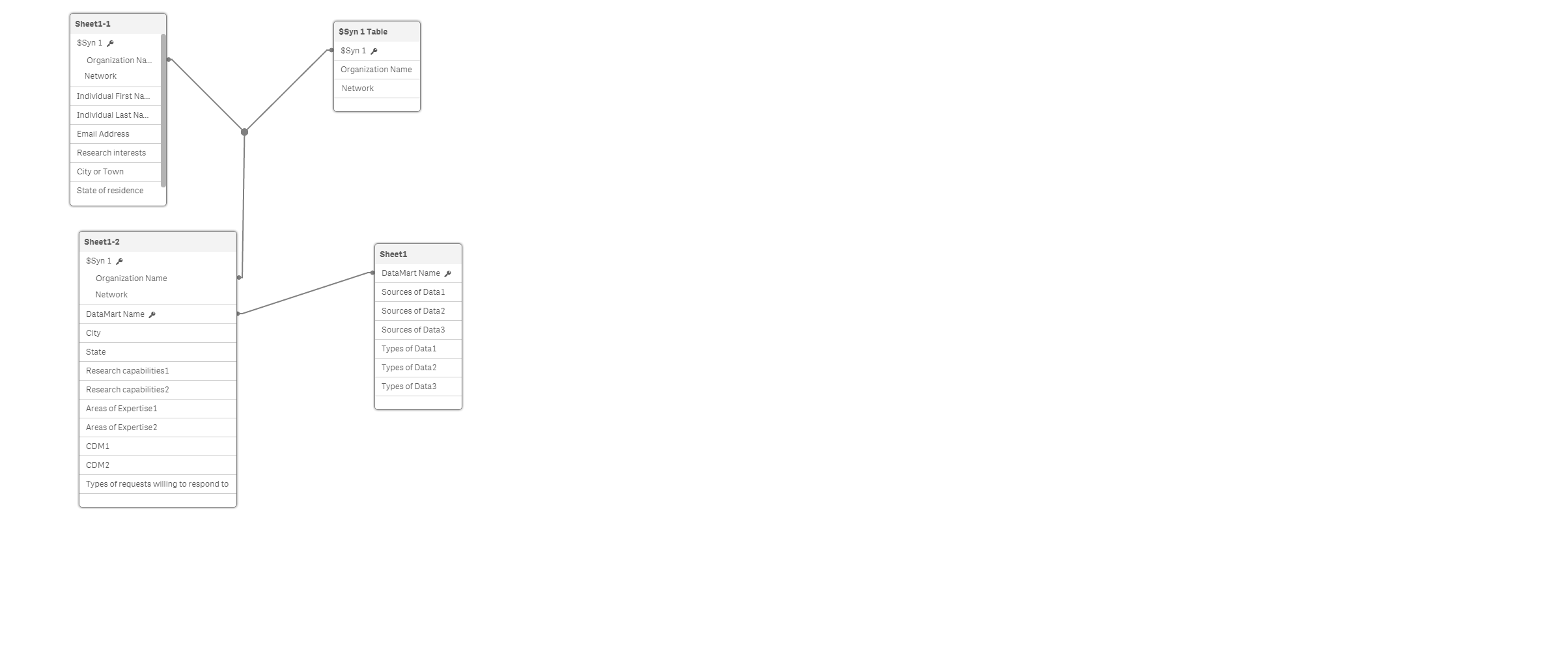
Here is a very simple data model (based on excel sheets) in Qlik Sense. The use cases are below, but basically I want to create a filter pane "sources of data" that simply presents a unique list of values from the sources of data 1, sources of data2 and sources of data 3 columns. A user would search for organizations or datamarts that have a specific source of data

 Gysbert_Wassena
- Mark as New
- Bookmark
- Subscribe
- Mute
- Subscribe to RSS Feed
- Permalink
- Report Inappropriate Content
Then you need to put all the data from the three fields into one field. That's something you need to fix in the load script.
NewSheet1:
CrossTable(Field, Value)
LOAD * RESIDENT Sheet1;
talk is cheap, supply exceeds demand
jmalenfant
- Mark as New
- Bookmark
- Subscribe
- Mute
- Subscribe to RSS Feed
- Permalink
- Report Inappropriate Content
Thanks. Do you know if it's possible to do this without changing the load script? Could I somehow create a master item, new variable, or custom object to do this?
Gysbert_Wassena- Mark as New
- Bookmark
- Subscribe
- Mute
- Subscribe to RSS Feed
- Permalink
- Report Inappropriate Content
I'm fairly sure it's not possible, but I could be wrong. What I do know that there is no excuse other than 'Look mum, see what totally cool, but utterly useless things I can do' to try it. This should be fixed in the script.
talk is cheap, supply exceeds demand
