Unlock a world of possibilities! Login now and discover the exclusive benefits awaiting you.

- Qlik Community
- :
- Forums
- :
- Analytics & AI
- :
- Products & Topics
- :
- App Development
- :
- Incorrect average total in pivot table
- Subscribe to RSS Feed
- Mark Topic as New
- Mark Topic as Read
- Float this Topic for Current User
- Bookmark
- Subscribe
- Mute
- Printer Friendly Page

- Mark as New
- Bookmark
- Subscribe
- Mute
- Subscribe to RSS Feed
- Permalink
- Report Inappropriate Content
Incorrect average total in pivot table
Hi,
I use the following measure to calculate my percentages per Year/Month:
Count(distinct [PurchDoc])/count(total< [Year/Month] >distinct [PurchDoc])
I expected the pivot table to calculate the average of the percentages for each column in the totals. Yet when I compare the totals from Qlik Sense with the average I calculated in Excel there is a difference for one column (53% instead of 56%).
Why is this?

Accepted Solutions

 kaushiknsolanki
- Mark as New
- Bookmark
- Subscribe
- Mute
- Subscribe to RSS Feed
- Permalink
- Report Inappropriate Content
Hi,
The expression works well.
Here is the QVF.
Also the Screenshot.

Regards,
Kaushik Solanki
 sunny_talwar
- Mark as New
- Bookmark
- Subscribe
- Mute
- Subscribe to RSS Feed
- Permalink
- Report Inappropriate Content
Can you try this:
Avg(Aggr(Count(distinct [PurchDoc])/count(total< [Year/Month] >distinct [PurchDoc]), [Year/Month], [Buying Channel]))
kaushiknsolanki
- Mark as New
- Bookmark
- Subscribe
- Mute
- Subscribe to RSS Feed
- Permalink
- Report Inappropriate Content
Hi,
Try this expression,
Avg(Aggr(Count(distinct [PurchDoc])/count(total< [Year/Month] >distinct [PurchDoc]),[Buying Channel]))
Regards,
Kaushik Solanki
- Mark as New
- Bookmark
- Subscribe
- Mute
- Subscribe to RSS Feed
- Permalink
- Report Inappropriate Content
I tried both expressions but it still displays an incorrect average of 53%.
sunny_talwar
- Mark as New
- Bookmark
- Subscribe
- Mute
- Subscribe to RSS Feed
- Permalink
- Report Inappropriate Content
Would you be able to share a sample?
- Mark as New
- Bookmark
- Subscribe
- Mute
- Subscribe to RSS Feed
- Permalink
- Report Inappropriate Content
No problem. See attachment.
kaushiknsolanki
- Mark as New
- Bookmark
- Subscribe
- Mute
- Subscribe to RSS Feed
- Permalink
- Report Inappropriate Content
Hi,
The expression works well.
Here is the QVF.
Also the Screenshot.
Regards,
Kaushik Solanki
sunny_talwar
- Mark as New
- Bookmark
- Subscribe
- Mute
- Subscribe to RSS Feed
- Permalink
- Report Inappropriate Content
Precisely, I think you might have just checked one expression and forgot to check mine. This one does seem to work:
Avg(Aggr(Count(distinct [PurchDoc])/count(total< [Year/Month] >distinct [PurchDoc]), [Year/Month], [Buying Channel]))
- Mark as New
- Bookmark
- Subscribe
- Mute
- Subscribe to RSS Feed
- Permalink
- Report Inappropriate Content
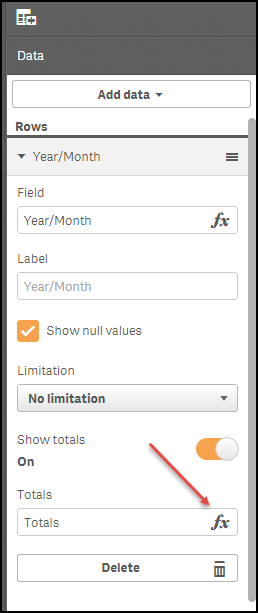
You're right. The expression works well. I was just implementing it in the wrong area. I thought it was to be inserted in the totals.