Unlock a world of possibilities! Login now and discover the exclusive benefits awaiting you.

- Qlik Community
- :
- Forums
- :
- Analytics & AI
- :
- Products & Topics
- :
- App Development
- :
- Re: Custom Pie Chart
- Subscribe to RSS Feed
- Mark Topic as New
- Mark Topic as Read
- Float this Topic for Current User
- Bookmark
- Subscribe
- Mute
- Printer Friendly Page

 qlik_agustin
- Mark as New
- Bookmark
- Subscribe
- Mute
- Subscribe to RSS Feed
- Permalink
- Report Inappropriate Content
Custom Pie Chart
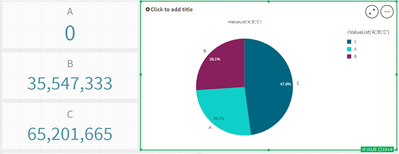
i want to produce a pie chart where C is the total of the whole pie.
after selecting in field B, A=0 and B will be equal. but if you select in field A, C>B>A.
Accepted Solutions
qlik_agustin
- Mark as New
- Bookmark
- Subscribe
- Mute
- Subscribe to RSS Feed
- Permalink
- Report Inappropriate Content
Thank you for this. Because of this i somehow understand how i will work on my current problem.
Here's how i got my ideal output.
=IF( ValueList('A', 'B', 'C') = 'A', if(count(GetCurrentSelections()>0) and getselectedcount([ID])>0,Sum({$}[A]),0),
IF( ValueList('A', 'B', 'C') = 'B', Sum({$}[B]), SUM({$}[C]) - Sum({$}[B]) ))

 brunobertels
- Mark as New
- Bookmark
- Subscribe
- Mute
- Subscribe to RSS Feed
- Permalink
- Report Inappropriate Content
qlik_agustin
- Mark as New
- Bookmark
- Subscribe
- Mute
- Subscribe to RSS Feed
- Permalink
- Report Inappropriate Content
Thank you for this. Because of this i somehow understand how i will work on my current problem.
Here's how i got my ideal output.
=IF( ValueList('A', 'B', 'C') = 'A', if(count(GetCurrentSelections()>0) and getselectedcount([ID])>0,Sum({$}[A]),0),
IF( ValueList('A', 'B', 'C') = 'B', Sum({$}[B]), SUM({$}[C]) - Sum({$}[B]) ))
