Unlock a world of possibilities! Login now and discover the exclusive benefits awaiting you.

- Qlik Community
- :
- Forums
- :
- Analytics & AI
- :
- Products & Topics
- :
- App Development
- :
- Re: Fields not showing up in Selections tool
- Subscribe to RSS Feed
- Mark Topic as New
- Mark Topic as Read
- Float this Topic for Current User
- Bookmark
- Subscribe
- Mute
- Printer Friendly Page

 Steve_Rosebrook
- Mark as New
- Bookmark
- Subscribe
- Mute
- Subscribe to RSS Feed
- Permalink
- Report Inappropriate Content
Fields not showing up in Selections tool
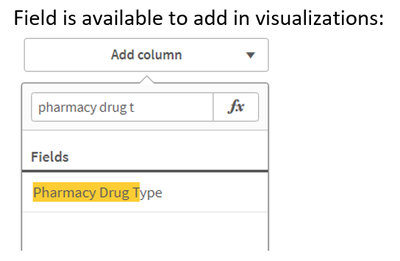
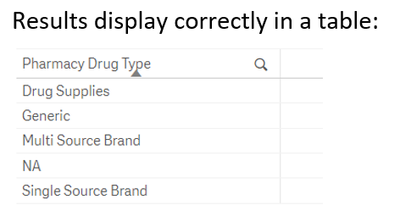
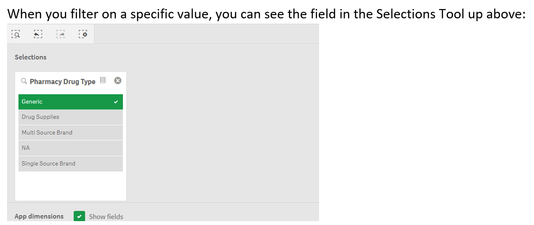
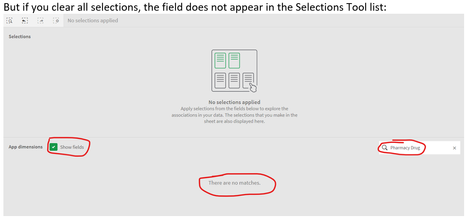
We have a very strange situation where there are fields that are showing up in edit mode (when creating master items or when adding dimensions/measures to a viz object) - but the fields do not show up in the Selections tool (even after checking the "Show fields" box. We're wondering if this is some kind of bug?
The fields have not been tagged as hidden, and they function and display like normal in every other situation - except for the Selections tool. Master items have not been created for these fields yet - they've initially only been offered to users as fields for now. (Yes, we will be creating master items eventually - and they do work as they should when they're included as master items - they just don't work correctly as fields.)
I'm adding some screen shots for one of the fields below, to show what we're seeing. Any help anyone can give us on this would be appreciated. Thanks!
- « Previous Replies
-
- 1
- 2
- Next Replies »

 lennyvz1
- Mark as New
- Bookmark
- Subscribe
- Mute
- Subscribe to RSS Feed
- Permalink
- Report Inappropriate Content
That automatic equal sign is the bane of many otherwise good apps. It turns a simple dimension into a calculated dimension and does bad things to the responsiveness of the app. I done troubleshooting on many "slow" apps and found that just going through and removing as many of those '=' as you can find will significantly improve the responsiveness of most apps with large data sets.

- « Previous Replies
-
- 1
- 2
- Next Replies »