Unlock a world of possibilities! Login now and discover the exclusive benefits awaiting you.

- Qlik Community
- :
- Forums
- :
- Analytics & AI
- :
- Products & Topics
- :
- App Development
- :
- Re: Filter Data by using a variable
- Subscribe to RSS Feed
- Mark Topic as New
- Mark Topic as Read
- Float this Topic for Current User
- Bookmark
- Subscribe
- Mute
- Printer Friendly Page

- Mark as New
- Bookmark
- Subscribe
- Mute
- Subscribe to RSS Feed
- Permalink
- Report Inappropriate Content
Filter Data by using a variable
(QLIK SENSE)
Hallo to all,
again there is a (hopefully easy) Problem I'm concerning of. I want to filter my data by using a variable. I've already read some threads about such a topic but can't adapt it to my problem, because i don't understand the way to use of $<xyz=...> which is often mentioned.
My Problem:
I have some Sheets. On one Sheet i have 5 buttons. Each button set the value of variable x to a different value for example 2012, 2013, ... . If i press one of these buttons, i will only get those data for example of the year 2013 (if i press Button 3). So i want to see only the customers who bough something in year 2013 in table 1. Or the orders made in 2013. I think you know what i mean. Is this possible?
Is it also possible to combine 2 buttons. If i use for example toggle buttons and different variables for each button, can i Filter customers, orders and the other data by 2 years so i get all data of e.g. 2012 and 2013 if these buttons are active?!
I hope you understand what i mean and that you know a way to realize it. Thanks a lot
Michael
- « Previous Replies
-
- 1
- 2
- Next Replies »
- Mark as New
- Bookmark
- Subscribe
- Mute
- Subscribe to RSS Feed
- Permalink
- Report Inappropriate Content
I already got this extension 😉
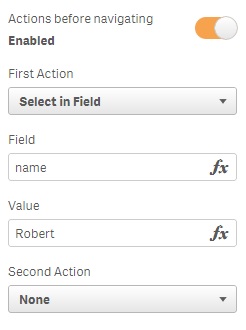
I choose the item "select in field" because that's exactly what i like to do.
I choose field "name" and as value "robert" but it doesn't work 😞 Did you try it on your own? Maybe I did just a stupid mistake using this function?!
- Mark as New
- Bookmark
- Subscribe
- Mute
- Subscribe to RSS Feed
- Permalink
- Report Inappropriate Content
try without the quotation marks
- Mark as New
- Bookmark
- Subscribe
- Mute
- Subscribe to RSS Feed
- Permalink
- Report Inappropriate Content
Hello to all of you,
finally everything works fine 🙂
1. I recognized, that there is a new version of that extension. 😉
2. You can set the value to more than one item by using this syntax: (Robert|Hans).
Thanks to all of you trying to help me!!!

 alextimofeyev
- Mark as New
- Bookmark
- Subscribe
- Mute
- Subscribe to RSS Feed
- Permalink
- Report Inappropriate Content
Thank you, Andrew!
I was searching for "button" and this extension didn't come up in the results.
- Mark as New
- Bookmark
- Subscribe
- Mute
- Subscribe to RSS Feed
- Permalink
- Report Inappropriate Content
Did this solution work for you? I can't figure out how to use that 

 abhi1693r
- Mark as New
- Bookmark
- Subscribe
- Mute
- Subscribe to RSS Feed
- Permalink
- Report Inappropriate Content
Hi,
I was looking at a similar problem and wanted to know if a solution was possible.
I have a field with values 1, 2 and 3. When a user selects 2, I want 1 to be auto selected. Similarly, If a user selects 3, I want 1 and 2 to be auto selected.
Can you help?
- « Previous Replies
-
- 1
- 2
- Next Replies »