Unlock a world of possibilities! Login now and discover the exclusive benefits awaiting you.

- Qlik Community
- :
- Forums
- :
- Analytics & AI
- :
- Products & Topics
- :
- App Development
- :
- Re: Filter a calculation
- Subscribe to RSS Feed
- Mark Topic as New
- Mark Topic as Read
- Float this Topic for Current User
- Bookmark
- Subscribe
- Mute
- Printer Friendly Page

 stekol61
- Mark as New
- Bookmark
- Subscribe
- Mute
- Subscribe to RSS Feed
- Permalink
- Report Inappropriate Content
Filter a calculation
I have added a filter to my app and i want to be able present result from this expression for different countries (wor_Country_S).
What is the best way to do this?
Count({<Week_S={'$(v_currentWeek)'} , wor_country_S >} wor_ticket_ID_S)
Accepted Solutions
stekol61
- Mark as New
- Bookmark
- Subscribe
- Mute
- Subscribe to RSS Feed
- Permalink
- Report Inappropriate Content
f ((wor_country_S= 'SE'), (MinString({<new_cur_week = {'$(v_currentWeek)'}>}SE)),
If ((wor_country_S= 'NO'), (MinString({<new_cur_week = {'$(v_currentWeek)'}>}NO)),
If ((wor_country_S= 'FI'), (MinString({<new_cur_week = {'$(v_currentWeek)'}>}FI)),
If ((wor_country_S= 'EE'), (MinString({<new_cur_week = {'$(v_currentWeek)'}>}EE)),
If ((wor_country_S= 'LT'), (MinString({<new_cur_week = {'$(v_currentWeek)'}>}LT)),0)))))

 rwunderlich
- Mark as New
- Bookmark
- Subscribe
- Mute
- Subscribe to RSS Feed
- Permalink
- Report Inappropriate Content
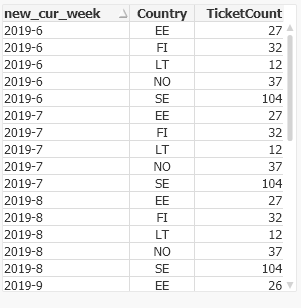
You may want to consider loading this data with a CrossTable load.
CrossTable(Country, TicketCount)
LOAD F1 as new_cur_week,
SE,
FI,
NO,
EE,
LT
FROM
Which will produce a data table like this:
-Rob
http://masterssummit.com
http://qlikviewcookbook.com
http://www.easyqlik.com
rwunderlich
- Mark as New
- Bookmark
- Subscribe
- Mute
- Subscribe to RSS Feed
- Permalink
- Report Inappropriate Content
If you want to show for each country, the simplest method is to create a table chart with wor_Country_S as DImension.
If you want calculate for a specific country, for example in a KPI, add the country name into your set analysis.
Count({<Week_S={'$(v_currentWeek)'} , wor_country_S={'Austria'} >} wor_ticket_ID_S)
BTW, I'm not sure why you have wor_country_S by itself in the expression you posted.
-Rob
http://masterssummit.com
http://qlikviewcookbook.com
http://www.easyqlik.com
stekol61
- Mark as New
- Bookmark
- Subscribe
- Mute
- Subscribe to RSS Feed
- Permalink
- Report Inappropriate Content
I will present the result as a 'KPI' and want to select any of six different countries.
Should a use set analysis for that?
I use wor_country_S by itself in the expression just for test purpose to present the result for all countries in a table.
rwunderlich
- Mark as New
- Bookmark
- Subscribe
- Mute
- Subscribe to RSS Feed
- Permalink
- Report Inappropriate Content
You don't need any set analysis for the country. Just create a filterbox and let the user select. Only selected countries will be included in the KPI.
-Rob
stekol61
- Mark as New
- Bookmark
- Subscribe
- Mute
- Subscribe to RSS Feed
- Permalink
- Report Inappropriate Content
Hi!
Count({<Week_S={'$(v_currentWeek)'} , wor_country_S >} wor_ticket_ID_S)
I removed 'wor_country_S' from the expression and then i can filter per Country.
Similar problem with my second expression.
Hardcode country as below work.
How can I get the Country filter works for this expression?
MinString({<new_cur_week = {'$(v_currentWeek)'}>}SE)
stekol61
- Mark as New
- Bookmark
- Subscribe
- Mute
- Subscribe to RSS Feed
- Permalink
- Report Inappropriate Content
Hi!
What might complicate the expression is the format of the data loaded
(MinString({<new_cur_week = {'$(v_currentWeek)'}>}SE))
| SE | FI | NO | EE | LT | |
| 2019-6 | 104 | 32 | 37 | 27 | 12 |
| 2019-7 | 104 | 32 | 37 | 27 | 12 |
| 2019-8 | 104 | 32 | 37 | 27 | 12 |
| 2019-9 | 101 | 31 | 36 | 26 | 12 |
| 2019-10 | 94 | 29 | 33 | 24 | 11 |
| 2019-11 | 94 | 29 | 33 | 24 | 11 |
| 2019-12 | 94 | 29 | 33 | 24 | 11 |
LOAD
F1 as new_cur_week,
SE,
FI,
NO,
EE,
LT
FROM
LET v_currentWeek = Replace(weekname(today()),'/','-');
stekol61
- Mark as New
- Bookmark
- Subscribe
- Mute
- Subscribe to RSS Feed
- Permalink
- Report Inappropriate Content
f ((wor_country_S= 'SE'), (MinString({<new_cur_week = {'$(v_currentWeek)'}>}SE)),
If ((wor_country_S= 'NO'), (MinString({<new_cur_week = {'$(v_currentWeek)'}>}NO)),
If ((wor_country_S= 'FI'), (MinString({<new_cur_week = {'$(v_currentWeek)'}>}FI)),
If ((wor_country_S= 'EE'), (MinString({<new_cur_week = {'$(v_currentWeek)'}>}EE)),
If ((wor_country_S= 'LT'), (MinString({<new_cur_week = {'$(v_currentWeek)'}>}LT)),0)))))
rwunderlich
- Mark as New
- Bookmark
- Subscribe
- Mute
- Subscribe to RSS Feed
- Permalink
- Report Inappropriate Content
You may want to consider loading this data with a CrossTable load.
CrossTable(Country, TicketCount)
LOAD F1 as new_cur_week,
SE,
FI,
NO,
EE,
LT
FROM
Which will produce a data table like this:
-Rob
http://masterssummit.com
http://qlikviewcookbook.com
http://www.easyqlik.com
