Unlock a world of possibilities! Login now and discover the exclusive benefits awaiting you.

- Qlik Community
- :
- Forums
- :
- Analytics & AI
- :
- Products & Topics
- :
- App Development
- :
- Re: Forecasting and Filters
- Subscribe to RSS Feed
- Mark Topic as New
- Mark Topic as Read
- Float this Topic for Current User
- Bookmark
- Subscribe
- Mute
- Printer Friendly Page

- Mark as New
- Bookmark
- Subscribe
- Mute
- Subscribe to RSS Feed
- Permalink
- Report Inappropriate Content
Forecasting and Filters
Hello, everyone.
Im making a simple month forecast table. It fills the days yet to come with an average of the days with actual data.
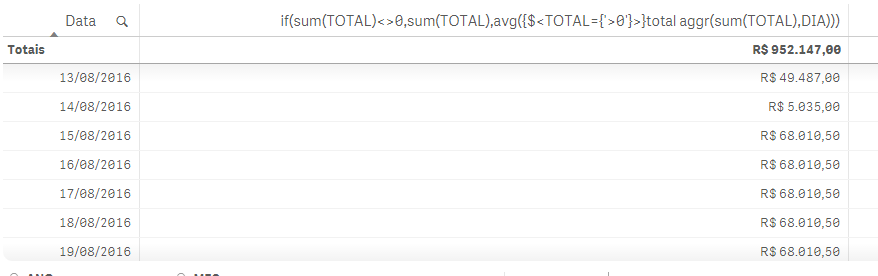
If i dont make any filtering it works just fine. But if i filter, for example, payments with money or credit cards the forecast data wont be displayed.
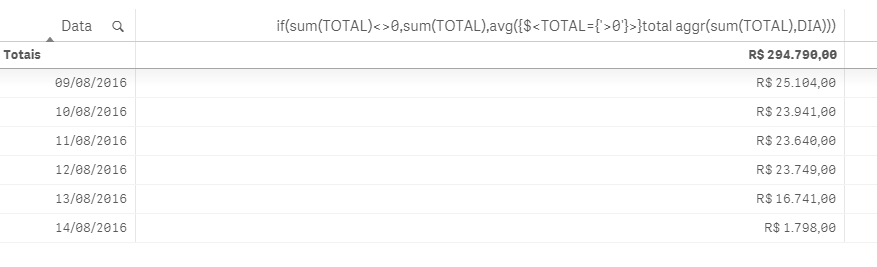
If i put the filter in se analysis it works fine too. But i dont want to add all payments types in set analysis. Because i also want to sue this expression in a line graph.
Can anyone tell me why this is happening?
Thanks in advance!
Accepted Solutions

 sunny_talwar
- Mark as New
- Bookmark
- Subscribe
- Mute
- Subscribe to RSS Feed
- Permalink
- Report Inappropriate Content
May be try this:
If(Sum({1}TOTAL) <> 0, Sum(TOTAL), Avg({<TOTAL = {'>0'} TOTAL Aggr(Sum(TOTAL), DIA)))
sunny_talwar
- Mark as New
- Bookmark
- Subscribe
- Mute
- Subscribe to RSS Feed
- Permalink
- Report Inappropriate Content
May be try this:
If(Sum({1}TOTAL) <> 0, Sum(TOTAL), Avg({<TOTAL = {'>0'} TOTAL Aggr(Sum(TOTAL), DIA)))
- Mark as New
- Bookmark
- Subscribe
- Mute
- Subscribe to RSS Feed
- Permalink
- Report Inappropriate Content
I tried it, but it fills all rows with the average.
sunny_talwar
- Mark as New
- Bookmark
- Subscribe
- Mute
- Subscribe to RSS Feed
- Permalink
- Report Inappropriate Content
All the rows? Really? Can you show me a sample where it does?
- Mark as New
- Bookmark
- Subscribe
- Mute
- Subscribe to RSS Feed
- Permalink
- Report Inappropriate Content
Oops, you were right. Thanks!

I got confused because it lost the capability to filter by month and year and i was looking at 2015 august.
Its working, thank you very much and sorry for the confusion! Altough it still doesnt work for pivot tables.
But now i can at least make it work for line charts!