Unlock a world of possibilities! Login now and discover the exclusive benefits awaiting you.

- Qlik Community
- :
- Forums
- :
- Analytics & AI
- :
- Products & Topics
- :
- App Development
- :
- Re: Formatting a Dimension for Money
- Subscribe to RSS Feed
- Mark Topic as New
- Mark Topic as Read
- Float this Topic for Current User
- Bookmark
- Subscribe
- Mute
- Printer Friendly Page

 ltc
ltc
- Mark as New
- Bookmark
- Subscribe
- Mute
- Subscribe to RSS Feed
- Permalink
- Report Inappropriate Content
Formatting a Dimension for Money
I have a dimension field that I'm formatting for money as follows:
=Money([Amount]/1000000)
So that's turning $10,333,333 into $10.33, but I need to see three decimal places to the right to show $10.333. How do I do that?
Accepted Solutions

 ryo_okabe
- Mark as New
- Bookmark
- Subscribe
- Mute
- Subscribe to RSS Feed
- Permalink
- Report Inappropriate Content
Hi,
There are two ways to change money format.
1.Change [MoneyFormat] in data load editor. This affect all money format.
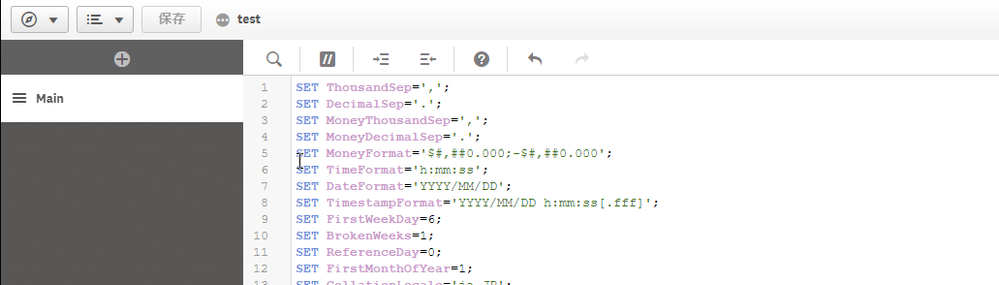
2.Change dimention to follows.This will only affect this dimension.
=money([Amount]/1000000,'$#,##0.000;-$#,##0.000')
ryo_okabe
- Mark as New
- Bookmark
- Subscribe
- Mute
- Subscribe to RSS Feed
- Permalink
- Report Inappropriate Content
Hi,
There are two ways to change money format.
1.Change [MoneyFormat] in data load editor. This affect all money format.
2.Change dimention to follows.This will only affect this dimension.
=money([Amount]/1000000,'$#,##0.000;-$#,##0.000')
