Unlock a world of possibilities! Login now and discover the exclusive benefits awaiting you.

- Qlik Community
- :
- Forums
- :
- Analytics & AI
- :
- Products & Topics
- :
- App Development
- :
- Re: GetSelectedCount() for master dimension
- Subscribe to RSS Feed
- Mark Topic as New
- Mark Topic as Read
- Float this Topic for Current User
- Bookmark
- Subscribe
- Mute
- Printer Friendly Page

 mrbalyaqv
- Mark as New
- Bookmark
- Subscribe
- Mute
- Subscribe to RSS Feed
- Permalink
- Report Inappropriate Content
GetSelectedCount() for master dimension
Hi all!
I'm trying to achieve following:
- before any selection made, in table there's no fields shown, only totals for measures;
- when user selects some fields from a list, these fields would be displayed in table.
When I use a data field for this 'fields list' all works just fine, but on selection bar real field name is displayed:
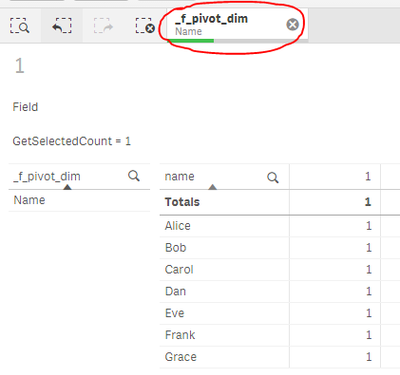
I'd want change displayed fields name on selection bar, because the real name could have a realy 'ugly' and not user-friendly name. For this purpose I created a master dimension. And now after selection from this dimension I see its name on selection bar, but displaying of selected columns doesn't work:
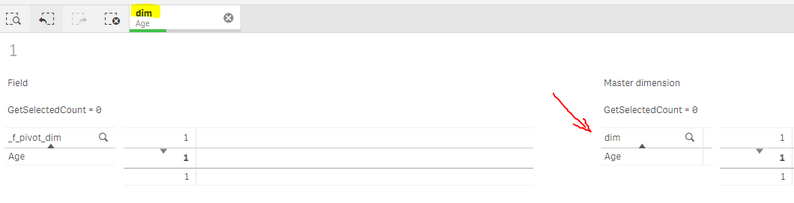
I guess, this happens because after selection in master dimension QS makes not same selection in initial field. If I understand correctly, GetSelectedCount() works only for expressions, that reurn field.
I thought about using GetPossibleCount() instead, but I don't know how to determine if it 0 or all values are selected in master dimension.
So, my question is: is it even possible to make selection in master dimenssion and count number of selected values?
Sample qvf-file attached.
Accepted Solutions

 sunny_talwar
- Mark as New
- Bookmark
- Subscribe
- Mute
- Subscribe to RSS Feed
- Permalink
- Report Inappropriate Content
This is not perfect, but you can try this
=Count(DISTINCT [_f_pivot_dim]) > 0 and SubStringCount(Concat(_f_pivot_dim, '|'), 'Name') > 0When nothing is selected, this will show all three dimensions.
sunny_talwar
- Mark as New
- Bookmark
- Subscribe
- Mute
- Subscribe to RSS Feed
- Permalink
- Report Inappropriate Content
This is not perfect, but you can try this
=Count(DISTINCT [_f_pivot_dim]) > 0 and SubStringCount(Concat(_f_pivot_dim, '|'), 'Name') > 0When nothing is selected, this will show all three dimensions.
mrbalyaqv
- Mark as New
- Bookmark
- Subscribe
- Mute
- Subscribe to RSS Feed
- Permalink
- Report Inappropriate Content
Well, it's not exactly what I tried to do, but I can deal with it. Thank you!
