Unlock a world of possibilities! Login now and discover the exclusive benefits awaiting you.

- Qlik Community
- :
- Forums
- :
- Analytics & AI
- :
- Products & Topics
- :
- App Development
- :
- Re: Help please
- Subscribe to RSS Feed
- Mark Topic as New
- Mark Topic as Read
- Float this Topic for Current User
- Bookmark
- Subscribe
- Mute
- Printer Friendly Page

 QlikTonic
- Mark as New
- Bookmark
- Subscribe
- Mute
- Subscribe to RSS Feed
- Permalink
- Report Inappropriate Content
Help please
Hi evrybody,
I need your help please ! I am not a developer but i am very motivated to learn,
I have 2 tables, one for order and one for orderdetails.
| Order : |
| OrderNum |
| 250400 |
| 250410 |
| 250420 |
| 250430 |
| Detail order : | |||
| OrderNum | Product | Quantity | Price |
| 250400 | 123 | 1 | 10 |
| 250400 | 650 | 5 | 8 |
| 250400 | 210 | 3 | 14 |
| 250410 | 137 | 9 | 10 |
| 250410 | 123 | 7 | 10 |
| 250410 | 159 | 5 | 10 |
| 250410 | 110 | 9 | 17 |
| 250410 | 201 | 4 | 12 |
| 250420 | 650 | 8 | 8 |
| 250420 | 210 | 10 | 14 |
| 250430 | 137 | 6 | 12 |
| 250430 | 123 | 3 | 10 |
| 250430 | 159 | 8 | 15 |
if in an order i have the product 650 i want to add for each line of the concern order : Contain650
it shoud be
| Order : | |
| OrderNum | Contain650 |
| 250400 | 1 |
| 250410 | 0 |
| 250420 | 1 |
| 250430 | 0 |
to try to do that i wrote :
| left join(Order) | ||
| load *, | ||
| if( | ||
| Product='650', 1,0) as Contain650; | ||
| Load | ||
| OrderNum | ||
| Product | ||
| resident Detail Order |
but the result is wrong , i have :
| Order : | |
| OrderNum | Contain650 |
| 250400 | 0 |
| 250400 | 1 |
| 250410 | 0 |
| 250420 | 0 |
| 250420 | 1 |
| 250430 | 0 |
i have 0 and 1 for each order, i don't understand why, can someone help me please ?
Many thanks
C.

 Sazabi
- Mark as New
- Bookmark
- Subscribe
- Mute
- Subscribe to RSS Feed
- Permalink
- Report Inappropriate Content
This is because the original table is broken out by Product.
Just because you have omitted Product in the final table, it will not do a group by.
You will be fine if you leave Product column in final resulting in-memory table.
In the Qlik front-end, it will do the group by for you when you create a table of OrderNum | sum(Contains650)
Regards,
S
QlikTonic
- Mark as New
- Bookmark
- Subscribe
- Mute
- Subscribe to RSS Feed
- Permalink
- Report Inappropriate Content
thanks for your answer, but when i write load *, it includes Product, no ?
| left join(Order) | ||
| load *, | ||
| if( | ||
| Product='650', 1,0) as Contain650; | ||
| Load | ||
| OrderNum | ||
| Product | ||
| resident Detail Order |
| left join(Order) | ||
| load *, | ||
| if( | ||
| Product='650', 1,0) as Contain650; | ||
| Load | ||
| OrderNum | ||
| Product | ||
| resident Detail Order |
Sazabi
- Mark as New
- Bookmark
- Subscribe
- Mute
- Subscribe to RSS Feed
- Permalink
- Report Inappropriate Content
Is this table you have in the data model or a table created in a sheet?
| Order : | |
| OrderNum | Contain650 |
| 250400 | 0 |
| 250400 | 1 |
| 250410 | 0 |
| 250420 | 0 |
| 250420 | 1 |
| 250430 | 0 |
If you have OrderNum as a dimension, and sum(Contain650) as a measure, you will have your intended result of
| Order : | |
| OrderNum | Contain650 |
| 250400 | 1 |
| 250410 | 0 |
| 250420 | 1 |
| 250430 | 0 |
QlikTonic
- Mark as New
- Bookmark
- Subscribe
- Mute
- Subscribe to RSS Feed
- Permalink
- Report Inappropriate Content
In fact my objective is to have 1 in my order table if i have a product 650 in an order detail
Sazabi
- Mark as New
- Bookmark
- Subscribe
- Mute
- Subscribe to RSS Feed
- Permalink
- Report Inappropriate Content
If you add this to the script, your in-memory fact table should produce your wanted results:
Load
OrderNum,
sum(Contain650)
Resident Order
group by OrderNum;
The only reason you see duplicates in your current result set is because a join is a Cartesian product, and the join conditions are a little ambiguous 🙂
Regards,
S
QlikTonic
- Mark as New
- Bookmark
- Subscribe
- Mute
- Subscribe to RSS Feed
- Permalink
- Report Inappropriate Content
i had created the case in excel.
in reality :
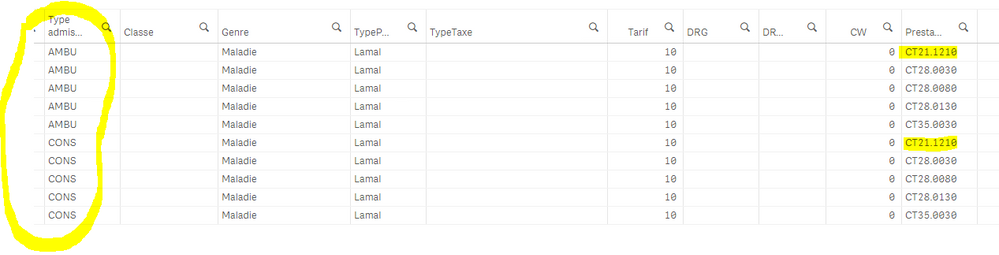
if i have the prestation ct21.1210 i want to change the admission type from AMBU to CONS... i have two times the lines and always keep my ambu admission type
QlikTonic
- Mark as New
- Bookmark
- Subscribe
- Mute
- Subscribe to RSS Feed
- Permalink
- Report Inappropriate Content
this is like duplicated... the old and the new 😞
Sazabi
- Mark as New
- Bookmark
- Subscribe
- Mute
- Subscribe to RSS Feed
- Permalink
- Report Inappropriate Content
I see, I see.
In this case you don't need to do a join at all. You want to modify the fact table based on condition Prestation = 'CT21.1210'
If you just do:
Load
if(Prestation = 'CT21.1210', 'CONS', Type admission) as Type admission,
your other stuff
RESIDENT TableName
you will change AMBU to CONS if Prestation is CT21.1210.
No duplicates 🙂 🙂 🙂 No joins needed
QlikTonic
- Mark as New
- Bookmark
- Subscribe
- Mute
- Subscribe to RSS Feed
- Permalink
- Report Inappropriate Content
I have always en double my informations, i wrote :
left join(Sejour_serviceTemp)
Load
DossierNum,
PrestaNum as PrestaL
resident Prestation
order by DossierNum;
and
Sejour_Service:
LOAD *,
if(
PrestaL='CT21.1210', 'CONS',
) as ADMCode,
Resident Sejour_serviceTemp;
drop table Sejour_serviceTemp;
DROP FIELDS PrestaL;
😞
