Unlock a world of possibilities! Login now and discover the exclusive benefits awaiting you.

- Qlik Community
- :
- Forums
- :
- Analytics & AI
- :
- Products & Topics
- :
- App Development
- :
- Re: How To Compare Sum(Sales) for two Timestamps
- Subscribe to RSS Feed
- Mark Topic as New
- Mark Topic as Read
- Float this Topic for Current User
- Bookmark
- Subscribe
- Mute
- Printer Friendly Page

- Mark as New
- Bookmark
- Subscribe
- Mute
- Subscribe to RSS Feed
- Permalink
- Report Inappropriate Content
How To Compare Sum(Sales) for two Timestamps
I am struggling to compare Sum(Sales) for two different timestamps. Need help. Thanks,Branislav

- « Previous Replies
-
- 1
- 2
- Next Replies »
Accepted Solutions

 Gysbert_Wassena
- Mark as New
- Bookmark
- Subscribe
- Mute
- Subscribe to RSS Feed
- Permalink
- Report Inappropriate Content
Selected Date: sum([Net Sales])
Previous Date: =sum({<[STAMP_DATE]={"$(=Max({<[STAMP_DATE]={[<$(=Max([STAMP_DATE]))]}>}[STAMP_DATE]))"}>}[Net Sales])
talk is cheap, supply exceeds demand
Gysbert_Wassena- Mark as New
- Bookmark
- Subscribe
- Mute
- Subscribe to RSS Feed
- Permalink
- Report Inappropriate Content
Selected Date: sum([Net Sales])
Previous Date: =sum({<[STAMP_DATE]={"$(=Max({<[STAMP_DATE]={[<$(=Max([STAMP_DATE]))]}>}[STAMP_DATE]))"}>}[Net Sales])
talk is cheap, supply exceeds demand

 sunny_talwar
- Mark as New
- Bookmark
- Subscribe
- Mute
- Subscribe to RSS Feed
- Permalink
- Report Inappropriate Content
This:
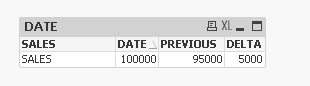
Expressions:
1) =Sum({<STAMP_DATE = {"$(=TimeStamp(Max({1}STAMP_DATE)))"}>}NET_SALES)
2) =Sum({<STAMP_DATE = {"$(=TimeStamp(Max({1}STAMP_DATE, 2)))"}>}NET_SALES)
3) =Column(1) - Column(2)
- Mark as New
- Bookmark
- Subscribe
- Mute
- Subscribe to RSS Feed
- Permalink
- Report Inappropriate Content
Thanks for your quick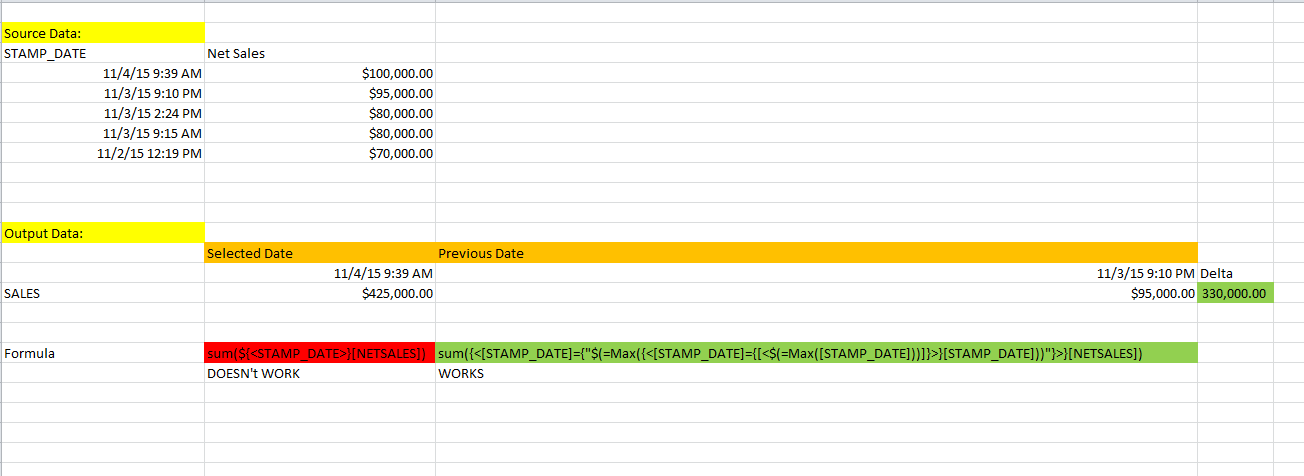 reply. Previous Date works great, but selected date gives me sum of all stamp_Dates
Gysbert_Wassena- Mark as New
- Bookmark
- Subscribe
- Mute
- Subscribe to RSS Feed
- Permalink
- Report Inappropriate Content
Then you did not select a date. So there does not exist a selected date.
talk is cheap, supply exceeds demand
- Mark as New
- Bookmark
- Subscribe
- Mute
- Subscribe to RSS Feed
- Permalink
- Report Inappropriate Content
Sunny:
It seems that it works when calculating Delta, but each column for Current Data_Stamp and Previous Data Stamp is showing 0 even when selected date
- Mark as New
- Bookmark
- Subscribe
- Mute
- Subscribe to RSS Feed
- Permalink
- Report Inappropriate Content
when I select a date it's OK, but when nothing is selected it's showing total of all stamps, I would like to show either only the latest stamp or 0 and values are only populated on selection
- Mark as New
- Bookmark
- Subscribe
- Mute
- Subscribe to RSS Feed
- Permalink
- Report Inappropriate Content
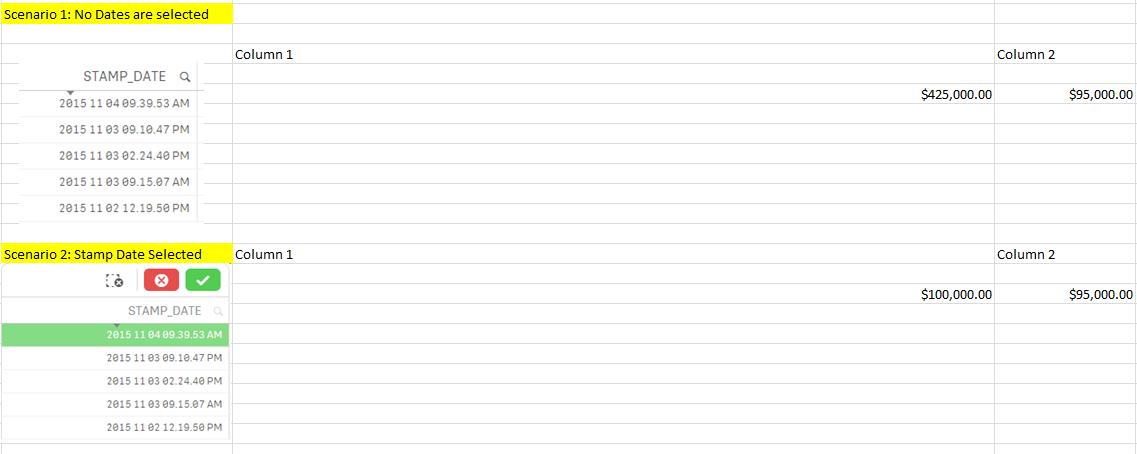
This is what it looks like. In Scenario 1 I have no dates selected and column 1 is summing all data_stamps, column 2 is taking previous datastamp which is what I am trying to do. The only issue I am having is in Column 1 when nothing is selected I do not want to see sum of all datestamps, as I mentioned earlier, I would like to see the latest only or 0
sunny_talwar
- Mark as New
- Bookmark
- Subscribe
- Mute
- Subscribe to RSS Feed
- Permalink
- Report Inappropriate Content
This will work without any selections:
Expressions
1) =Sum({<STAMP_DATE = {"$(=TimeStamp(Max(STAMP_DATE)))"}>}NET_SALES)
2) =If(Sum({<STAMP_DATE = {"$(=TimeStamp(Max(STAMP_DATE)))"}>}NET_SALES)> 0, Above(Sum({1}NET_SALES)))
3) =Column(1) - Column(2)
sunny_talwar
- Mark as New
- Bookmark
- Subscribe
- Mute
- Subscribe to RSS Feed
- Permalink
- Report Inappropriate Content
Give try to these expressions:
Expressions
1) =Sum({<STAMP_DATE = {"$(=TimeStamp(Max(STAMP_DATE)))"}>}NET_SALES)
2) =If(Sum({<STAMP_DATE = {"$(=TimeStamp(Max(STAMP_DATE)))"}>}NET_SALES)> 0, Above(Sum({1}NET_SALES)))
3) =Column(1) - Column(2)
- « Previous Replies
-
- 1
- 2
- Next Replies »