Unlock a world of possibilities! Login now and discover the exclusive benefits awaiting you.

- Qlik Community
- :
- Forums
- :
- Analytics & AI
- :
- Products & Topics
- :
- App Development
- :
- Re: How to use Unicode with the Repeat Function
- Subscribe to RSS Feed
- Mark Topic as New
- Mark Topic as Read
- Float this Topic for Current User
- Bookmark
- Subscribe
- Mute
- Printer Friendly Page

 crichter14
- Mark as New
- Bookmark
- Subscribe
- Mute
- Subscribe to RSS Feed
- Permalink
- Report Inappropriate Content
How to use Unicode with the Repeat Function
Patric Nordström presented this in his tips & tricks from 2019, and I was wondering
I can change his code from:
Repeat('▮',round(sum(Sales)/max(total aggr(sum(Sales), CategoryName))*10))
to
Repeat('💍',round(sum(Sales)/max(total aggr(sum(Sales), CategoryName))*10)) and it works.
But what if I only had the unicode? How do I put that into the original line of the expression?
U+1F48D
Thank you in advance,
Cheryl
Accepted Solutions

 QlikTom
- Mark as New
- Bookmark
- Subscribe
- Mute
- Subscribe to RSS Feed
- Permalink
- Report Inappropriate Content
You can use the CHR() function in combination with the Unicode point number.
In this case 💍 = 128141
So in your case it would be:
Repeat(chr(128141),round(sum(Sales)/max(total aggr(sum(Sales), CategoryName))*10))
On most reference sites, the unicode point number is listed under "HTML code" or "HTML entity", but all you need is the integer number.
https://unicode-table.com/en/1F48D/
CHR function:
https://help.qlik.com/en-US/sense/latest/Subsystems/Hub/Content/Sense_Hub/Scripting/StringFunctions/...
You can discover the unicode point number of a symbol by using the ORD() function:
https://help.qlik.com/en-US/sense/latest/Subsystems/Hub/Content/Sense_Hub/Scripting/StringFunctions/...
QlikTom
- Mark as New
- Bookmark
- Subscribe
- Mute
- Subscribe to RSS Feed
- Permalink
- Report Inappropriate Content
You can use the CHR() function in combination with the Unicode point number.
In this case 💍 = 128141
So in your case it would be:
Repeat(chr(128141),round(sum(Sales)/max(total aggr(sum(Sales), CategoryName))*10))
On most reference sites, the unicode point number is listed under "HTML code" or "HTML entity", but all you need is the integer number.
https://unicode-table.com/en/1F48D/
CHR function:
https://help.qlik.com/en-US/sense/latest/Subsystems/Hub/Content/Sense_Hub/Scripting/StringFunctions/...
You can discover the unicode point number of a symbol by using the ORD() function:
https://help.qlik.com/en-US/sense/latest/Subsystems/Hub/Content/Sense_Hub/Scripting/StringFunctions/...


- Mark as New
- Bookmark
- Subscribe
- Mute
- Subscribe to RSS Feed
- Permalink
- Report Inappropriate Content
Thanks for the information @QlikTom
crichter14
- Mark as New
- Bookmark
- Subscribe
- Mute
- Subscribe to RSS Feed
- Permalink
- Report Inappropriate Content
Thank you Qliktom!
QlikTom
- Mark as New
- Bookmark
- Subscribe
- Mute
- Subscribe to RSS Feed
- Permalink
- Report Inappropriate Content
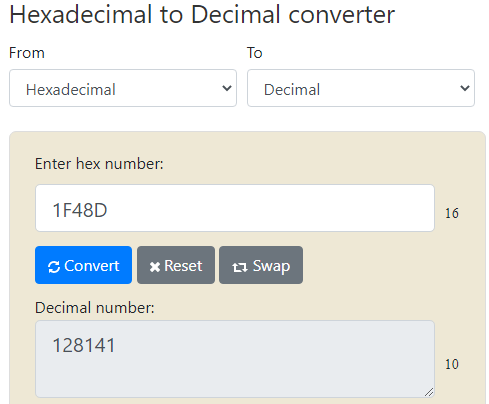
One more bit of relevant information. Whenever you see a unicode symbol/emoji it is typically listed in hexadecimal like so:
U+1F48D
If you parse out the section after "U+" you will find this is just a hexadecimal number. This can be converted to the decimal number you need on any number of websites or even with the windows calculator in "Programmer" mode.
Example:
 crichter14
- Mark as New
- Bookmark
- Subscribe
- Mute
- Subscribe to RSS Feed
- Permalink
- Report Inappropriate Content
Thank you Tom!! that's so helpful!

 IgorManzhin
- Mark as New
- Bookmark
- Subscribe
- Mute
- Subscribe to RSS Feed
- Permalink
- Report Inappropriate Content
Hello all, thank you. Sorry a lot, could you explain how to be with the green triangles. For red triangles i found chr (128314), chr (128315), but there is no way with greens.
