Unlock a world of possibilities! Login now and discover the exclusive benefits awaiting you.

- Qlik Community
- :
- Forums
- :
- Analytics & AI
- :
- Products & Topics
- :
- App Development
- :
- Re: Load cumulativ data
- Subscribe to RSS Feed
- Mark Topic as New
- Mark Topic as Read
- Float this Topic for Current User
- Bookmark
- Subscribe
- Mute
- Printer Friendly Page
 Øystein_Kolsrud
- Mark as New
- Bookmark
- Subscribe
- Mute
- Subscribe to RSS Feed
- Permalink
- Report Inappropriate Content
Load cumulativ data
I often have cases where I want to analyze cumulative data across a table. A typical example is that I want to display cumulative quarterly sales per year when my input data contains data regarding sales per quarter. So I would like to take this input:
| Year | Quarter | Sales |
| 2020 | 1 | 1 |
| 2020 | 2 | 2 |
| 2020 | 3 | 7 |
| 2020 | 4 | 2 |
| 2021 | 1 | 8 |
| 2021 | 2 | 1 |
| 2021 | 3 | 1 |
| 2021 | 4 | 3 |
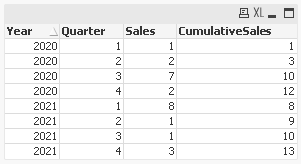
And get this table:
| Year | Quarter | Sales | Cumulative Sales |
| 2020 | 1 | 1 | 1 |
| 2020 | 2 | 2 | 3 |
| 2020 | 3 | 7 | 10 |
| 2020 | 4 | 2 | 12 |
| 2021 | 1 | 8 | 8 |
| 2021 | 2 | 1 | 9 |
| 2021 | 3 | 1 | 10 |
| 2021 | 4 | 3 | 13 |
What is the best way to do this in the script?
Accepted Solutions

 MarcoWedel
- Mark as New
- Bookmark
- Subscribe
- Mute
- Subscribe to RSS Feed
- Permalink
- Report Inappropriate Content
one solution might be:
tabSales:
LOAD Year,
     Quarter,
     Sales,
     RangeSum(Sales,If(Year=Previous(Year),Peek(CumulativeSales))) as CumulativeSales
FROM [https://community.qlik.com/t5/App-Development/Load-cumulativ-data/m-p/1863624] (html, codepage is 1252, embedded labels, table is @1);
hope this helps
Marco
MarcoWedel
- Mark as New
- Bookmark
- Subscribe
- Mute
- Subscribe to RSS Feed
- Permalink
- Report Inappropriate Content
one solution might be:
tabSales:
LOAD Year,
     Quarter,
     Sales,
     RangeSum(Sales,If(Year=Previous(Year),Peek(CumulativeSales))) as CumulativeSales
FROM [https://community.qlik.com/t5/App-Development/Load-cumulativ-data/m-p/1863624] (html, codepage is 1252, embedded labels, table is @1);
hope this helps
Marco
Øystein_Kolsrud
- Mark as New
- Bookmark
- Subscribe
- Mute
- Subscribe to RSS Feed
- Permalink
- Report Inappropriate Content
Nice! Thank you very much for the solution! I actually didn't realize I could use Peek and refer to a field that doesn't exist. I would assume it would return a "Field 'CumulativeSales' not found" error on the first row, but I see now that the Peek function returns 'null' whenever a field is non-existent.
