Unlock a world of possibilities! Login now and discover the exclusive benefits awaiting you.

- Qlik Community
- :
- Forums
- :
- Analytics & AI
- :
- Products & Topics
- :
- App Development
- :
- Re: Loading expressions into QV from a file
- Subscribe to RSS Feed
- Mark Topic as New
- Mark Topic as Read
- Float this Topic for Current User
- Bookmark
- Subscribe
- Mute
- Printer Friendly Page

- Mark as New
- Bookmark
- Subscribe
- Mute
- Subscribe to RSS Feed
- Permalink
- Report Inappropriate Content
Loading expressions into QV from a file
HI All,
I have a ridiculous chart to create 🙂 with hundreds of columns (but will control show / hide via conditional to make it usable).
Entering expression on screen for this volume is a nightmare, so what I want to do is load something like this...
Metrics:
LOAD * INLINE [_MetricCode,_Metric_Name,_MetricExpression
MAA, Sales ,sum(SALES)
];
& then have a chart that uses the expression..
=if(_MetricCode='MAA',_MetricExpression)
.. hoping the resulting expression column would be the sum of my sales i.e. £100
... however I am getting the 'text' as a result in the column i.e. 'sum(SALES'.
Is there a way please to tell the expression the result is a formulae ?
Thanks in advance
Nick
Accepted Solutions

 sunny_talwar
- Mark as New
- Bookmark
- Subscribe
- Mute
- Subscribe to RSS Feed
- Permalink
- Report Inappropriate Content
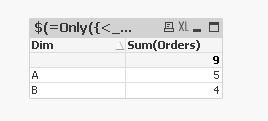
Try using set analysis instead of if statement:
$(=Only({<_MetricCode = {'MAB'}>}_MetricExpression))
sunny_talwar
- Mark as New
- Bookmark
- Subscribe
- Mute
- Subscribe to RSS Feed
- Permalink
- Report Inappropriate Content
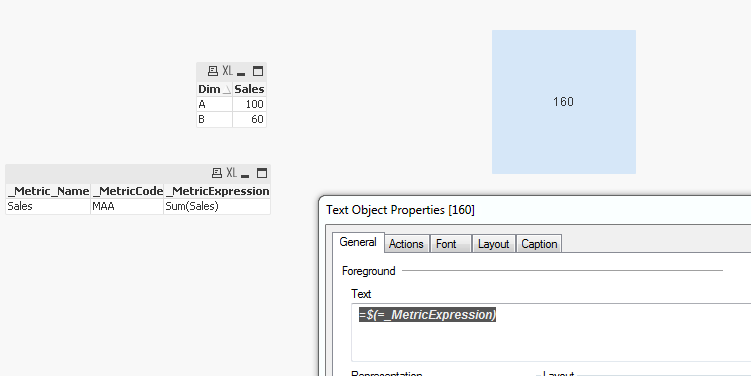
May be try it like this:
$(=if(_MetricCode='MAA',_MetricExpression))
Sample:
- Mark as New
- Bookmark
- Subscribe
- Mute
- Subscribe to RSS Feed
- Permalink
- Report Inappropriate Content
Oops it only works when you have one expression logic - as soon as you have 2 or more it doesn't 😞
Any ideas please ?
Thanks again
Nick
sunny_talwar
- Mark as New
- Bookmark
- Subscribe
- Mute
- Subscribe to RSS Feed
- Permalink
- Report Inappropriate Content
Try using set analysis instead of if statement:
$(=Only({<_MetricCode = {'MAB'}>}_MetricExpression))
- Mark as New
- Bookmark
- Subscribe
- Mute
- Subscribe to RSS Feed
- Permalink
- Report Inappropriate Content
Excellent - thanks again !
Nick