Unlock a world of possibilities! Login now and discover the exclusive benefits awaiting you.

- Qlik Community
- :
- Forums
- :
- Analytics & AI
- :
- Products & Topics
- :
- App Development
- :
- Re: Making Selections with Total Qualifier
- Subscribe to RSS Feed
- Mark Topic as New
- Mark Topic as Read
- Float this Topic for Current User
- Bookmark
- Subscribe
- Mute
- Printer Friendly Page

 mjperreault
- Mark as New
- Bookmark
- Subscribe
- Mute
- Subscribe to RSS Feed
- Permalink
- Report Inappropriate Content
Making Selections with Total Qualifier
Hi All,
I have data such as the below.
| Continent | Country | Metric |
| North America | Canada | 400 |
| North America | Mexico | 100 |
| North America | USA | 200 |
| South America | Argentina | 200 |
| South America | Brazil | 300 |
| South America | Venezuala | 300 |
On my sheet I have made made the below table with a Country's % of Continent measure with expression sum(Metric)/sum(Total <Continent>Metric) which yields the desired output.
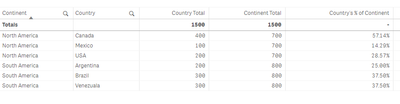
However I want to be able to filter for an individual country and have the % stay the same while also filtering the other countries out of the table.
Currently if I filter on country the % changes to 100%
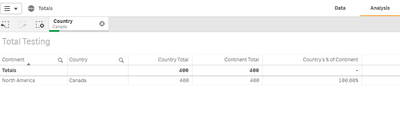
If I update my formula to sum(Metric)/sum(Total <Continent>{<{Country}>}Metric) then the % is correct but the other Countries are not filtered out when I make my selection.
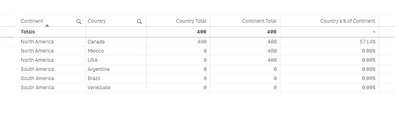
Does anyone have any ideas, I want to do this with a formula and not by adding a field in me data model that is the continents total value.
QVF attached
Thanks,
Mark
Accepted Solutions

 Kushal_Chawda
- Mark as New
- Bookmark
- Subscribe
- Mute
- Subscribe to RSS Feed
- Permalink
- Report Inappropriate Content
@mjperreault try below
=sum(aggr(sum({<Country,Continent>}Metric)/sum(TOTAL<Continent>{<Country,Continent>}Metric),Country,Continent))*Avg(1)

 jwjackso
- Mark as New
- Bookmark
- Subscribe
- Mute
- Subscribe to RSS Feed
- Permalink
- Report Inappropriate Content
Try sum(Metric)/sum({1}Total <Continent>Metric) and suppress zeroes on the chart.
mjperreault
- Mark as New
- Bookmark
- Subscribe
- Mute
- Subscribe to RSS Feed
- Permalink
- Report Inappropriate Content
Thanks for the suggestion, that would yield this
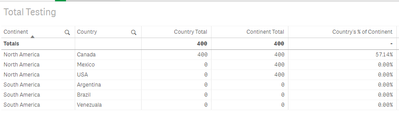
I do not want to remove the Continent total from the table. Would prefer not to accomplish this with table settings as well but strictly using a formula but not sure if its possible.
Thanks,
Mark
Kushal_Chawda
- Mark as New
- Bookmark
- Subscribe
- Mute
- Subscribe to RSS Feed
- Permalink
- Report Inappropriate Content
@mjperreault try below
=sum(aggr(sum({<Country,Continent>}Metric)/sum(TOTAL<Continent>{<Country,Continent>}Metric),Country,Continent))*Avg(1)
