Unlock a world of possibilities! Login now and discover the exclusive benefits awaiting you.

- Qlik Community
- :
- Forums
- :
- Analytics & AI
- :
- Products & Topics
- :
- App Development
- :
- Re: Market share & growth over time
- Subscribe to RSS Feed
- Mark Topic as New
- Mark Topic as Read
- Float this Topic for Current User
- Bookmark
- Subscribe
- Mute
- Printer Friendly Page

- Mark as New
- Bookmark
- Subscribe
- Mute
- Subscribe to RSS Feed
- Permalink
- Report Inappropriate Content
Market share & growth over time
Hello Qlik community,
I started Qlik few weeks ago after some experience on a competitor solution in 2009. Transition is not that easy  .
.
After running through the forum I already found several answer to some basic questions but I failing to create charts and pivot tables containing Year or month to visualize market share or growth. I manage to do it for a specific period of time in KPI (but not working if I change the time filter, however it is not an issue so far).
For the market share, I tried to use "sum([Sales]) / sum(TOTAL [Sales])" but it is giving me the % of a specific point versus the total of all points appearing on the chart. Regarding the growth, all the formula I tested are giving me error or 0% or 100% or -100% ==> TOTAL failure.
Basically, I'm trying to have similar chart as below.
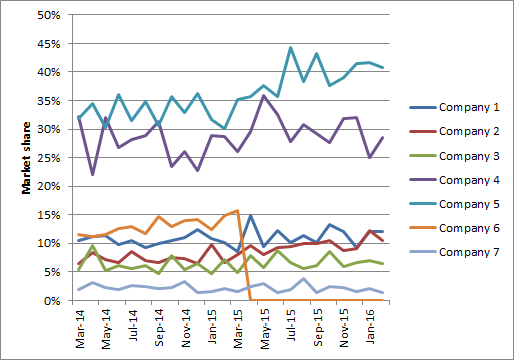
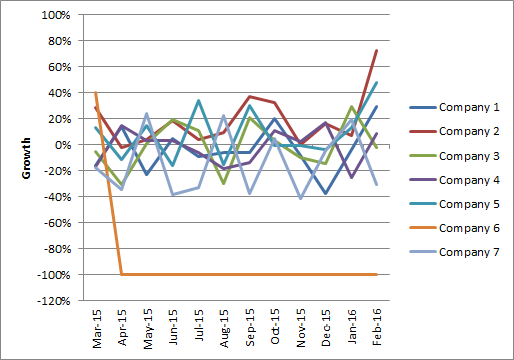
I also attached a sample of my database for reference
Thanks in advance for the guidance
regards
PierreMT
Accepted Solutions

 sunny_talwar
- Mark as New
- Bookmark
- Subscribe
- Mute
- Subscribe to RSS Feed
- Permalink
- Report Inappropriate Content
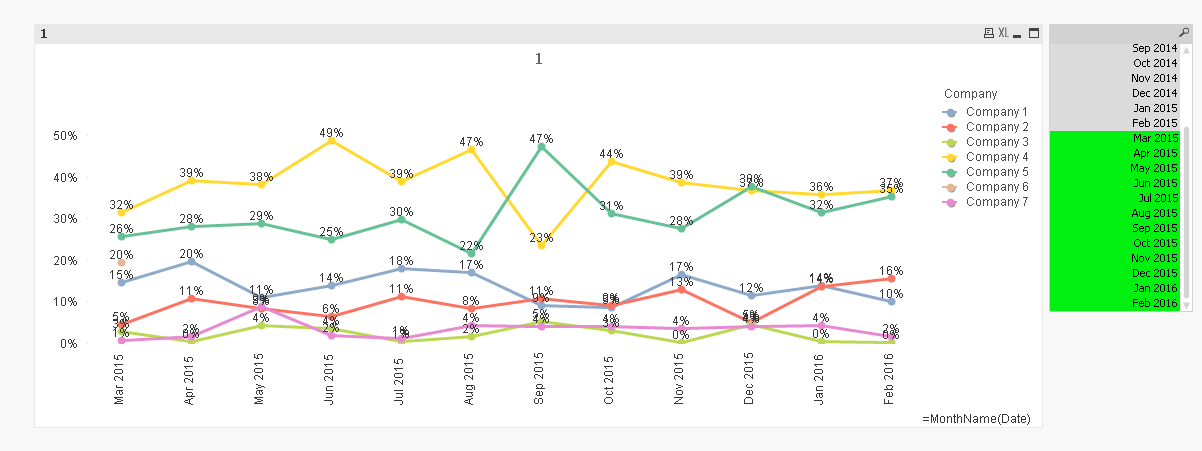
May be you are looking for this:
Sum([Sales]) / Sum(TOTAL <Date> [Sales])
sunny_talwar
- Mark as New
- Bookmark
- Subscribe
- Mute
- Subscribe to RSS Feed
- Permalink
- Report Inappropriate Content
May be you are looking for this:
Sum([Sales]) / Sum(TOTAL <Date> [Sales])
- Mark as New
- Bookmark
- Subscribe
- Mute
- Subscribe to RSS Feed
- Permalink
- Report Inappropriate Content
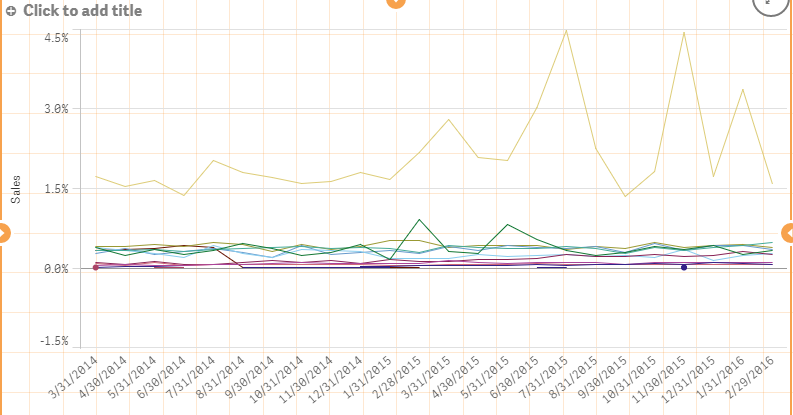
Hi Sunny T,
Thanks for your support.
Just tried, but it is giving me a market shares below 5% each month while I have 7 companies. I guess it is also dividing by the total of the points.
sunny_talwar
- Mark as New
- Bookmark
- Subscribe
- Mute
- Subscribe to RSS Feed
- Permalink
- Report Inappropriate Content
For Growth, what is your way of calculating growth in the Excel file?
- Mark as New
- Bookmark
- Subscribe
- Mute
- Subscribe to RSS Feed
- Permalink
- Report Inappropriate Content
Sunny T,
Thats quite strange I copy paste your formula in Qlik Sense and it is not working it showed what I you see above. Still checking
Regarding the growth I usually do : =iferror([Actual value]/[Last year value] -1,0)

 ecolomer
- Mark as New
- Bookmark
- Subscribe
- Mute
- Subscribe to RSS Feed
- Permalink
- Report Inappropriate Content
See this:
- Mark as New
- Bookmark
- Subscribe
- Mute
- Subscribe to RSS Feed
- Permalink
- Report Inappropriate Content
Sunny T
I found out why it didnt works for the market share, I was using a Master item dimension as X axis which add a different name as 'Date'. I change my axis and it worked. But if I use a Master item dimension as X axis and the same one in the formula it doesn't works. I presume it is normal as I can't select the master item in the formula fields.
Waiting for some solution on the growth 
- Mark as New
- Bookmark
- Subscribe
- Mute
- Subscribe to RSS Feed
- Permalink
- Report Inappropriate Content
Enrique,
Thanks also for your support.
It is indeed a very nice way to present the market share (it also helped me to found out why Sunny T's solution didn't worked), I will consider such presentation for some reports.
In case you have genius idea like this for growth, I'm interested
regards
PierreM T
- Mark as New
- Bookmark
- Subscribe
- Mute
- Subscribe to RSS Feed
- Permalink
- Report Inappropriate Content
Hi,
Any idea for the growth?
Standard formula is: [Reference value] / [Previous value] -1
Reference value could be a month or a year
Previous value could be the same month of last year or previous month
Thanks in advance