Unlock a world of possibilities! Login now and discover the exclusive benefits awaiting you.

- Qlik Community
- :
- Forums
- :
- Analytics & AI
- :
- Products & Topics
- :
- App Development
- :
- Re: Measure involving Different Part Number UOM
- Subscribe to RSS Feed
- Mark Topic as New
- Mark Topic as Read
- Float this Topic for Current User
- Bookmark
- Subscribe
- Mute
- Printer Friendly Page

 tyember1
- Mark as New
- Bookmark
- Subscribe
- Mute
- Subscribe to RSS Feed
- Permalink
- Report Inappropriate Content
Measure involving Different Part Number UOM
Hello,
I am trying to divide Order Quantity by the UOM of the corresponding Item number. the item numbers ending in E are eaches, and without the E are cases. I need to divide the EA order quantity by the Case UOM. This is coming out of a database, so the above and below expressions are not working for me yet. Unsure of what to use to see this result.
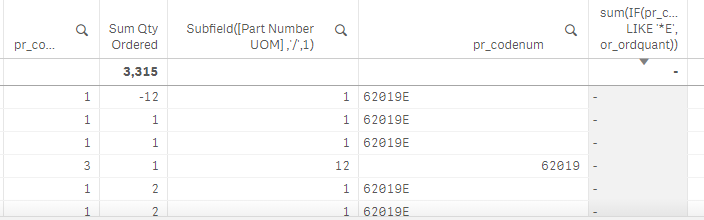
sum(IF(pr_codenum LIKE '*E', or_ordquant)) /
sum(IF(pr_codenum LIKE '*E',({1<pr_codenum-={'*E'}>} [Part Number UOM])))
Thank you,
Tyler
Accepted Solutions
tyember1
- Mark as New
- Bookmark
- Subscribe
- Mute
- Subscribe to RSS Feed
- Permalink
- Report Inappropriate Content
I ended up creating a table and picking out the numbers from the item description then joining to the Item Master.
ex of item description:
pr_codenum: 60020E pr_descrip: FR Smoked Pecans 1/1lb
pr_codenum: 60020 pr_descrip: FR Smoked Pecans 12/1lb
Item_Master:
LOAD
*,
pr_c2id as c2_id,
KeepChar(replace(pr_descrip,'W/','With'),'1234567890/') as 'Part Number UOM',
left(pr_codenum,5) as 'CombinedPartCode',
pr_caid as ca_id
FROM [lib://Extract QVDs/TL_Item_Master.QVD]
(qvd);
left join(Item_Master)
IM_2:
LOAD
left(pr_codenum,5) as 'CombinedPartCode',
(Subfield(KeepChar(replace(pr_descrip,'W/','With'),'1234567890/') ,'/',1)) as 'Case to EA UOM'
FROM [lib://Extract QVDs/TL_Item_Master.QVD]
(qvd);
Now that we have the same Case to EA UOM for both the items that end in E and items that do not, I can use an expression to convert the order count from EA to Case

 Marcos_rv
- Mark as New
- Bookmark
- Subscribe
- Mute
- Subscribe to RSS Feed
- Permalink
- Report Inappropriate Content
Try this:
sum( {< pr_codenum ={ '*E'} >} or_ordquant)) /
count ( Total {< pr_codenum ={ '*E'} >} >} [Part Number UOM])
tyember1
- Mark as New
- Bookmark
- Subscribe
- Mute
- Subscribe to RSS Feed
- Permalink
- Report Inappropriate Content
I ended up creating a table and picking out the numbers from the item description then joining to the Item Master.
ex of item description:
pr_codenum: 60020E pr_descrip: FR Smoked Pecans 1/1lb
pr_codenum: 60020 pr_descrip: FR Smoked Pecans 12/1lb
Item_Master:
LOAD
*,
pr_c2id as c2_id,
KeepChar(replace(pr_descrip,'W/','With'),'1234567890/') as 'Part Number UOM',
left(pr_codenum,5) as 'CombinedPartCode',
pr_caid as ca_id
FROM [lib://Extract QVDs/TL_Item_Master.QVD]
(qvd);
left join(Item_Master)
IM_2:
LOAD
left(pr_codenum,5) as 'CombinedPartCode',
(Subfield(KeepChar(replace(pr_descrip,'W/','With'),'1234567890/') ,'/',1)) as 'Case to EA UOM'
FROM [lib://Extract QVDs/TL_Item_Master.QVD]
(qvd);
Now that we have the same Case to EA UOM for both the items that end in E and items that do not, I can use an expression to convert the order count from EA to Case
