Unlock a world of possibilities! Login now and discover the exclusive benefits awaiting you.

Announcements
Share your agentic AI experience, learn from others, and earn a new badge: Put Agentic AI to Work
- Qlik Community
- :
- Forums
- :
- Analytics & AI
- :
- Products & Topics
- :
- App Development
- :
- Pivot table: Merge Fields
Options
- Subscribe to RSS Feed
- Mark Topic as New
- Mark Topic as Read
- Float this Topic for Current User
- Bookmark
- Subscribe
- Mute
- Printer Friendly Page
Turn on suggestions
Auto-suggest helps you quickly narrow down your search results by suggesting possible matches as you type.
Showing results for

 skompel2
Contributor II
2019-02-05
11:35 AM
- Mark as New
- Bookmark
- Subscribe
- Mute
- Subscribe to RSS Feed
- Permalink
- Report Inappropriate Content
Pivot table: Merge Fields
I have a excel file like this:
| Prod | Agreed Capacity |
| E | 20 |
| T | 30 |
| C | 60 |
| S | 93 |
| L | 160 |
I have another excel file with batch/lot sizes for similar prod groups:
| Prod | Lot | Batch |
| E (NA) | 1 | |
| T | 10 | |
| C (NA) | 1 | |
| S | 1 | |
| L | 1 | |
| E | 2 | |
| C | 5 |
I created new field in script and collected all the NON - "NA " products as "PILOT". To create a pivot table comparing capacity with qty, I used PILOT and AGREED CAPACITY as Dimensions and in expression I used:
=if(PILOT='C',Sum([BATCH]),If(PILOT='S',Sum([BATCH]),If(PILOT='L',Sum([BATCH]),If(PILOT='E',Sum([BATCH]),If(PILOT='T',Sum([BATCH])))))). My ideal solution should be like this:
| Pilot | Agreed Capacity | SUM |
| E | 20 | 2 |
| T | 30 | 10 |
| C | 60 | 5 |
| S | 93 | 1 |
| L | 160 | 1 |
But I get the table as this:
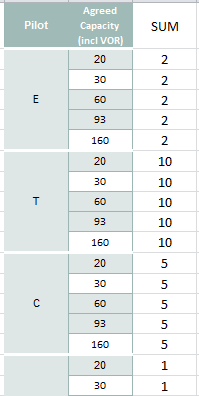
etc etc..... How can i match fields in one excel sheet field to the other? Please help.
701 Views
1 Reply

 sunny_talwar
MVP
2019-02-05
11:44 AM
- Mark as New
- Bookmark
- Subscribe
- Mute
- Subscribe to RSS Feed
- Permalink
- Report Inappropriate Content
May be you need this
Sum(If(Pilot = Prod, Batch))
698 Views
