Unlock a world of possibilities! Login now and discover the exclusive benefits awaiting you.

- Qlik Community
- :
- Forums
- :
- Analytics & AI
- :
- Products & Topics
- :
- App Development
- :
- Qlik Sense Auto Number Format
- Subscribe to RSS Feed
- Mark Topic as New
- Mark Topic as Read
- Float this Topic for Current User
- Bookmark
- Subscribe
- Mute
- Printer Friendly Page

 sqdev
sqdev
- Mark as New
- Bookmark
- Subscribe
- Mute
- Subscribe to RSS Feed
- Permalink
- Report Inappropriate Content
Qlik Sense Auto Number Format
Hi all,
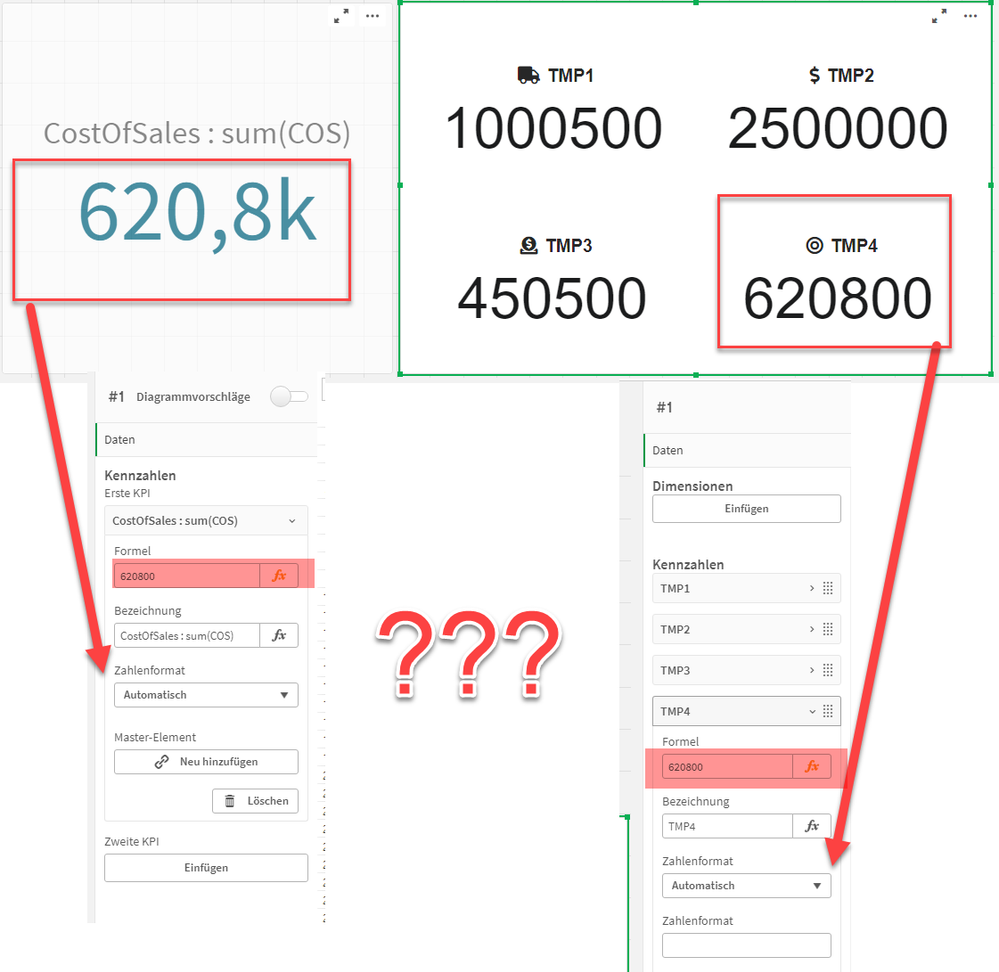
I've been trying for an hour to format the number format on the right side of my screenshot like on the left side and can't find a solution.
Can someone give me a hint how to solve it ?
Thanks a lot in advance!

 rubenmarin
- Mark as New
- Bookmark
- Subscribe
- Mute
- Subscribe to RSS Feed
- Permalink
- Report Inappropriate Content
Hi, the one on the right looks like an extension, I think this formatting is done by the object, not by default, in example when you show values in table they are shown in all it's length, like on the right side os your screenshot.
One option could be editing the extension to work as the default KPI object formatting numbers. I can't help you with this.
There is a workaround to simulate that behaviour, the expression can be something like:
If([YourExpression]>1e6, Num([YourExpression]/1e6, '#.##0,0M'),
  If([YourExpression]>1e3, Num([YourExpression]/1e3, '#.##0,0k'),
    Num([YourExpression], '#.##0,0'))
