Unlock a world of possibilities! Login now and discover the exclusive benefits awaiting you.

- Qlik Community
- :
- Forums
- :
- Analytics & AI
- :
- Products & Topics
- :
- App Development
- :
- Re: Qlik Sense chart expression selection
- Subscribe to RSS Feed
- Mark Topic as New
- Mark Topic as Read
- Float this Topic for Current User
- Bookmark
- Subscribe
- Mute
- Printer Friendly Page

 Architect
- Mark as New
- Bookmark
- Subscribe
- Mute
- Subscribe to RSS Feed
- Permalink
- Report Inappropriate Content
Qlik Sense chart expression selection
HI,
I have added these two expressions in my Qlik Sense app.
Expression1>
If( $(v_Rec_GM)>0 and ([Rec. Sales Price])>= $(vLowvcomp), 'G2',
If( $(v_Rec_GM)<=0 and ([Rec. Sales Price])< $(vLowvcomp), 'G3',
If( $(v_Rec_GM)<=0 and ([Rec. Sales Price])>= $(vLovwcomp), 'G1',
If( $(v_Rec_GM)>0 and ([Rec. Sales Price])< $(vLowvcomp),'G5',null)))).
I am using this expression1 for the column = 'Action Item'
Expression2>
If( $(v_Rec_GM)>0 and ([Rec. Sales Price])>= $(vLowvcomp), 'G2',
If( $(v_Rec_GM)<=0 and ([Rec. Sales Price])< $(vLowvcomp), 'G3',
If( $(v_Rec_GM)<=0 and ([Rec. Sales Price])>= $(vLowvcomp), 'G1',
)))
I am using this expression2 for the column = 'Action'
Below are the columns that I obtain following the expressions-
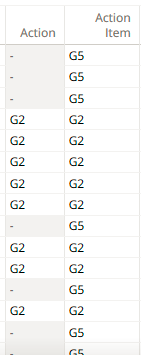
My Target->
I need to remove all the rows with 'G5' in my final app. and I will have 'Action Item' column with 'G1','G2', and 'G3'
only.
The issue I encountered is, removing 'G5' in the expression will fill up the column with '-' values, and I am not able to remove them in the chart.
- Tags:
- jonny
- qlik sense

 GaryGiles
- Mark as New
- Bookmark
- Subscribe
- Mute
- Subscribe to RSS Feed
- Permalink
- Report Inappropriate Content
Have you un-checked the "Include null values" box for the Action dimension in the chart properties panel?
Architect
- Mark as New
- Bookmark
- Subscribe
- Mute
- Subscribe to RSS Feed
- Permalink
- Report Inappropriate Content
@GaryGilesyes I have unchecked the box
Architect
- Mark as New
- Bookmark
- Subscribe
- Mute
- Subscribe to RSS Feed
- Permalink
- Report Inappropriate Content
Now i have also tried the issue to resolve using below 'LEN' expression, but having same output with '-'
as values.
IF(len(If( $(v_Rec_GM)>0 and ([Rec. Sales Price])>= $(vLowcomp), 'G2',
If( $(v_Rec_GM)<=0 and ([Rec. Sales Price])< $(vLowcomp), 'G3',
If( $(v_Rec_GM)<=0 and ([Rec. Sales Price])>= $(vLowcomp), 'G1',
))))>0,
If( $(v_Rec_GM)>0 and ([Rec. Sales Price])>= $(vLowcomp), 'G2',
If( $(v_Rec_GM)<=0 and ([Rec. Sales Price])< $(vLowcomp), 'G3',
If( $(v_Rec_GM)<=0 and ([Rec. Sales Price])>= $(vLowcomp), 'G1',
))))

 NitinK7
- Mark as New
- Bookmark
- Subscribe
- Mute
- Subscribe to RSS Feed
- Permalink
- Report Inappropriate Content
If there not a sensitive data then could you please attach here your qvf that will be helpful to check
Architect
- Mark as New
- Bookmark
- Subscribe
- Mute
- Subscribe to RSS Feed
- Permalink
- Report Inappropriate Content
HI @NitinK7 sharing the file is very difficult.
NitinK7
- Mark as New
- Bookmark
- Subscribe
- Mute
- Subscribe to RSS Feed
- Permalink
- Report Inappropriate Content
Ok, I understand
at least please provide your data file with dummy data
and how you calculate v_Rec_GM and vLowvcomp this 2 variables
 jwjackso
- Mark as New
- Bookmark
- Subscribe
- Mute
- Subscribe to RSS Feed
- Permalink
- Report Inappropriate Content
Using this data:
SET vLowvcomp=200;
Data:
Load * Inline [
"v_Rec_GM","Rec. Sales Price"
1,300
-1,100
-1,200
1,100
];
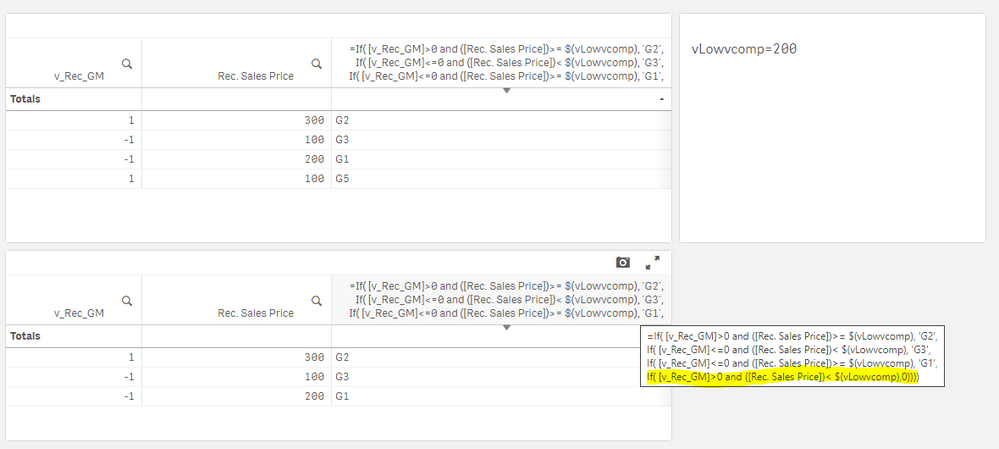
I unchecked "Include zero values" for the measure.
Architect
- Mark as New
- Bookmark
- Subscribe
- Mute
- Subscribe to RSS Feed
- Permalink
- Report Inappropriate Content
I have tried following your process,
still, I see those 'zero' values in the chart.
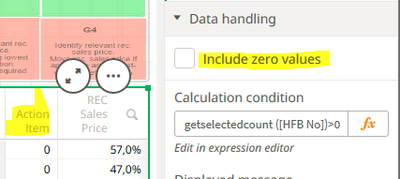
here the 'Action Item' column is dimension.
jwjackso
- Mark as New
- Bookmark
- Subscribe
- Mute
- Subscribe to RSS Feed
- Permalink
- Report Inappropriate Content
In your case, you have multiple measures. The "REC Sales Price" percentage is non-zero, so the row is not suppressed. In my example, I changed the "Action Item" column from a measure to a dimension, used the Null() function and suppressed nulls on that column.
=If( [v_Rec_GM]>0 and ([Rec. Sales Price])>= $(vLowvcomp), 'G2',
If( [v_Rec_GM]<=0 and ([Rec. Sales Price])< $(vLowvcomp), 'G3',
If( [v_Rec_GM]<=0 and ([Rec. Sales Price])>= $(vLowvcomp), 'G1',
If( [v_Rec_GM]>0 and ([Rec. Sales Price])< $(vLowvcomp),Null()))))
