Unlock a world of possibilities! Login now and discover the exclusive benefits awaiting you.

- Qlik Community
- :
- Forums
- :
- Analytics & AI
- :
- Products & Topics
- :
- App Development
- :
- Re: Qlik sense variable calculation before express...
- Subscribe to RSS Feed
- Mark Topic as New
- Mark Topic as Read
- Float this Topic for Current User
- Bookmark
- Subscribe
- Mute
- Printer Friendly Page

 jjmartegarcia
- Mark as New
- Bookmark
- Subscribe
- Mute
- Subscribe to RSS Feed
- Permalink
- Report Inappropriate Content
Qlik sense variable calculation before expression evaluation fails.
Hello everyone,
I have the following issue:
I want to use the numerical value of a variable (as a constant) instead of the expression in a pivot table.
The expression for the variable in the variable editor is the following: =Sum({1<Jaar = P(), DateID={"TRANSDATE"}, [asset.htm_tramtype_description] ={"Avenio"},[asset.assettype]={"TRAM"}>}[meterreading.delta])
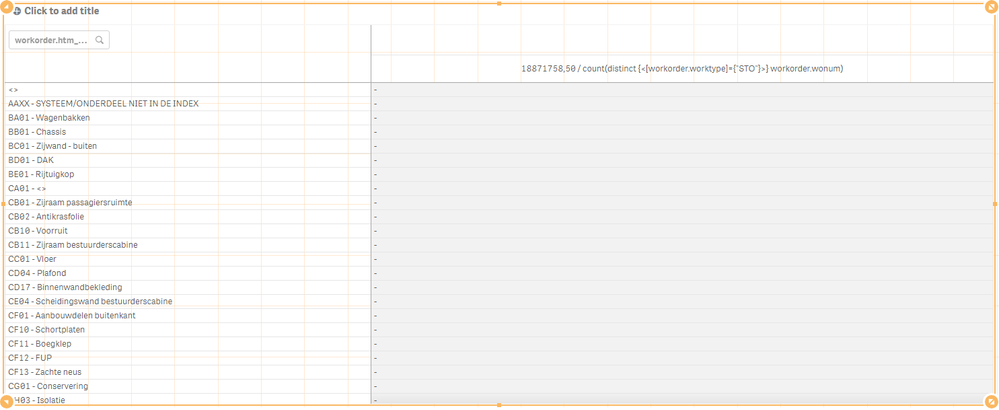
The pivot table has one dimension and looks like:
The expression for the measure in the pivot table :
$(vKM_Avenio)
/
count(distinct {<[workorder.worktype]={"STO"}>} workorder.wonum)
As you can see in the picture above, in the pivot chart only null is displayed for the measure. The expression "count(distinct {<[workorder.worktype]={"STO"}>} workorder.wonum)" has an association with the dimension so this is not the cause. The expression underneath the variable vKM_Avenio does not have an association with the dimension, but since the variable has been defined with a preceeding "=" sign, I expected that this would work.
What am I doing wrong here? Or is this just not possible with Qlik Sense?
Help is much appreciated!
Kind Regards,
Junior
Accepted Solutions

 agigliotti
- Mark as New
- Bookmark
- Subscribe
- Mute
- Subscribe to RSS Feed
- Permalink
- Report Inappropriate Content
what about using the below expression:
vKM_Avenio
/
count(distinct {<[workorder.worktype]={"STO"}>} workorder.wonum)
?
Follow me on my LinkedIn | Know Gamma Informatica at gammainformatica.it
agigliotti
- Mark as New
- Bookmark
- Subscribe
- Mute
- Subscribe to RSS Feed
- Permalink
- Report Inappropriate Content
it seems the variable "vKM_Avenio" value is correct (18871758,50).
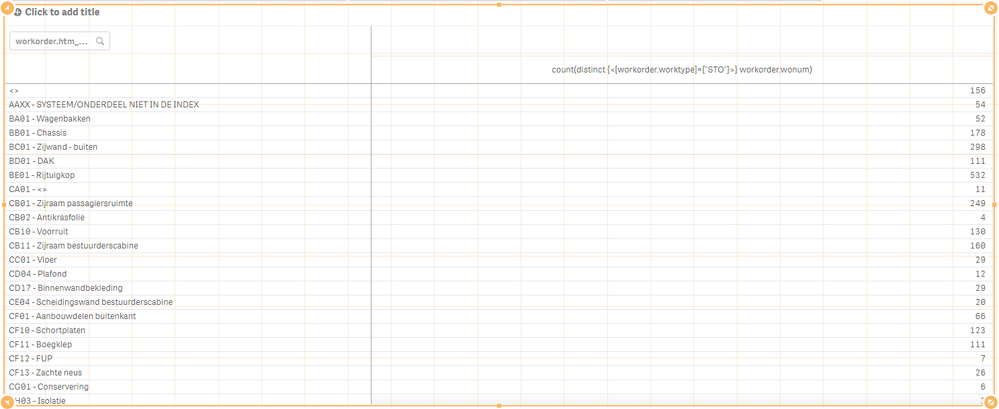
let's try using "count(distinct {<[workorder.worktype]={"STO"}>} workorder.wonum)" as expression in your pivot table to see what you get.
Follow me on my LinkedIn | Know Gamma Informatica at gammainformatica.it
jjmartegarcia
- Mark as New
- Bookmark
- Subscribe
- Mute
- Subscribe to RSS Feed
- Permalink
- Report Inappropriate Content
Hi Agigliotti,
This is what I get:
Kind Regards,
Junior
agigliotti
- Mark as New
- Bookmark
- Subscribe
- Mute
- Subscribe to RSS Feed
- Permalink
- Report Inappropriate Content
what about using the below expression:
vKM_Avenio
/
count(distinct {<[workorder.worktype]={"STO"}>} workorder.wonum)
?
Follow me on my LinkedIn | Know Gamma Informatica at gammainformatica.it
jjmartegarcia
- Mark as New
- Bookmark
- Subscribe
- Mute
- Subscribe to RSS Feed
- Permalink
- Report Inappropriate Content
Thanks Agigliotti!
This does the job.
I'm curious to know where you got this information from. This is what Qlik help explains.
Kind Regards,
Junior
