Unlock a world of possibilities! Login now and discover the exclusive benefits awaiting you.

- Qlik Community
- :
- Forums
- :
- Analytics & AI
- :
- Products & Topics
- :
- App Development
- :
- Re: QlikView QlikSense Scenario for Complex Repor...
- Subscribe to RSS Feed
- Mark Topic as New
- Mark Topic as Read
- Float this Topic for Current User
- Bookmark
- Subscribe
- Mute
- Printer Friendly Page

 ujjwalraja
- Mark as New
- Bookmark
- Subscribe
- Mute
- Subscribe to RSS Feed
- Permalink
- Report Inappropriate Content
QlikView QlikSense Scenario for Complex Reporting
++Updated to include all the scenarios
Hi Qlik Community,
I have input data as
T1:
LOAD * INLINE [
Broker, Carrier, Sales
B, BC1, 10
B, BC2, 20
B, BC3, 30
B, BC4, 20
B, BC4, 20
D, DC1, 80
D, DC2, 90
D, DC3, 60
D, DC3, 40
];
The Requirement is to get a report built in the below format
| Broker | Top 1st Carrier | Top 2nd Carrier | Top 1st Carrier Sales | Top 2nd Carrier Sales | Top 1st Carrier %age | Top 2nd Carrier %age |
| B | BC4 | BC3 | 40 | 30 | 20+20/20+20+30+20+10 | 30/20+20+30+20+10 |
| D | DC3 | DC2 | 100 | 90 | 60+40/80+90+60+40 | 90/80+90+60+40 |
I started building it in below approach-
Dimension- Broker
Measures-
Top 1st Carrier- FirstSortedValue(Carrier,-Aggr(Sum(Sales),Broker,Carrier),1)
Top 2nd Carrier - FirstSortedValue(Carrier,-Aggr(Sum(Sales),Broker,Carrier),2)
Top 1st Carrier Sales - Sum({<Carrier={'$(=FirstSortedValue(Carrier,-Aggr(Sum(Sales),Broker,Carrier),1))'}>}Sales)
Top 2nd Carrier Sales- Sum({<Carrier={'$(=FirstSortedValue(Carrier,-Aggr(Sum(Sales),Broker,Carrier),2))'}>}Sales)
The result are coming correct for the first 2 measures but for the next 2 the results are not coming correct
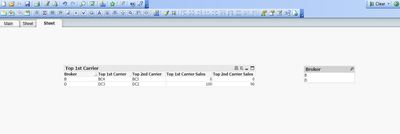
, When I select a particular Broker the results are coming correct but again it is only for single Broker.
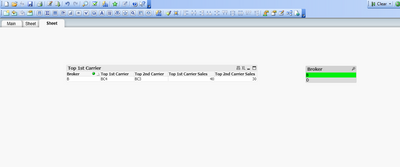
Please help me on how to achieve this scenario as per the requirement table.

 edwin
edwin
- Mark as New
- Bookmark
- Subscribe
- Mute
- Subscribe to RSS Feed
- Permalink
- Report Inappropriate Content
here is the same design pattern where you look for the top n:
https://community.qlik.com/t5/App-Development/Display-maximum-and-minimum-value/m-p/1954261#M78698
edwin
- Mark as New
- Bookmark
- Subscribe
- Mute
- Subscribe to RSS Feed
- Permalink
- Report Inappropriate Content
you just look for rank =1, 2, or 3
