Unlock a world of possibilities! Login now and discover the exclusive benefits awaiting you.

- Qlik Community
- :
- Forums
- :
- Analytics & AI
- :
- Products & Topics
- :
- App Development
- :
- Ranking with filtering
- Subscribe to RSS Feed
- Mark Topic as New
- Mark Topic as Read
- Float this Topic for Current User
- Bookmark
- Subscribe
- Mute
- Printer Friendly Page

 kcville
- Mark as New
- Bookmark
- Subscribe
- Mute
- Subscribe to RSS Feed
- Permalink
- Report Inappropriate Content
Ranking with filtering
Hello
I have a large table with names, departments and a field with a measure.
I would like to Rank the measure for each name after selecting a department. But I want to maintain the Rank result when I filter on an individual name.
Currently what happens when I select a name the table is filtered and the Rank result goes to 1 as there is the only row.
I want to Rank on the underlying data rather than what is in the table, I know I could do this in script but I have lots of departments and lots of measures so would be too complicated.
I hope this makes sense.
Kelly

 Taoufiq_Zarra
- Mark as New
- Bookmark
- Subscribe
- Mute
- Subscribe to RSS Feed
- Permalink
- Report Inappropriate Content
Hi,
can you sahre a sample and the expected output ?
Taoufiq ZARRA
"Please LIKE posts and "Accept as Solution" if the provided solution is helpful "
(you can mark up to 3 "solutions") 😉
kcville
- Mark as New
- Bookmark
- Subscribe
- Mute
- Subscribe to RSS Feed
- Permalink
- Report Inappropriate Content
Example data:
Name Department Sales Rank
John Sales 10 1
Peter Sales 11 2
Paul Sales 12 3
I would like to filter to Paul and see the following:
Name Department Sales Rank
Paul Sales 12 3
What I see at the moment
Name Department Sales Rank
Paul Sales 12 1

 tresB
tresB
- Mark as New
- Bookmark
- Subscribe
- Mute
- Subscribe to RSS Feed
- Permalink
- Report Inappropriate Content
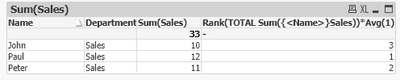
If you are using any aggregation function for calculating rank, you could use set analysis to disregard the selection and keep the rank fixed. like:
Rank(TOTAL Sum({<Name>}Sales))*Avg(1)

Taoufiq_Zarra
- Mark as New
- Bookmark
- Subscribe
- Mute
- Subscribe to RSS Feed
- Permalink
- Report Inappropriate Content
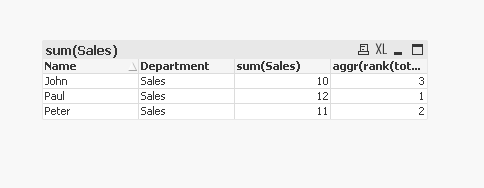
If I consider the following example:
Data:
load * inline [
Name , Department ,Sales
John , Sales , 10
Peter , Sales , 11
Paul , Sales , 12
];
In dimension :Name, Departement
Expression: sum(Sales)
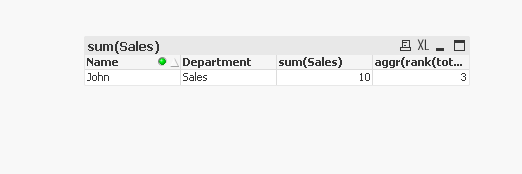
aggr(rank(total sum({1} Sales)),Name,Department)for rank
output :
Taoufiq ZARRA
"Please LIKE posts and "Accept as Solution" if the provided solution is helpful "
(you can mark up to 3 "solutions") 😉
kcville
- Mark as New
- Bookmark
- Subscribe
- Mute
- Subscribe to RSS Feed
- Permalink
- Report Inappropriate Content
Thank you both so much, I used a combination of both your methods...
aggr(rank(total sum({<Name>} Sales)),Name, Department)
