Unlock a world of possibilities! Login now and discover the exclusive benefits awaiting you.

- Qlik Community
- :
- Forums
- :
- Analytics & AI
- :
- Products & Topics
- :
- App Development
- :
- Re: Seeking correct syntax when using variable as ...
- Subscribe to RSS Feed
- Mark Topic as New
- Mark Topic as Read
- Float this Topic for Current User
- Bookmark
- Subscribe
- Mute
- Printer Friendly Page

 graham-crooks
- Mark as New
- Bookmark
- Subscribe
- Mute
- Subscribe to RSS Feed
- Permalink
- Report Inappropriate Content
Seeking correct syntax when using variable as constraint in set analysis
Dear Community
I'm using Qlik Sense 3.1 SR4 here; I'm aiming for something of a YTD calculation, based on the Year up to the point the data is loaded and it's being plotted in a stacked bar chart in comparison with previous years.
I have EventDate values in the data and from this I'm deriving EDateNumMonth from Num(Month(EventDate)), giving a number value for Month in each data row. Meanwhile, a control variable, vEDateNumMonthToday is set in the load script; Let's say we're in March, so 3 then.
Now in Qlikview (v11) I used an expression logic that ran like this:
sum({<FieldNumMonth={'<=$(vTheCurrentMonth)'}>}RCounter).
This worked great and provided a YTD total for each year present in the data.
I'm trying to employ the same approach in our QlikSense rendition, but it seems something is skewed.
If I hard code the limitation, as:
sum({<EDateNumMonth={'<=3'}>}RC)
or sum({<EDateNumMonth={'>=1<=3'}>}RC)
everything is fine - all adds up as it should.
As soon as I add a dollar expansion to the set analysis:
sum({<EDateNumMonth={'<=$(vEDateNumMonthToday)'}>}RC) - the columns disappear, or
sum({<EDateNumMonth={'>=1<=$(vEDateNumMonthToday)'}>}RC) - the columns display the total for the whole year!
Uuh?
Am I missing something here?
@MichaelTarallo, or other community colleagues; Any constructive suggestions would be most welcome.
Regards
Graham

Accepted Solutions

- Mark as New
- Bookmark
- Subscribe
- Mute
- Subscribe to RSS Feed
- Permalink
- Report Inappropriate Content
Hi!
You should put an equal sign so that the variable calculates 
currently it is comparing it with a string Num(Month(Today(1)))
I tried changing your variable in the script as
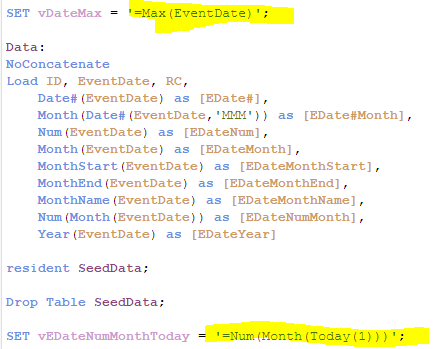
Now it computes
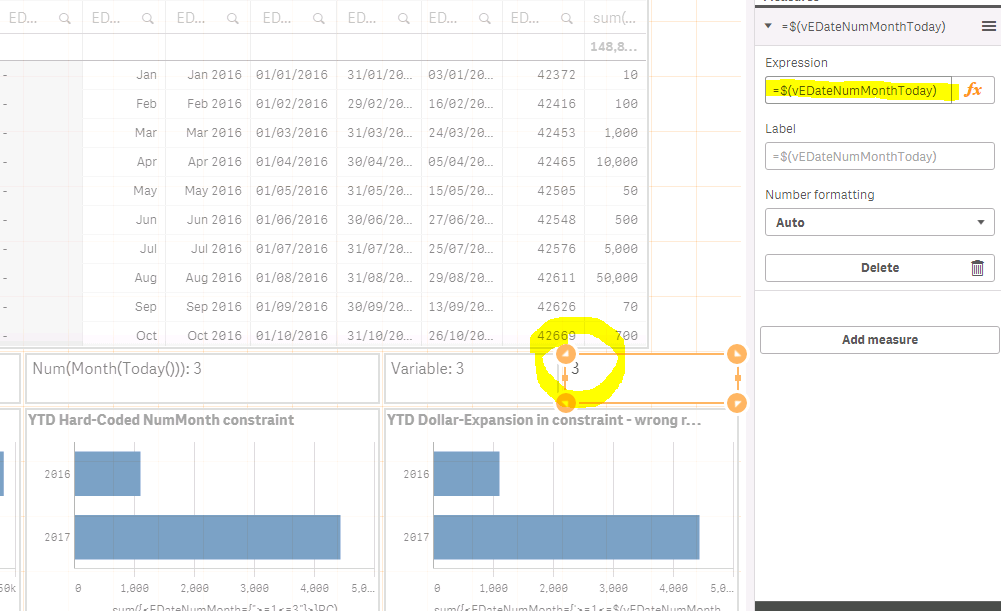
- Mark as New
- Bookmark
- Subscribe
- Mute
- Subscribe to RSS Feed
- Permalink
- Report Inappropriate Content
Hi!
You should put an equal sign so that the variable calculates
currently it is comparing it with a string Num(Month(Today(1)))
I tried changing your variable in the script as
Now it computes

 sunny_talwar
- Mark as New
- Bookmark
- Subscribe
- Mute
- Subscribe to RSS Feed
- Permalink
- Report Inappropriate Content
Or even a dollar sign expansion within the dollar sign expansion can work also
Sum({<EDateNumMonth={'>=1<=$(=$(vEDateNumMonthToday))'}>}RC)
graham-crooks
- Mark as New
- Bookmark
- Subscribe
- Mute
- Subscribe to RSS Feed
- Permalink
- Report Inappropriate Content
Hey, Thank you for that insight. More attention to LET and SET would probably have been useful when I wrote the script.