Unlock a world of possibilities! Login now and discover the exclusive benefits awaiting you.

- Qlik Community
- :
- Forums
- :
- Analytics & AI
- :
- Products & Topics
- :
- App Development
- :
- Re: Set Analysis Help - Value different in KPI vs ...
- Subscribe to RSS Feed
- Mark Topic as New
- Mark Topic as Read
- Float this Topic for Current User
- Bookmark
- Subscribe
- Mute
- Printer Friendly Page

 mjperreault
- Mark as New
- Bookmark
- Subscribe
- Mute
- Subscribe to RSS Feed
- Permalink
- Report Inappropriate Content
Set Analysis Help - Value different in KPI vs Table
Hi All,
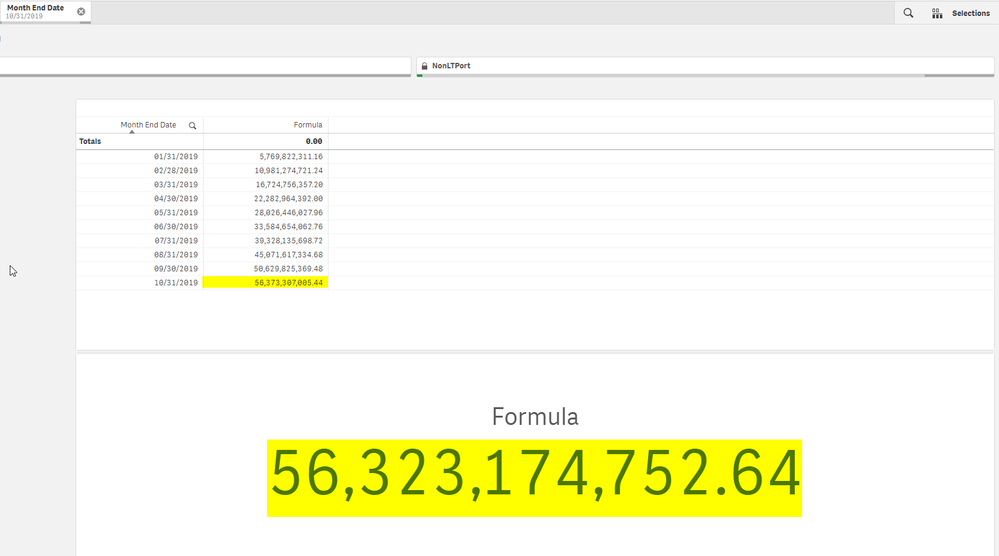
I am having some difficulty with an expression where my formula in a Table is yielding different results than my formula in a KPI. The value in the table is the desired value but I can't seem to get it to work in the KPI.
In the picture below I am expecting the value in the KPI to be the same as the value for 10/31/2019 in the table. My only selection is a 10/31/2019 in a field called Month End Date. I am trying to calculate a Rolling YTD value.
Below is the formula. Any help would be greatly appreciated!
Rangesum(Above(RangeSum(Sum(Total {<[Month End Date],[Month] = {'Jan'},Year = {'2019'}>}PSTotalAssets)+
Sum(Total {<[Month End Date],[Month] = {'Jan'},Year = {'2019'}>}SPV_PSTotalAssets),Above(Sum({<[Month End Date],[Year] = {'2019'}>}[Inflow/Outflow]),0,Rowno()))*
Sum({<[Month End Date],Year = {'2019'}>}Aggr({<[Month End Date],Year = {'2019'}>}sum({<[Month End Date],Year = {'2019'}>}[Days in Month]),[Month End Date])),0,RowNo()))
Thanks!
Mark
- Tags:
- rangesum
Accepted Solutions

 sunny_talwar
- Mark as New
- Bookmark
- Subscribe
- Mute
- Subscribe to RSS Feed
- Permalink
- Report Inappropriate Content
Simplified a little
Sum(Aggr(

RangeSum(Sum(TOTAL {<[Month End Date], [Month] = {'Jan'}, Year = {'2019'}>} RangeSum(SPV_PSTotalAssets, PSTotalAssets)), RangeSum(Above(Sum({<[Month End Date], [Year] = {'2019'}>}[Inflow/Outflow]), 0, RowNo())))
*
Only({<[Month End Date], Year = {'2019'}>}[Days in Month])

, [Month End Date]))- Mark as New
- Bookmark
- Subscribe
- Mute
- Subscribe to RSS Feed
- Permalink
- Report Inappropriate Content
Hi All,
I've attached a QVF for this issue which should hopefully help!
@sunny_talwar was wondering if you'd be able to take a look.
Thanks,
Mark
sunny_talwar
- Mark as New
- Bookmark
- Subscribe
- Mute
- Subscribe to RSS Feed
- Permalink
- Report Inappropriate Content
Not the best of ways to do it, but you can try this
Aggr(

    If([Month End Date] = Max(TOTAL [Month End Date]), Rangesum(Above(RangeSum(Sum(Total {<[Month End Date],[Month] = {'Jan'},Year = {'2019'}>}PSTotalAssets)+
Sum(Total {<[Month End Date],[Month] = {'Jan'},Year = {'2019'}>}SPV_PSTotalAssets),Above(Sum({<[Month End Date],[Year] = {'2019'}>}[Inflow/Outflow]),0,Rowno()))*
Sum({<[Month End Date],Year = {'2019'}>}Aggr({<[Month End Date],Year = {'2019'}>}Only({<[Month End Date],Year = {'2019'}>}[Days in Month]),[Month End Date])),0,RowNo())))

, [Month End Date])- Mark as New
- Bookmark
- Subscribe
- Mute
- Subscribe to RSS Feed
- Permalink
- Report Inappropriate Content
Simplified a little
Sum(Aggr(

RangeSum(Sum(TOTAL {<[Month End Date], [Month] = {'Jan'}, Year = {'2019'}>} RangeSum(SPV_PSTotalAssets, PSTotalAssets)), RangeSum(Above(Sum({<[Month End Date], [Year] = {'2019'}>}[Inflow/Outflow]), 0, RowNo())))
*
Only({<[Month End Date], Year = {'2019'}>}[Days in Month])

, [Month End Date]))- Mark as New
- Bookmark
- Subscribe
- Mute
- Subscribe to RSS Feed
- Permalink
- Report Inappropriate Content
Hi @sunny_talwar ,
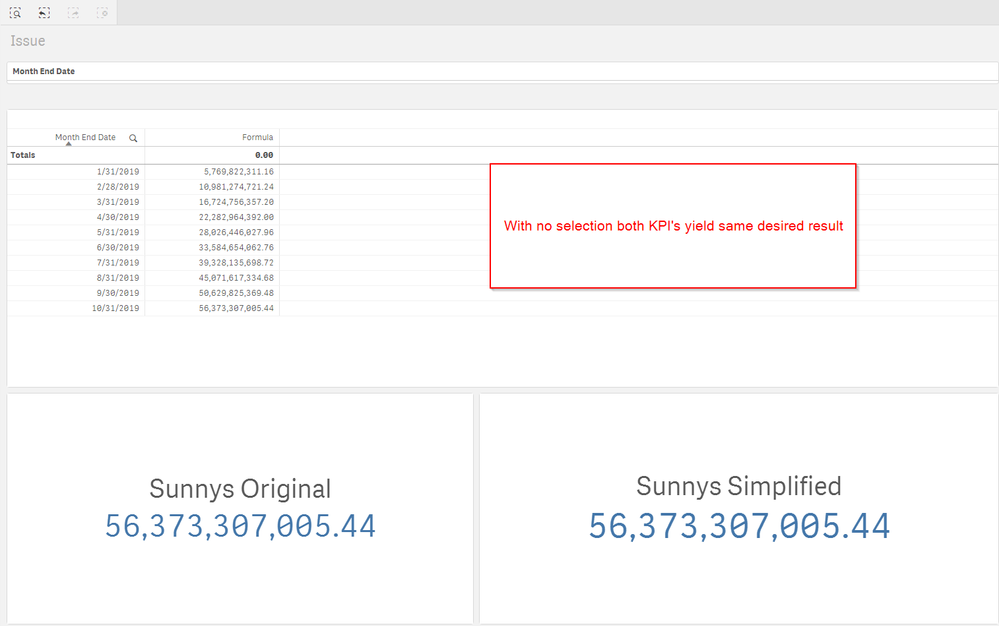
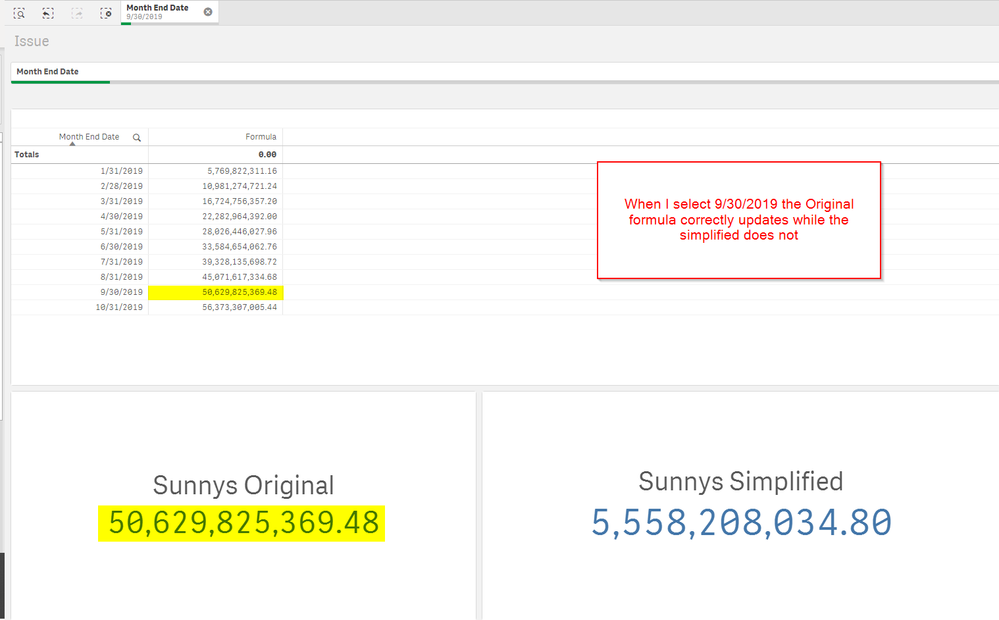
Thanks so much for your responses! They are very helpful. I prefer the "simplified" version as it seems cleaner however, the simplified version will only work if I do not select a Month End Date while the other version works when I choose different Months. Any thoughts on a tweak to the simplified version to achieve this?
No Selection
With Selection
Thanks Again!
Mark
mjperreault
- Mark as New
- Bookmark
- Subscribe
- Mute
- Subscribe to RSS Feed
- Permalink
- Report Inappropriate Content
Think I figured it out.
Updated
Sum({<[Month End Date] = {"<=$(=Max([Month End Date]))"}, [Year] = {'2019'}>}Aggr({<[Month End Date], [Year] = {'2019'}>}
RangeSum(Sum(TOTAL {<[Month End Date], [Month] = {'Jan'}, Year = {'2019'}>} RangeSum(SPV_PSTotalAssets, PSTotalAssets)), RangeSum(Above(Sum({<[Month End Date], [Year] = {'2019'}>}[Inflow/Outflow]), 0, RowNo())))
*
Only({<[Month End Date], Year = {'2019'}>}[Days in Month])
, [Month End Date]))
Thanks again Sunny
