Unlock a world of possibilities! Login now and discover the exclusive benefits awaiting you.

- Qlik Community
- :
- Forums
- :
- Analytics & AI
- :
- Products & Topics
- :
- App Development
- :
- Re: Set Analysis Issue
- Subscribe to RSS Feed
- Mark Topic as New
- Mark Topic as Read
- Float this Topic for Current User
- Bookmark
- Subscribe
- Mute
- Printer Friendly Page

 risabhroy_03
- Mark as New
- Bookmark
- Subscribe
- Mute
- Subscribe to RSS Feed
- Permalink
- Report Inappropriate Content
Set Analysis Issue
I have a field [Max_Invoice_Date_GMT_Updated] that has dates stored for each [Company_Code] as shown below
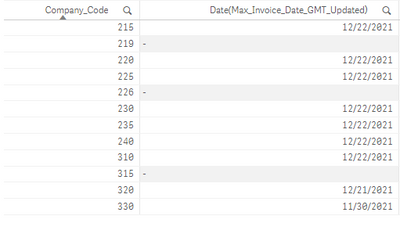
Now, I want to sum my [Quantity] where [Invoice_Date_GMT_Updated] = [Max_Invoice_Date_GMT_Updated] using set analysis.
I wrote - Sum({<[Invoice_Date_GMT_Updated] = p(Max_Invoice_Date_GMT_Updated)>}Quantity)
but unfortunately, I am not getting the correct values. I don't want to use it because my data is too large and it might affect my performance.
Please help.
Accepted Solutions
.png "sasikanth")
 sasikanth
- Mark as New
- Bookmark
- Subscribe
- Mute
- Subscribe to RSS Feed
- Permalink
- Report Inappropriate Content
Hi,
You can try to do this at script level like below to avoid performance hit on the application
MAP:
mapping load
company_code, max([Invoice_Date_GMT_Updated]) as [Invoice_Date_GMT_Updated]
from CompanyTable;
Company:
Load *, if ([Invoice_Date_GMT_Updated] =MaxDate,1,0) as Max_Flag;
Load *,
applymap('MAP',company_code ,'N/A') as MaxDate
from CompanyTable;
Chart expression: sum({<Max_Flag={'1'}>}Quantity)
Thanks,
Sasi
sasikanth
- Mark as New
- Bookmark
- Subscribe
- Mute
- Subscribe to RSS Feed
- Permalink
- Report Inappropriate Content
Hi,
You can try to do this at script level like below to avoid performance hit on the application
MAP:
mapping load
company_code, max([Invoice_Date_GMT_Updated]) as [Invoice_Date_GMT_Updated]
from CompanyTable;
Company:
Load *, if ([Invoice_Date_GMT_Updated] =MaxDate,1,0) as Max_Flag;
Load *,
applymap('MAP',company_code ,'N/A') as MaxDate
from CompanyTable;
Chart expression: sum({<Max_Flag={'1'}>}Quantity)
Thanks,
Sasi
