Unlock a world of possibilities! Login now and discover the exclusive benefits awaiting you.

- Qlik Community
- :
- Forums
- :
- Analytics & AI
- :
- Products & Topics
- :
- App Development
- :
- Re: Set Analysis not working
- Subscribe to RSS Feed
- Mark Topic as New
- Mark Topic as Read
- Float this Topic for Current User
- Bookmark
- Subscribe
- Mute
- Printer Friendly Page

 arusanah
- Mark as New
- Bookmark
- Subscribe
- Mute
- Subscribe to RSS Feed
- Permalink
- Report Inappropriate Content
Set Analysis not working
Hi Friends ,
I'm writing two expression one with simple sum(if()) and other one using set Analysis . both are giving me different answers .
sum(if(CASH_DATE<=[Snapshot Date],CASH_AMOUNT,0)) --gives me correct number
Sum({< CASH_DATE={"<= $([Snapshot Date])"}>} CASH_AMOUNT)
-- take my numbers off
Please help me find out error with my set expression.
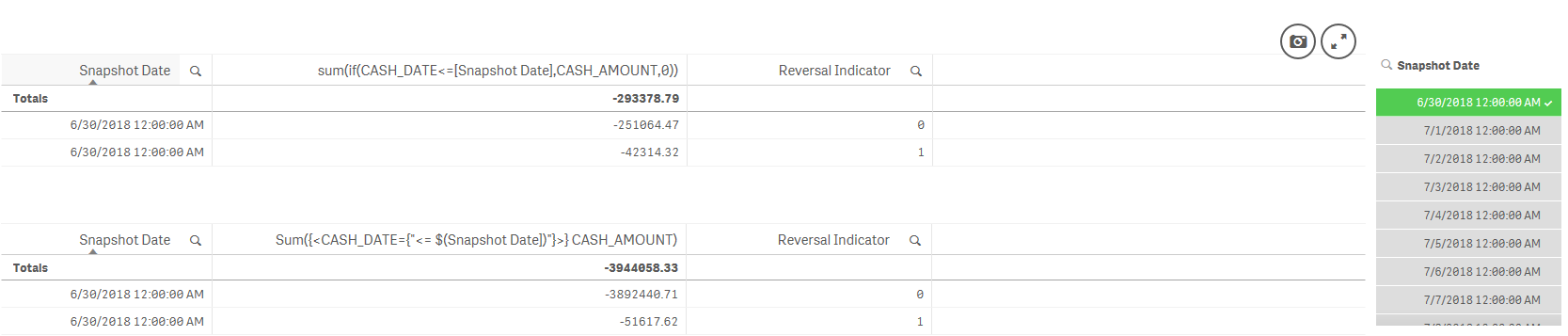
Any help is greatly appreciated!
Accepted Solutions

 YoussefBelloum
- Mark as New
- Bookmark
- Subscribe
- Mute
- Subscribe to RSS Feed
- Permalink
- Report Inappropriate Content
Hi,
try this:
Sum({< CASH_DATE={"<=$(=[Snapshot Date])"}>} CASH_AMOUNT)
YoussefBelloum
- Mark as New
- Bookmark
- Subscribe
- Mute
- Subscribe to RSS Feed
- Permalink
- Report Inappropriate Content
Hi,
try this:
Sum({< CASH_DATE={"<=$(=[Snapshot Date])"}>} CASH_AMOUNT)
arusanah
- Mark as New
- Bookmark
- Subscribe
- Mute
- Subscribe to RSS Feed
- Permalink
- Report Inappropriate Content
Thank you Youssef ,whit above expression I need to make selection on snapshot filter to see numbers . I tried to update above expression to see max snapshot date data
if(isnull(getfieldselections([Snapshot Date])),Sum({< CASH_DATE={"=max([Snapshot Date])"}>} CASH_AMOUNT),
Sum({<{"<=$(=[Snapshot Date])"}>} CASH_AMOUNT))
but this shows sum of all transactions and not just max date when nothing is selected .

 Chanty4u
- Mark as New
- Bookmark
- Subscribe
- Mute
- Subscribe to RSS Feed
- Permalink
- Report Inappropriate Content
may be this?
if(isnull(getfieldselections([Snapshot Date])),Sum({< CASH_DATE={"$(=max([Snapshot Date]))"}>} CASH_AMOUNT),
Sum({<{"<=$(=[Snapshot Date])"}>} CASH_AMOUNT))
arusanah
- Mark as New
- Bookmark
- Subscribe
- Mute
- Subscribe to RSS Feed
- Permalink
- Report Inappropriate Content
Thanks Chanty But this doesn't work either , already tried
Chanty4u
- Mark as New
- Bookmark
- Subscribe
- Mute
- Subscribe to RSS Feed
- Permalink
- Report Inappropriate Content
try
CASH_DATE= {'$(=Max([Snapshot Date]))'}
or
CASH_DATE= {'$(=Max([Snapshot Date]))'}
or
CASH_DATE= {'$(=date(max([Snapshot Date])))'}
