Unlock a world of possibilities! Login now and discover the exclusive benefits awaiting you.

- Qlik Community
- :
- Forums
- :
- Analytics & AI
- :
- Products & Topics
- :
- App Development
- :
- Set analysis aggr Only ?
- Subscribe to RSS Feed
- Mark Topic as New
- Mark Topic as Read
- Float this Topic for Current User
- Bookmark
- Subscribe
- Mute
- Printer Friendly Page

- Mark as New
- Bookmark
- Subscribe
- Mute
- Subscribe to RSS Feed
- Permalink
- Report Inappropriate Content
Set analysis aggr Only ?
Hi team !
I have 2 requirements for the business that i cant' solve myself (I'm on Qlik Sense Nov. 2017) !
Here my sample of data:
Transaction_ID, Category, Item_Code, Qty_sold
1, Shoes, Brown_Richelieu, 2
1, Shoes, Tennis, 1
1, Shoes, Black_Richelieu, 3
2, Jeans, T54_654, 2
2, Shoes, Tennis, 1
3, Shoes, Black_Derbie, 3
4, Jeans, T65_876, 2
I want to sum qty sold of transactions which contains only the category "shoes":
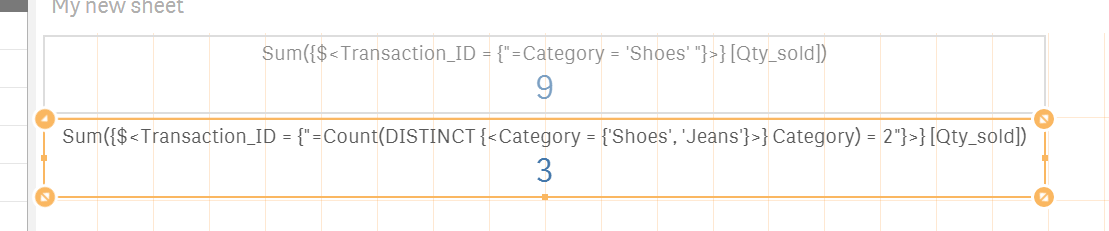
>> here, only for transactions ID which contains category "Shoes", (1 and 3), the result must be 9
I want to sum qty sold of transactions which contains only the category "shoes" and "Jeans":
>> here, only for transactions ID which contains category "Shoes" and "Jeans", (2), the result must be 3
I have already try:
- Sum{$<[Category] = {'Shoes'}>} [Qty_sold])
- Aggr(Sum{$<[Category] = {'Shoes'}>} [Qty_sold]), [Transaction_ID])
But it didn't work !
Can you help me ?
Thanks in advance !
Quentin

 sunny_talwar
- Mark as New
- Bookmark
- Subscribe
- Mute
- Subscribe to RSS Feed
- Permalink
- Report Inappropriate Content
Try this
1) Sum{$<Transaction_ID = {"=Category = 'Shoes' "}>} [Qty_sold])
1) Sum({$<Transaction_ID = {"=Category = 'Shoes' "}>} [Qty_sold])
2) Sum{$<Transaction_ID = {"=Count(DISTINCT {<Category = {'Shoes', 'Jeans'}>} Category) = 2"}>} [Qty_sold])
2) Sum({$<Transaction_ID = {"=Count(DISTINCT {<Category = {'Shoes', 'Jeans'}>} Category) = 2"}>} [Qty_sold])