Unlock a world of possibilities! Login now and discover the exclusive benefits awaiting you.

- Qlik Community
- :
- Forums
- :
- Analytics & AI
- :
- Products & Topics
- :
- App Development
- :
- Re: Set analysis with multiple conditions
- Subscribe to RSS Feed
- Mark Topic as New
- Mark Topic as Read
- Float this Topic for Current User
- Bookmark
- Subscribe
- Mute
- Printer Friendly Page

 almosthuman
- Mark as New
- Bookmark
- Subscribe
- Mute
- Subscribe to RSS Feed
- Permalink
- Report Inappropriate Content
Set analysis with multiple conditions
Hi all,
this is my base table:
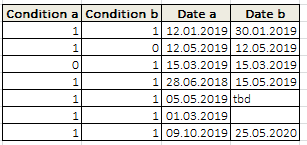
I need to count only entries where:
- "Date a" is smaller than "Date b"
- "Condition a" and "Condition b" is equal "1"
- "Date a" is from 2019.
Therefore the result should be equal 2.
I tried this:
Count({$<[Date a] ={"=month(date([Date a]))='*' and num(year([Data a]))=2019"}, //only from 2019
[Date a] ={"=date([Date a]) < date([Date b])"}, //only where "Date a" is smaller than "Date b"
[Condition a] -= {0}, //exclude 0
[Condition b] -= {0}, //exclude 0
>}[Date a]
But it won't work.
Any ideas? Thanks in advance.
almosthuman
- Mark as New
- Bookmark
- Subscribe
- Mute
- Subscribe to RSS Feed
- Permalink
- Report Inappropriate Content
- "Condition a" and "Condition b" is equal 1

 Frank_Hartmann
- Mark as New
- Bookmark
- Subscribe
- Mute
- Subscribe to RSS Feed
- Permalink
- Report Inappropriate Content
Maybe something like this:
script:
LOAD * INLINE [
    Condition_a, Condition_b, Date_a, Date_b
    1, 1, 12.01.2019, 30.01.2019
    1, 0, 12.05.2019, 12.05.2019
    0, 1, 15.03.2019, 15.03.2019
    1, 1, 28.06.2018, 15.05.2019
    1, 1, 05.05.2019, tbd
    1, 1, 01.03.2019
    1, 1, 09.10.2019, 25.05.2020
];
textbox:
=count({<Date_b={"=Date_a < Date_b and Condition_a = 1 and Condition_b =1 and year(Date_a) = 2019 and Date_b <> 'tbd' and Date_b <> Null()"}>}Date_a)
almosthuman
- Mark as New
- Bookmark
- Subscribe
- Mute
- Subscribe to RSS Feed
- Permalink
- Report Inappropriate Content

 thi_pham
- Mark as New
- Bookmark
- Subscribe
- Mute
- Subscribe to RSS Feed
- Permalink
- Report Inappropriate Content
2 solutions:
1st : count( {<Condition_a={1},Condition_b={1},[Date_a]={"=Date_a.autoCalendar.Date < Date_b.autoCalendar.Date"},[Date_a.autoCalendar.Year]={'2019'} >} Date_a)
2nd:
sum(if(Condition_a = 1 and Condition_b = 1 and Date_a < Date_b and year(Date_a)=2019 , 1, 0))
Just make sure Date_a and Date_b is loaded as Date. I tried and get same value (2) with both solutions
Frank_Hartmann
- Mark as New
- Bookmark
- Subscribe
- Mute
- Subscribe to RSS Feed
- Permalink
- Report Inappropriate Content
for me, using above mentioned script and expression in Qlikview in a textbox, it is 2.
not able to test on sense but normally should be the same....
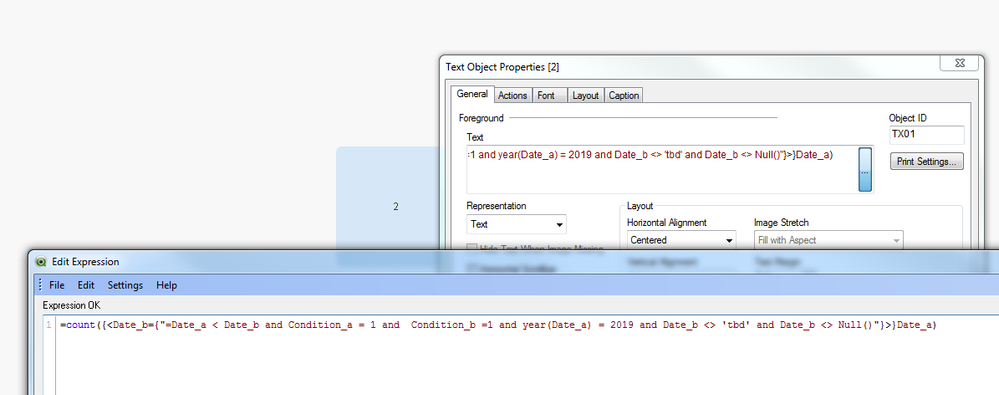
P.S: Maybe its due to the field names as i used "_" inside the fieldnames
Maybe just change the fieldnames according your environment:
=count({<[Date b]={"=[Date a] < [Date b] and Condition_a = 1 and Condition_b =1 and year([Date a]) = 2019 and [Date b]<> 'tbd' and [Date b]<> Null()"}>}[Date a])
thi_pham
- Mark as New
- Bookmark
- Subscribe
- Mute
- Subscribe to RSS Feed
- Permalink
- Report Inappropriate Content
I tried on Qlik sense : count({<Date_b={"=Date_a < Date_b and Condition_a = 1 and Condition_b =1 and year(Date_a) = 2019 and Date_b <> 'tbd' and Date_b <> Null()"}>}Date_a)
It returned 2 as well.
@almosthuman : it might be a problem in date format of date_a and date_b which cause the Date_a < Date_b not correct.
Below script might fix the date format. FYR
SET ThousandSep=',';
SET DecimalSep='.';
SET MoneyThousandSep=',';
SET MoneyDecimalSep='.';
SET MoneyFormat='$#,##0.00;-$#,##0.00';
SET TimeFormat='h:mm:ss TT';
SET DateFormat='DD.MM.YYYY';
SET TimestampFormat='DD.MM.YYYY h:mm:ss[.fff] TT';
SET FirstWeekDay=6;
SET BrokenWeeks=1;
SET ReferenceDay=0;
SET FirstMonthOfYear=1;
SET CollationLocale='en-US';
SET CreateSearchIndexOnReload=1;
SET MonthNames='Jan;Feb;Mar;Apr;May;Jun;Jul;Aug;Sep;Oct;Nov;Dec';
SET LongMonthNames='January;February;March;April;May;June;July;August;September;October;November;December';
SET DayNames='Mon;Tue;Wed;Thu;Fri;Sat;Sun';
SET LongDayNames='Monday;Tuesday;Wednesday;Thursday;Friday;Saturday;Sunday';
LOAD * INLINE [
Condition_a, Condition_b, Date_a, Date_b
1, 1, 12.01.2019, 30.01.2019
1, 0, 12.05.2019, 12.05.2019
0, 1, 15.03.2019, 15.03.2019
1, 1, 28.06.2018, 15.05.2019
1, 1, 05.05.2019, tbd
1, 1, 01.03.2019
1, 1, 09.10.2019, 25.05.2020
];
[autoCalendar]:
DECLARE FIELD DEFINITION Tagged ('$date')
FIELDS
Dual(Year($1), YearStart($1)) AS [Year] Tagged ('$axis', '$year'),
Dual('Q'&Num(Ceil(Num(Month($1))/3)),Num(Ceil(NUM(Month($1))/3),00)) AS [Quarter] Tagged ('$quarter', '$cyclic'),
Dual(Year($1)&'-Q'&Num(Ceil(Num(Month($1))/3)),QuarterStart($1)) AS [YearQuarter] Tagged ('$yearquarter', '$qualified'),
Dual('Q'&Num(Ceil(Num(Month($1))/3)),QuarterStart($1)) AS [_YearQuarter] Tagged ('$yearquarter', '$hidden', '$simplified'),
Month($1) AS [Month] Tagged ('$month', '$cyclic'),
Dual(Year($1)&'-'&Month($1), monthstart($1)) AS [YearMonth] Tagged ('$axis', '$yearmonth', '$qualified'),
Dual(Month($1), monthstart($1)) AS [_YearMonth] Tagged ('$axis', '$yearmonth', '$simplified', '$hidden'),
Dual('W'&Num(Week($1),00), Num(Week($1),00)) AS [Week] Tagged ('$weeknumber', '$cyclic'),
Date(Floor($1)) AS [Date] Tagged ('$axis', '$date', '$qualified'),
Date(Floor($1), 'D') AS [_Date] Tagged ('$axis', '$date', '$hidden', '$simplified'),
If (DayNumberOfYear($1) <= DayNumberOfYear(Today()), 1, 0) AS [InYTD] ,
Year(Today())-Year($1) AS [YearsAgo] ,
If (DayNumberOfQuarter($1) <= DayNumberOfQuarter(Today()),1,0) AS [InQTD] ,
4*Year(Today())+Ceil(Month(Today())/3)-4*Year($1)-Ceil(Month($1)/3) AS [QuartersAgo] ,
Ceil(Month(Today())/3)-Ceil(Month($1)/3) AS [QuarterRelNo] ,
If(Day($1)<=Day(Today()),1,0) AS [InMTD] ,
12*Year(Today())+Month(Today())-12*Year($1)-Month($1) AS [MonthsAgo] ,
Month(Today())-Month($1) AS [MonthRelNo] ,
If(WeekDay($1)<=WeekDay(Today()),1,0) AS [InWTD] ,
(WeekStart(Today())-WeekStart($1))/7 AS [WeeksAgo] ,
Week(Today())-Week($1) AS [WeekRelNo] ;
DERIVE FIELDS FROM FIELDS Date_a, Date_b USING [autoCalendar] ;
 JGMDataAnalysis
- Mark as New
- Bookmark
- Subscribe
- Mute
- Subscribe to RSS Feed
- Permalink
- Report Inappropriate Content
You can solve this at load time...
Script:
SET HidePrefix = '_';
LET vCurrentYear = Year(Today());

Test:
NOCONCATENATE
LOAD
	RowNo() AS [ID],
	*,
	If(Year([Date a]) = $(vCurrentYear) And [Date a] < [Date b]
    	And [Condition a] And [Condition b], 1, 0) AS [_Flag]
;
LOAD
    [Condition a],
    [Condition b],
    Alt(Date(Date#([Date 1], 'DD.MM.YYYY'), 'DD/MM/YYYY'), Null()) AS [Date a],
    Alt(Date(Date#([Date 2], 'DD.MM.YYYY'), 'DD/MM/YYYY'), Null()) AS [Date b]
;
LOAD * INLINE [
    Condition a, Condition b, Date 1, 	  Date 2
    1, 			 1, 		  12.01.2019, 30.01.2019
    1, 			 0, 		  12.05.2019, 12.05.2019
    0, 			 1, 		  15.03.2019, 15.03.2019
    1, 			 1, 		  28.06.2018, 15.05.2019
    1, 			 1, 		  05.05.2019, tbd
    1, 			 1, 		  01.03.2019,
    1, 			 1, 		  09.10.2019, 25.05.2020
];
Measure:
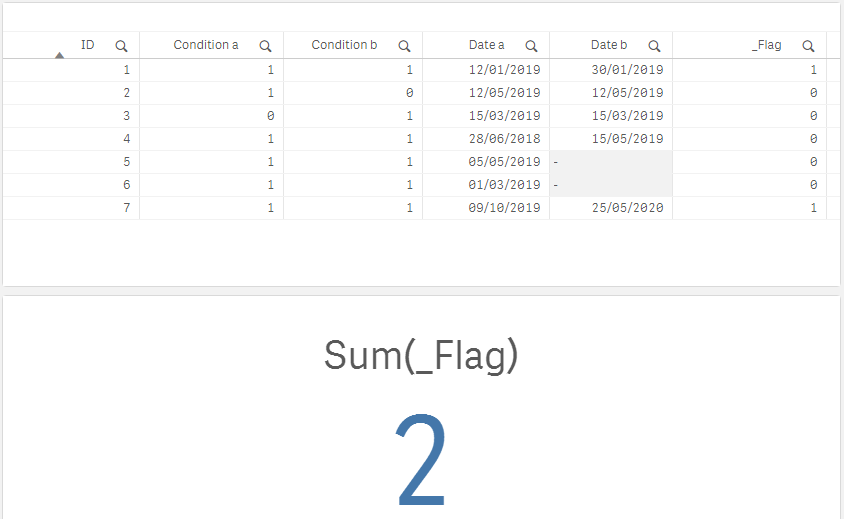
Sum(_Flag)
Result:
 JGMDataAnalysis
- Mark as New
- Bookmark
- Subscribe
- Mute
- Subscribe to RSS Feed
- Permalink
- Report Inappropriate Content
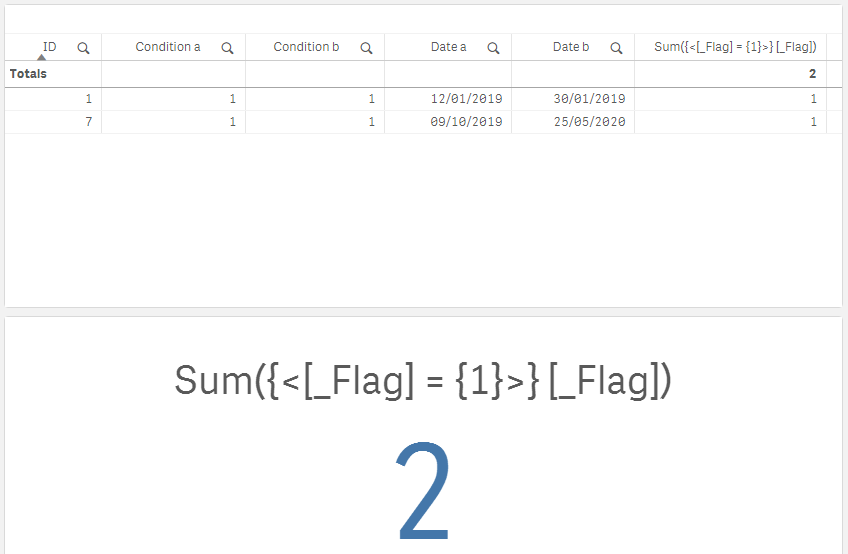
Use [_Flag] as a set modifier to filter the table.