Unlock a world of possibilities! Login now and discover the exclusive benefits awaiting you.

- Qlik Community
- :
- Forums
- :
- Analytics & AI
- :
- Products & Topics
- :
- App Development
- :
- Re: Sheet action: Select values matching search cr...
- Subscribe to RSS Feed
- Mark Topic as New
- Mark Topic as Read
- Float this Topic for Current User
- Bookmark
- Subscribe
- Mute
- Printer Friendly Page

 justalkak
- Mark as New
- Bookmark
- Subscribe
- Mute
- Subscribe to RSS Feed
- Permalink
- Report Inappropriate Content
Sheet action: Select values matching search criteria
Hi,
I am struggling with sheet actions, which I find too limited unfortunately.
This is what I need to achieve:
while changing to next sheet I need to Clear all selections and then assign former value of Dimension1 to field Dimension2.
I have managed to do this by using on sheet 2 the two actions:
- Clear all selections and
- Select values matching search criteria with Dimension2 and formula: ='=Only({$1} Dimension1)'
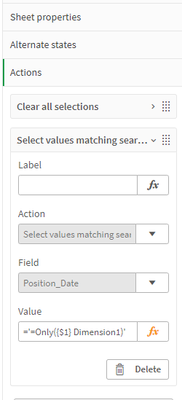
This works nice if I have selected some value of Dimension1 on the first sheet. However, if no values were selected there, if I move to the next sheet I will get ALL possible values of Dimension2 selected, which is what I dont want. If no Dimension1 values were selected on the 1st page then I would like to get no values transferred at all on next sheet to Dimension2.

(Position_Date is my Dimension2 here)
I have tried with If condition on the formula above and with set analysis expression like:
='=If(Only({$1} Dimension1)>0, Only({$1} Dimension1), null())' or
='=Only({$1} {<Dimension1={'$(=Only({$1} Dimension1))'}>}Dimension1)'
but with no success. Adding the conditions makes the formula stop working properly..
I need to do this exactly this way because I have alternate state on Dimension1 and I need to clear all first not to show aternate state filter and then apply the former Dimension1 value..
Appreciate any help on this.
Accepted Solutions
justalkak
- Mark as New
- Bookmark
- Subscribe
- Mute
- Subscribe to RSS Feed
- Permalink
- Report Inappropriate Content
I've found a way.. used Select values in a field action instead and =Only({$1} Position_Date_FULL) in a variable. Works as I need.

.png "Former Employee") JonnyPoole
JonnyPoole
- Mark as New
- Bookmark
- Subscribe
- Mute
- Subscribe to RSS Feed
- Permalink
- Report Inappropriate Content
To force an earlier stage resolution, try using variables where the variable expression has a preceding '='. The '=' sign in front of an expression used by a variable will force the whole thing to be evaluated and then basically the result is copy/pasted to where you want it to be used.
justalkak
- Mark as New
- Bookmark
- Subscribe
- Mute
- Subscribe to RSS Feed
- Permalink
- Report Inappropriate Content
I've tried with variables, but it looks like it is more about the action expression. Variable did not change anything
justalkak
- Mark as New
- Bookmark
- Subscribe
- Mute
- Subscribe to RSS Feed
- Permalink
- Report Inappropriate Content
I've found a way.. used Select values in a field action instead and =Only({$1} Position_Date_FULL) in a variable. Works as I need.
