Unlock a world of possibilities! Login now and discover the exclusive benefits awaiting you.

- Qlik Community
- :
- Forums
- :
- Analytics & AI
- :
- Products & Topics
- :
- App Development
- :
- Re: Time Buckets from Timestamp
- Subscribe to RSS Feed
- Mark Topic as New
- Mark Topic as Read
- Float this Topic for Current User
- Bookmark
- Subscribe
- Mute
- Printer Friendly Page

 WernerDC
- Mark as New
- Bookmark
- Subscribe
- Mute
- Subscribe to RSS Feed
- Permalink
- Report Inappropriate Content
Time Buckets from Timestamp
Good day Qlickers.
As you know, Dates are a headache in Qlik Sense. I always have a hard time around them.
How do I get a timestamp to hourly buckets?
Ive tried some stuff already but I cant seem to get it to work.
See the table attached:

I want to create Hourly buckets on that Timestamp if possible. My times are in 24hours.
This is my script:

Hope someone can help me.
Kind regards

 Clever_Anjos
- Mark as New
- Bookmark
- Subscribe
- Mute
- Subscribe to RSS Feed
- Permalink
- Report Inappropriate Content
Use Trunc(yourdatetimefield,1/24) to convert to lowest hour
Clever_Anjos
- Mark as New
- Bookmark
- Subscribe
- Mute
- Subscribe to RSS Feed
- Permalink
- Report Inappropriate Content
In meantime "Dates are NOT a headache in Qlik Sense." 🙂 🙂
https://community.qlik.com/t5/Qlik-Design-Blog/Get-the-Dates-Right/ba-p/1476178
WernerDC
- Mark as New
- Bookmark
- Subscribe
- Mute
- Subscribe to RSS Feed
- Permalink
- Report Inappropriate Content
This trunc is not recognized in my script?
WernerDC
- Mark as New
- Bookmark
- Subscribe
- Mute
- Subscribe to RSS Feed
- Permalink
- Report Inappropriate Content
Hi,
I tried this and it works if I do a limited load thru the debugger. It returns exactly what I want.
Input:
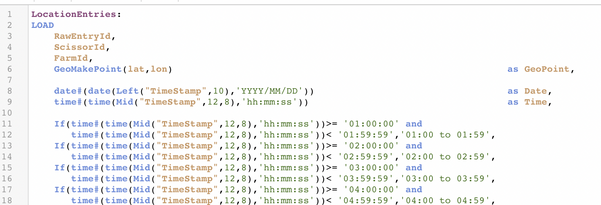
Output: See Time and Bucket columns. It works.
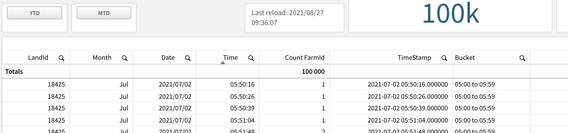
Problem is, when I reload the entire App, the Time and Bucket Fields return Blank. What causes this?
Hope you can help me
Kind regards
Clever_Anjos
- Mark as New
- Bookmark
- Subscribe
- Mute
- Subscribe to RSS Feed
- Permalink
- Report Inappropriate Content
I´m so sorry, my mistake
Use Floor(yourdatetimefield,1/24) to convert to the lowest hour
