Unlock a world of possibilities! Login now and discover the exclusive benefits awaiting you.

- Qlik Community
- :
- Forums
- :
- Analytics & AI
- :
- Products & Topics
- :
- App Development
- :
- Re: Week return different values
- Subscribe to RSS Feed
- Mark Topic as New
- Mark Topic as Read
- Float this Topic for Current User
- Bookmark
- Subscribe
- Mute
- Printer Friendly Page

 waszcma1
- Mark as New
- Bookmark
- Subscribe
- Mute
- Subscribe to RSS Feed
- Permalink
- Report Inappropriate Content
Week return different values
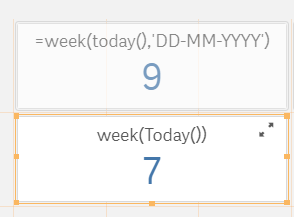
Could anyone explain me this behavior? Today() = 19.02.2021
Accepted Solutions

 mikaelsc
- Mark as New
- Bookmark
- Subscribe
- Mute
- Subscribe to RSS Feed
- Permalink
- Report Inappropriate Content
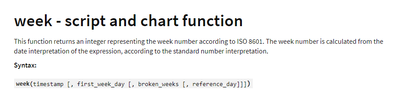
as @MayilVahanan mentionned, you're using the week() function with a wrong parameter
using 'DD MM YYYY' as second parameter is just as useful as using 'Mikael' as second parameter.
it expects the "first_week_day"
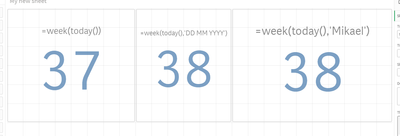
maybe qlik could/should return an empty or null or other error value, but at the basis, you're using a wrong parameter value...
if you want to store qvd's with week info, maybe use something like this:
date(weekstart(today()),'YYYY-MM-DD')
(that should remove the "W1, W53, issues that may appear around New Year...)

 MayilVahanan
- Mark as New
- Bookmark
- Subscribe
- Mute
- Subscribe to RSS Feed
- Permalink
- Report Inappropriate Content
Hi @waszcma1
In week, we can't assign the date format. Generally, 2nd parameter of Week in Qlik takes the firstweekday.
FYR:
Please close the thread by marking correct answer & give likes if you like the post.
waszcma1
- Mark as New
- Bookmark
- Subscribe
- Mute
- Subscribe to RSS Feed
- Permalink
- Report Inappropriate Content
Hi, I know that syntax with week( today(),'DD-MM-YYYY') is wrong.
I have discover this in some apps handover to me and noticed that this is have a huge impact of indexing of qvd files where this week calculation is used in naming conventions. i.e.: store table into file_$(vWeek)_$(vYear).qvd(qvd);
The most odd thing is that
- this syntax week( today(),'DD-MM-YYYY') is not returning any error,
- it is returning different value for 15-17.02.2021. value is 8
- while on 18-19.02.2021 value is 9
I have discovered this when I have been asked to force reload and loading app referring to load * file_$(vWeek)_$(vYear).qvd(qvd) failed, I have debug variables and noticed that on Friday 19.02.2021
application was trying load the file with the name file_9_2021.qvd(qvd)
I think this is a Qlik Sense bug
waszcma1
- Mark as New
- Bookmark
- Subscribe
- Mute
- Subscribe to RSS Feed
- Permalink
- Report Inappropriate Content
week(today()) | = 15 | 16.04.2021
week(today()),'DDMMYYYY') | = 17 | 16.04.2021
week(today()-1,'DDMMYYYY') | = 17 | 15.04.2021
week(today()-2,'DDMMYYYY') | = 16 | 14.04.2021
week(today()-3,'DDMMYYYY') | = 16 | 13.04.2021
week(today()-4,'DDMMYYYY') | = 16 | 12.04.2021
Can someone who is more advanced than me explain me why the syntax is working but showing wrong week number?
The interesting behaviur is that week number is +2 for Friday and Thursday but +1 for Mon-Wed
Is it kind of managing BrokenWeeks ?
I have found this in one of my client and have no idea why it was used in such way for indexing week snapshots ,do you have any idea?
I think this is really bad approach as the manual reload on Friday or Thursday could casue the issue with generating snapshot file under wrong week number.
waszcma1
- Mark as New
- Bookmark
- Subscribe
- Mute
- Subscribe to RSS Feed
- Permalink
- Report Inappropriate Content
and some more examples:
 waszcma1
- Mark as New
- Bookmark
- Subscribe
- Mute
- Subscribe to RSS Feed
- Permalink
- Report Inappropriate Content
Can anyone explain me why week() function is behaving like this with used 'DDMMYYYY' ?
it is becouse of global settings?
SET FirstWeekDay=0;
SET BrokenWeeks=0;
SET ReferenceDay=4;
SET FirstMonthOfYear=1;
mikaelsc
- Mark as New
- Bookmark
- Subscribe
- Mute
- Subscribe to RSS Feed
- Permalink
- Report Inappropriate Content
as @MayilVahanan mentionned, you're using the week() function with a wrong parameter
using 'DD MM YYYY' as second parameter is just as useful as using 'Mikael' as second parameter.
it expects the "first_week_day"
maybe qlik could/should return an empty or null or other error value, but at the basis, you're using a wrong parameter value...
if you want to store qvd's with week info, maybe use something like this:
date(weekstart(today()),'YYYY-MM-DD')
(that should remove the "W1, W53, issues that may appear around New Year...)
waszcma1
- Mark as New
- Bookmark
- Subscribe
- Mute
- Subscribe to RSS Feed
- Permalink
- Report Inappropriate Content
Thanks for putting more lights on this 🙂
