Unlock a world of possibilities! Login now and discover the exclusive benefits awaiting you.

- Qlik Community
- :
- Forums
- :
- Archive
- :
- Archived Groups
- :
- Remove Documents CALs from the APIs in Qlik View 1...
- Subscribe to RSS Feed
- Mark Topic as New
- Mark Topic as Read
- Float this Topic for Current User
- Bookmark
- Subscribe
- Mute
- Printer Friendly Page

 gballester
- Mark as New
- Bookmark
- Subscribe
- Mute
- Subscribe to RSS Feed
- Permalink
- Report Inappropriate Content
Remove Documents CALs from the APIs in Qlik View 12.
Remove Documents CALs from the APIs in Qlik View 12.
Let us build an example of how you can release documents cals from a C # program in Qlik View 12.
We have a complex license management because we have clients in several countries and each client defines, from a database, which users should have access to each document.
For that, we have a C # solution that manages the licenses automatically, depending on what defined in the databases. Perform this task manually, is somewhat tedious and impossible, because not only should we eliminate the licenses manually, but also, the permissions on each document.
When we started the migration tests to QlikView 12, we found that deleting document licenses and releasing developer licenses did not work.
It was a tremendous blow, because that prevented us from moving on to the new version.
After weeks of research and with the help of Qlik support, we managed to overcome the pitfall.
I share the solution found in the Community, because I saw several users who have this problem.
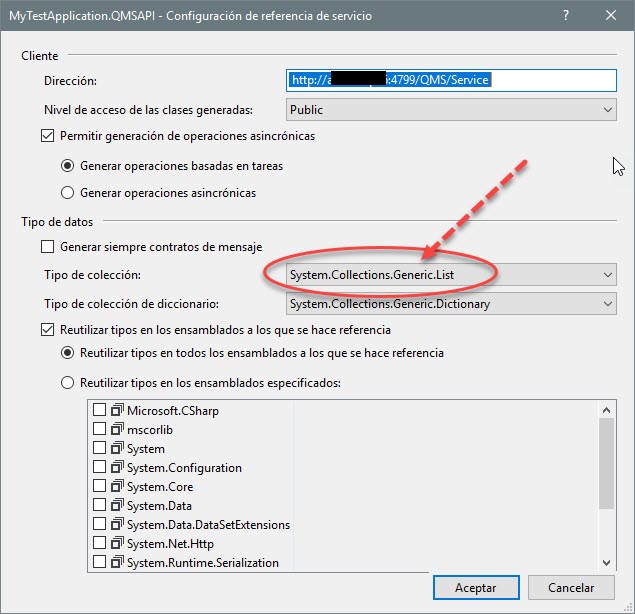
Before starting, take into account very important lake. When adding the Service Reference must select to work with System.Collection.Generic.List instead of array, which is what appears by default. This is essential for the release of licenses to work.
Well, get to work.
The first step is to build the solution according to what detailed in the example of the Qlik APIs for version 12.
Once you have the solution finished and without errors, replace the code armed by:
using System;
using System.Collections.Generic;
using System.ServiceModel;
using System.ServiceModel.Channels;
using System.ServiceModel.Configuration;
using System.ServiceModel.Description;
using System.ServiceModel.Dispatcher;
using MyTestApplication.QMSAPI;
namespace MyTestApplication
{
class ServiceKeyBehaviorExtensionElement : BehaviorExtensionElement
{
public override Type BehaviorType
{
get { return typeof(ServiceKeyEndpointBehavior); }
}
protected override object CreateBehavior()
{
return new ServiceKeyEndpointBehavior();
}
}
class ServiceKeyEndpointBehavior : IEndpointBehavior
{
public void Validate(ServiceEndpoint endpoint) { }
public void AddBindingParameters(ServiceEndpoint endpoint, BindingParameterCollection bindingParameters) { }
public void ApplyDispatchBehavior(ServiceEndpoint endpoint, EndpointDispatcher endpointDispatcher) { }
public void ApplyClientBehavior(ServiceEndpoint endpoint, ClientRuntime clientRuntime)
{
clientRuntime.MessageInspectors.Add(new ServiceKeyClientMessageInspector());
}
}
class ServiceKeyClientMessageInspector : IClientMessageInspector
{
private const string SERVICE_KEY_HTTP_HEADER = "X-Service-Key";
public static string ServiceKey { get; set; }
public object BeforeSendRequest(ref Message request, IClientChannel channel)
{
object httpRequestMessageObject;
if (request.Properties.TryGetValue(HttpRequestMessageProperty.Name, out httpRequestMessageObject))
{
HttpRequestMessageProperty httpRequestMessage = httpRequestMessageObject as HttpRequestMessageProperty;
if (httpRequestMessage != null)
{
httpRequestMessage.Headers[SERVICE_KEY_HTTP_HEADER] = (ServiceKey ?? string.Empty);
}
else
{
httpRequestMessage = new HttpRequestMessageProperty();
httpRequestMessage.Headers.Add(SERVICE_KEY_HTTP_HEADER, (ServiceKey ?? string.Empty));
request.Properties[HttpRequestMessageProperty.Name] = httpRequestMessage;
}
}
else
{
HttpRequestMessageProperty httpRequestMessage = new HttpRequestMessageProperty();
httpRequestMessage.Headers.Add(SERVICE_KEY_HTTP_HEADER, (ServiceKey ?? string.Empty));
request.Properties.Add(HttpRequestMessageProperty.Name, httpRequestMessage);
}
return null;
}
public void AfterReceiveReply(ref Message reply, object correlationState) { }
}
class Program
{
static void Main(string[] args)
{
try
{
string usuario = "USUARIO_PRUEBA@CUP.COM";
// create a QMS API client
IQMS apiClient = new QMSClient();
// retrieve a time limited service key
ServiceKeyClientMessageInspector.ServiceKey = apiClient.GetTimeLimitedServiceKey();
// get a list of QVS services
List<ServiceInfo> qvsServices = apiClient.GetServices(ServiceTypes.QlikViewServer);
if (qvsServices.Count > 0)
{
// retrieve folder settings for the first QVS in the list
QVSSettings qvsSettings = apiClient.GetQVSSettings(qvsServices[0].ID, QVSSettingsScope.Folders);
//qvsServices = apiClient.GetServices(ServiceTypes.QlikViewServer);
List<DocumentFolder> documentFolders = apiClient.GetUserDocumentFolders(qvsServices[0].ID, DocumentFolderScope.General);
List<DocumentNode> documents = apiClient.GetUserDocumentNodes(qvsServices[0].ID, documentFolders[1].ID, "");
foreach (DocumentNode myNode in documents)
{
if (myNode.Name.Equals("DOCUMENTO_QLIK_PRUEBA.QVW")) //Document Name
{
// remove cals
var docMetaData = apiClient.GetDocumentMetaData(myNode, DocumentMetaDataScope.Licensing);
foreach (AssignedNamedCAL myCal in docMetaData.Licensing.AssignedCALs)
{
if (myCal.UserName.Equals(usuario)) //User Name on the CAL
{
// remove licensy - both methods are neccesary
docMetaData.Licensing.AssignedCALs.Remove(myCal);
docMetaData.Licensing.RemovedAssignedCALs.Add(myCal);
// update allocated cals number
docMetaData.Licensing.CALsAllocated = docMetaData.Licensing.CALsAllocated - 1;
// save document licensing metadata
apiClient.SaveDocumentMetaData(docMetaData);
}
}
break;
}
}
}
}
catch (System.Exception ex)
{
Console.WriteLine("An exception occurred: " + ex.Message);
}
}
}
}
Once you have done this, replace the Qlik document name and the user, for the values you want to use to test.
For example,
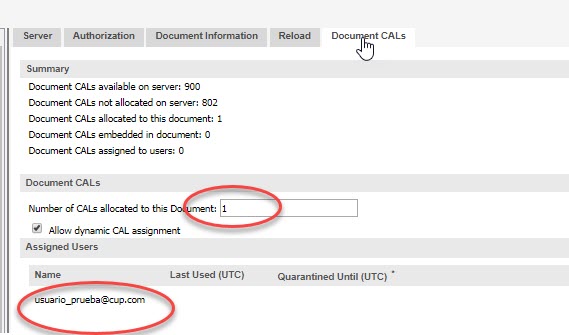
Before executing the solution, we have the user with assigned license and cals allocated in 1
After executing the solution, it remains
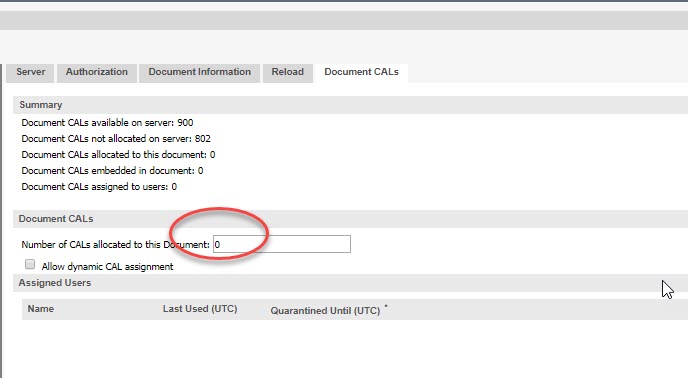
The License was released and the allocated cals remained at zero.
Keep in mind that if the user used the license. The license will be quarantined for 7 days from the last access date. If the user does not enter for a month, the license will be automatically removed.
Well, I hope that this small contribution will help those who encountered this problem when wanting to do tests in QlikView 12.
Then I'm going to upload another explanation of how to free developer licenses.
I leave below code to remove the authorizations on the document.
// remove authorization
var docMetaDataAutho = apiClient.GetDocumentMetaData(myNode, DocumentMetaDataScope.Authorization);
foreach (var user in docMetaDataAutho.Authorization.Access)
{
if (user.UserName.ToLower() == usuario.ToLower())
{
docMetaDataAutho.Authorization.Access.Remove(user);
apiClient.SaveDocumentMetaData(docMetaDataAutho);
}
}
