Unlock a world of possibilities! Login now and discover the exclusive benefits awaiting you.

- Qlik Community
- :
- Forums
- :
- Analytics & AI
- :
- Products & Topics
- :
- Connectivity & Data Prep
- :
- Data Connection not displaying list of tables for ...
- Subscribe to RSS Feed
- Mark Topic as New
- Mark Topic as Read
- Float this Topic for Current User
- Bookmark
- Subscribe
- Mute
- Printer Friendly Page

 MarkRDavies
- Mark as New
- Bookmark
- Subscribe
- Mute
- Subscribe to RSS Feed
- Permalink
- Report Inappropriate Content
Data Connection not displaying list of tables for connected Database
A Data Connection that has been used for a while is functioning fine, tasks are all completing successfully etc. however,
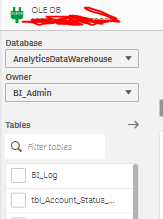
When developers are using the data connection to add a table/view the list of tables/views in the connected database is not appearing
They choose the Connection, use the Database dropdown which is correctly populated, use the Owner drop down which again is correctly populated, but at this point the list of tables under the 'Filter tables' filter does not appear.
Does not appear to be a permissions issue, as the existing tables using the connection can still be successfully reloaded, fields can be added etc.
The Data connection was created by myself and other developers have permissions to use it .. it is set up with Windows integrated security
I have attached 2 screen shots showing the difference between when I try to add a table (Showing Tables) and another where a developer tries to do the same (Not Showing Tables)
I have also restarted the Qlik services, but the issue persists
No idea what is going on, any help greatly appreciated - never seen this issue before

Accepted Solutions
MarkRDavies
- Mark as New
- Bookmark
- Subscribe
- Mute
- Subscribe to RSS Feed
- Permalink
- Report Inappropriate Content
Hi, Qlik have updated me that this is browser issue affecting Chrome and Edge.
I have used Firefox this morning and can confirm that there is no issue when using that, I believe Safari is also ok though I haven't tried that

 Vikram_Jayakuma
- Mark as New
- Bookmark
- Subscribe
- Mute
- Subscribe to RSS Feed
- Permalink
- Report Inappropriate Content
Check for the developer tools when the preview is not loading to understand if there is a timeout. issue happening
MarkRDavies
- Mark as New
- Bookmark
- Subscribe
- Mute
- Subscribe to RSS Feed
- Permalink
- Report Inappropriate Content
Hi, Qlik have updated me that this is browser issue affecting Chrome and Edge.
I have used Firefox this morning and can confirm that there is no issue when using that, I believe Safari is also ok though I haven't tried that

 SayliHS
- Mark as New
- Bookmark
- Subscribe
- Mute
- Subscribe to RSS Feed
- Permalink
- Report Inappropriate Content
Hi,
We are facing similar issue while trying to connect to ODBC Hive from Data manager. Only "Database" dropdown shows "HIVE" preselected. Nothing shows up in "Owner" and "Tables" dropdowns. It is since past three weeks or so that we are encountering this issue on both Google chrome and Edge.
Have tried clearing cache and cookies from both browsers, however, didn't help. Tried restarting the services as well, that too didn't solve.
QlikSense Version - QS Enterprise November 2024
Google Chrome Version - 143.0.7499.41
MS Edge version - 143.0.3650.66
Any suggestions on how to resolve this, are much appreciated.
