Unlock a world of possibilities! Login now and discover the exclusive benefits awaiting you.

- Qlik Community
- :
- Forums
- :
- Analytics & AI
- :
- Products & Topics
- :
- Connectivity & Data Prep
- :
- LDAPS Integration with Microfocus
- Subscribe to RSS Feed
- Mark Topic as New
- Mark Topic as Read
- Float this Topic for Current User
- Bookmark
- Subscribe
- Mute
- Printer Friendly Page

 Vishal_Gupta
- Mark as New
- Bookmark
- Subscribe
- Mute
- Subscribe to RSS Feed
- Permalink
- Report Inappropriate Content
LDAPS Integration with Microfocus
Hi Qlik Experts,
I am trying to sync users from Microfocus LDAP Server but facing some problems and could not find any help or details on community, helpsite or support.
Following is the detail I have for configuration:
LDAP (eDir) Server details
- User Name- apiadmin (cn=apiadmin, ou=sa, o=system)
- Password- ***
- Server IP – 172.**.58.** (IDEMAPPUAT01)
- Port - 636
Following is the Screenshot of Configuration settings i have done with few modifications for it to work on LDAP Admin tool.
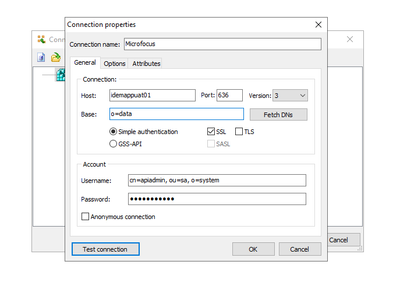
Steps done to resolve all the issues previously faced:
- Port 389 & 636 opened between server.
- Imported SSL Certificate of LDAP Server.
- Added IP & Hostname of LDAP Server in host file C:\Windows\System32\drivers\etc\host
I am able to succesfully connect and see all the users in LDAP Server with above settings.
Challenge with setting up LDAP Configuration in Qlik Sense:
- Tried Connecting LDAP Server via Generic LDAP and Advanced LDAP Connector in Qlik.
- Both Connectors are giving me same set of errors.
- Both Connectors needs a User Directory Name as a mandatory input field. There is not User Directory name in LDAP server details given above
Screenshot of the Configuration setup in Qlik:
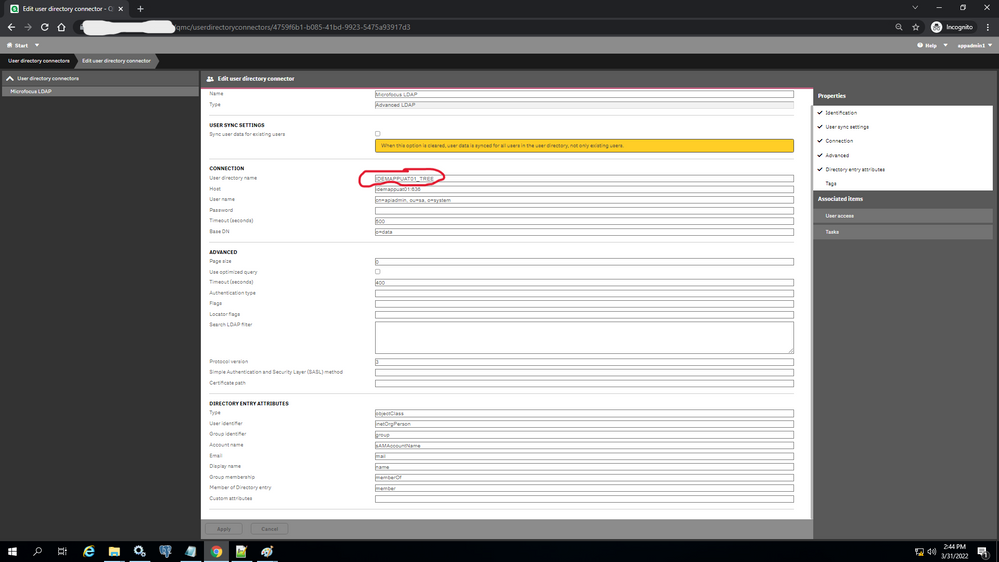
Tried giving a arbitrary User Directory Name, following is the error i am facing

I can see that user directory name is the issue here but i am not able to understand what should be the input than.
Please let me know what am i missing here.
@Bastien_Laugiero @Sebastian_Linser @ToniKautto


.png)
