Unlock a world of possibilities! Login now and discover the exclusive benefits awaiting you.

- Qlik Community
- :
- Forums
- :
- Analytics & AI
- :
- Products & Topics
- :
- Connectivity & Data Prep
- :
- Re: NO ACCESS TO DATA LOAD EDITOR
- Subscribe to RSS Feed
- Mark Topic as New
- Mark Topic as Read
- Float this Topic for Current User
- Bookmark
- Subscribe
- Mute
- Printer Friendly Page

 manassrivastava
- Mark as New
- Bookmark
- Subscribe
- Mute
- Subscribe to RSS Feed
- Permalink
- Report Inappropriate Content
NO ACCESS TO DATA LOAD EDITOR
Hi Team,
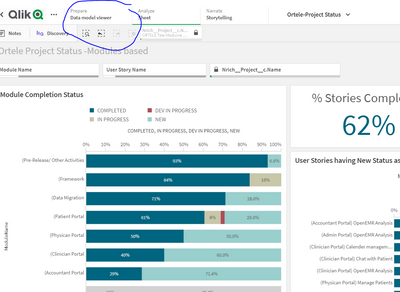
Kindly note I dont see any access to Data Load Editor, althought I have received full access to source data and have all permissions:
Can you advise what could be wrong :
-Manas

 squeakie_pig
- Mark as New
- Bookmark
- Subscribe
- Mute
- Subscribe to RSS Feed
- Permalink
- Report Inappropriate Content
This could be a few things.
If the app is in a Managed Space you can't access the load script. If it is a Shared Space you need to be the owner of the app to be able to see the load script. If you duplicate it and create a copy you'll be able to see it. Or if you need to change the script on THIS version you need to be the owner.

 rubenmarin
- Mark as New
- Bookmark
- Subscribe
- Mute
- Subscribe to RSS Feed
- Permalink
- Report Inappropriate Content
Hi, so far I know only the owner of the app can edit the script, you can go to qmc-> apps and change the owner.
 AnneEb
- Mark as New
- Bookmark
- Subscribe
- Mute
- Subscribe to RSS Feed
- Permalink
- Report Inappropriate Content
I know it's been a few years but did you ever find a solution to your issue? I am facing the same one and have no clue how to fix it.

 Vicky_Z
- Mark as New
- Bookmark
- Subscribe
- Mute
- Subscribe to RSS Feed
- Permalink
- Report Inappropriate Content
do you experience the issue on Qlik Sense on premise or Cloud? if this on on premise, try to test with a superadmin role which has all permission to find out if any security rules restrict the access https://community.qlik.com/t5/Official-Support-Articles/Guidance-on-how-to-conclude-if-the-issue-is-...
