Unlock a world of possibilities! Login now and discover the exclusive benefits awaiting you.

- Qlik Community
- :
- Forums
- :
- Analytics & AI
- :
- Products & Topics
- :
- Connectivity & Data Prep
- :
- ODBC SQL connection problem with Qlik Sense Data T...
- Subscribe to RSS Feed
- Mark Topic as New
- Mark Topic as Read
- Float this Topic for Current User
- Bookmark
- Subscribe
- Mute
- Printer Friendly Page

 VANNI
VANNI
- Mark as New
- Bookmark
- Subscribe
- Mute
- Subscribe to RSS Feed
- Permalink
- Report Inappropriate Content
ODBC SQL connection problem with Qlik Sense Data Transfer
Hello
I am a business consultant. I have been using Qlik View for 15 years. I have done various tests over the past few years with qlik sense desktop. I have now started using Qlik Sense Business (which is Saas type).
I have problems connecting ODBC with a SQL Server through Qlik Sense Data transfer , problems that do not exists if I use View or Sense Desktop.
In Sql Server Express 19 on local I have System Data base and two test data base (LENOVOTEST and School)
I have activated a ODBC DSN named LENOVO with the latest driver.
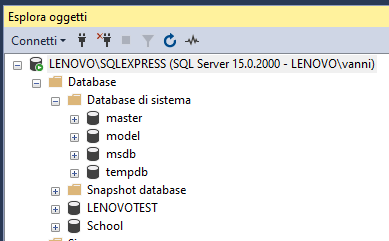

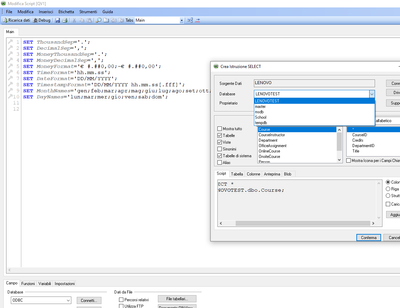
When I use ODB connection with Qlik View I can access to all DB's and tables of each DB
When I use ODBC from Qlik Sense Desktop I can access to all DB's and all tables of each DB
I can find the database LENOVOTEST and I can select the owner (dbo) and then select the table
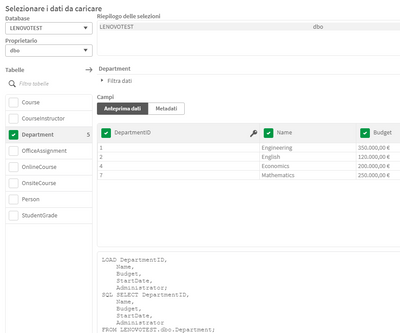
Now, when I tried to use Data Transfer to upload table with ODBC SQL it is possible only for the tables in systems SQL DB (i.e. master , model, msdb, tempdb)
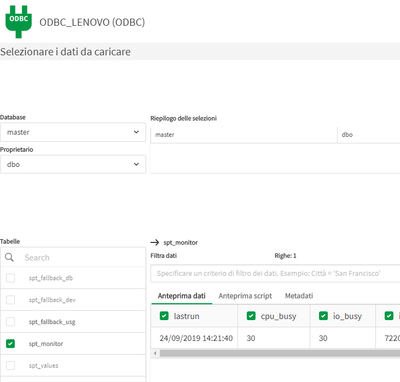
because when you select a different table it is impossible to enter the owner for the reason that this part remain inactive, the box remains under intensified
I tried in two different PC environment and I obtained the same result.
Has anyone already had this problem and can help me to solve it?
Many Thanks
Vanni Pancaldi