Unlock a world of possibilities! Login now and discover the exclusive benefits awaiting you.

- Qlik Community
- :
- Forums
- :
- Analytics & AI
- :
- Products & Topics
- :
- Connectivity & Data Prep
- :
- Re: Qlik Sense: Store Qlik Files to Sharepoint Loc...
- Subscribe to RSS Feed
- Mark Topic as New
- Mark Topic as Read
- Float this Topic for Current User
- Bookmark
- Subscribe
- Mute
- Printer Friendly Page

 emoyse
- Mark as New
- Bookmark
- Subscribe
- Mute
- Subscribe to RSS Feed
- Permalink
- Report Inappropriate Content
Qlik Sense: Store Qlik Files to Sharepoint Location
I have a requirement to use Sharepoint as a file repository. What I would like to do is setup a sharepoint folder location in Qlik Sense to select any of the files I need and also store output files to this location too. I have a shared documents location e.g https://{site url}/sites/Delivery/Shared%20Documents
I am using the sharepoint web connector to select data from a specific file within Sharepoint, but this is not suitable when a folder location is required.
- Is this possible?
- I tried to use a REST connector but that didn't seem to work either.
- I would also like to be able to setup an NPrinting destination folder which is sharepoint too.
A network share setup on the Sharepoint server is not an option due to security concerns.
Any help or a point in the right direction would be greatly appreciated.
Thank you in advance for your help.
- Tags:
- sharepoint

 lucienorrin
- Mark as New
- Bookmark
- Subscribe
- Mute
- Subscribe to RSS Feed
- Permalink
- Report Inappropriate Content
I'd like to know if this is possible as well. Both on-prem and SharePoint Online.

 TresSciuri
- Mark as New
- Bookmark
- Subscribe
- Mute
- Subscribe to RSS Feed
- Permalink
- Report Inappropriate Content
Has anyone managed to crack this? There doesn't seem to be much documentation on this.
 Miramon
- Mark as New
- Bookmark
- Subscribe
- Mute
- Subscribe to RSS Feed
- Permalink
- Report Inappropriate Content
I'd like to know if this is possible as well

 Frank_S
- Mark as New
- Bookmark
- Subscribe
- Mute
- Subscribe to RSS Feed
- Permalink
- Report Inappropriate Content
Try this:
Example:
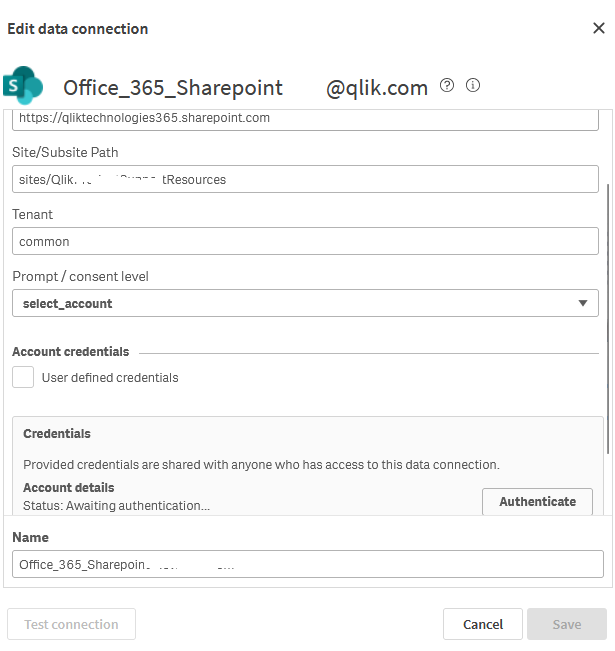
Save connection.
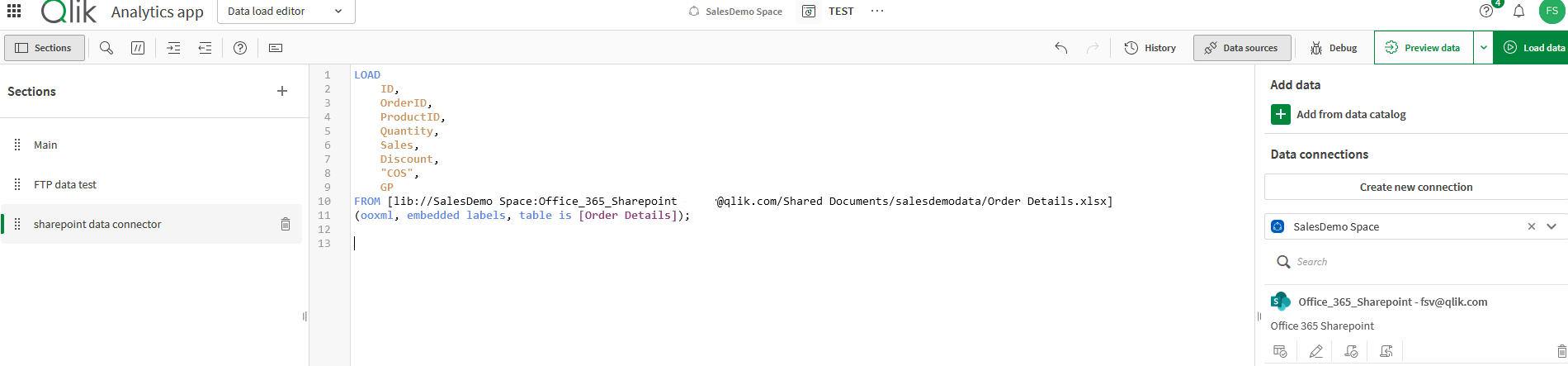
Edit and select data/file
Insert
Below is the result of the insert.
The steps are in the link above as well.
Kind regards...
Miramon
- Mark as New
- Bookmark
- Subscribe
- Mute
- Subscribe to RSS Feed
- Permalink
- Report Inappropriate Content
Thank you very much.
The Test Connection returns "Failed on attempt 1 to GET. (Message: Unable to connect to the remote server)".
I've installed Qlik Web Connectors and by that way I can connect to Sharepoint, I can load data from files, but it's not very friendly.
I would like to find the logs to know what the problem is, but I don't find them. I am looking here \ProgramData\Qlik\Sense\Log\Proxy\Trace, but...
Best regards...
