Unlock a world of possibilities! Login now and discover the exclusive benefits awaiting you.

- Qlik Community
- :
- Forums
- :
- Analytics & AI
- :
- Products & Topics
- :
- Connectivity & Data Prep
- :
- Re: REST API - Help connecting to Twitter please?
- Subscribe to RSS Feed
- Mark Topic as New
- Mark Topic as Read
- Float this Topic for Current User
- Bookmark
- Subscribe
- Mute
- Printer Friendly Page

 mikkeltaylor
- Mark as New
- Bookmark
- Subscribe
- Mute
- Subscribe to RSS Feed
- Permalink
- Report Inappropriate Content
REST API - Help connecting to Twitter please?
Hi, Over the xmas period (at work) I was really looking forward to trying out the new REST API connector and pulling some simple data from Twitter to be able to put into a Qlik dashboard to show management. Unfortunately, I'm stuck with setting up the connection , so would really appreciate the support of this community  .
.
I thought I would start with one of the simple such as the trends/place API - https://api.twitter.com/1.1/trends/place.json
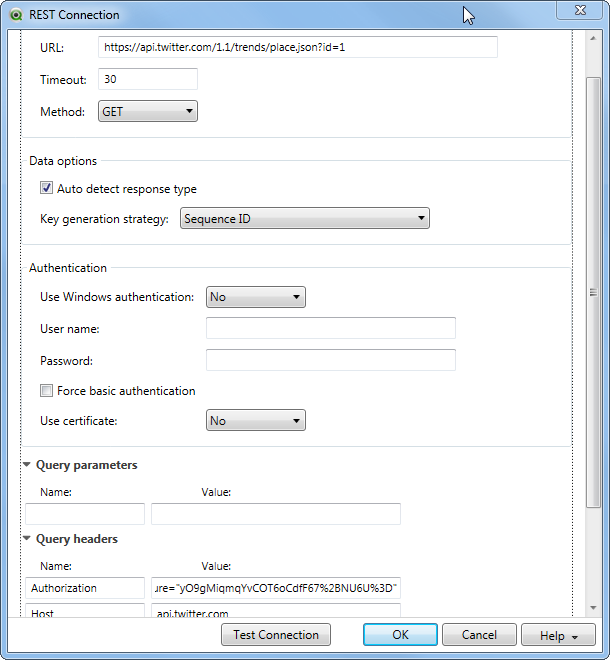
When it goes through to the next screen I am only given the option of CSV , so when I try to change this to JSON I get an error saying invalid response type. I've tried with and without id=1 (worldwide) and also adding it to the query parameters.
Can anyone help and do you have a simple example I can try to replicate please?
Thanks
Michael
- « Previous Replies
-
- 1
- 2
- Next Replies »

 Bjorn_Wedbratt
- Mark as New
- Bookmark
- Subscribe
- Mute
- Subscribe to RSS Feed
- Permalink
- Report Inappropriate Content
Hi Lars.
Please have a look atProblem with Authorization token in Google Analyticswhich may help you resolve your issue.
Best,
Bjorn

 lars_plenge
- Mark as New
- Bookmark
- Subscribe
- Mute
- Subscribe to RSS Feed
- Permalink
- Report Inappropriate Content
Thanks Björn
Your reply resolved my issue.
Best regards
Lars
lars_plenge
- Mark as New
- Bookmark
- Subscribe
- Mute
- Subscribe to RSS Feed
- Permalink
- Report Inappropriate Content
Hi Björn
I ran into another issue. I need variables in the URL. I created vURL and added it in “WITH CONNECTION”. This is not working.
Please help
Lars
LET vURL = 'https://www.googleapis.com/analytics/v3/data/ga?ids%2ga%%3A98567028&metrics%2ga%%3Atransactions%%2Cg... date(now(),'YYYY-MM-DD') & '&end-date%2' & date(now(),'YYYY-MM-DD');
CUSTOM CONNECT TO "Provider=QvRestConnector.exe;
timeout=30;
method=GET;
autoDetectResponseType=true;
keyGenerationStrategy=0;
useWindowsAuthentication=false;
useCertificate=No
certificateStoreLocation=CurrentUser;
certificateStoreName=My;
PaginationType=None;
XUserId=DKFeeDB;
XPassword=JLSOaMB;
";
RestConnectorMasterTable:
SQL SELECT
"__KEY_root",
(SELECT
"name",
"columnType",
"dataType",
"__FK_columnHeaders"
FROM "columnHeaders" FK "__FK_columnHeaders"),
(SELECT
"ga:transactions",
"ga:transactionRevenue",
"__FK_totalsForAllResults"
FROM "totalsForAllResults" FK "__FK_totalsForAllResults")
FROM JSON (wrap on) "root" PK "__KEY_root"
WITH CONNECTION (
URL "$(vURL)",
HTTPHEADER "Authorization" "Bearer $(vAccessToken)"
)
;
lars_plenge
- Mark as New
- Bookmark
- Subscribe
- Mute
- Subscribe to RSS Feed
- Permalink
- Report Inappropriate Content
Please disregard the last question. It is working there is a typo in the vURL. I was missing the last " ' ".

- « Previous Replies
-
- 1
- 2
- Next Replies »