Do not input private or sensitive data. View Qlik Privacy & Cookie Policy.
Skip to main content

Announcements
Qlik and ServiceNow Partner to Bring Trusted Enterprise Context into AI-Powered Workflows. Learn More!
hic
Former Employee
Former Employee

Do you belong to the group of people who think that Count(distinct…) in a chart is a slow, single-threaded operation that should be avoided?


If so, I can tell you that you are wrong.


Well - it used to be single-threaded and slow, but that was long ago. It was fixed already for – I think – version 9, but the rumor of its slowness lives on like an urban myth that refuses to die. Today the calculation is multi-threaded and optimized.


To prove that Count(distinct…) is faster than what many people think, I constructed a test which categorically shows that it is not slower – it is in fact a lot faster than the alternative solutions.


I created a data model with a very large fact table: 1M, 3M, 10M, 30M and 100M records. In it, I created a secondary key, with a large number of distinct values: 1%, 0.1% and 0.01% of the number of records in the fact table.


The goal was to count the number of distinct values of the secondary key when making a selection. There are several ways that this can be done:

  • Use count distinct in the fact table: Count(distinct [Secondary ID])
  • Use count on a second table that just contains the unique IDs: Count([Secondary ID Copy])
  • Use sum on a field that just contains ‘1’ in the second table: Sum([Secondary ID Count])
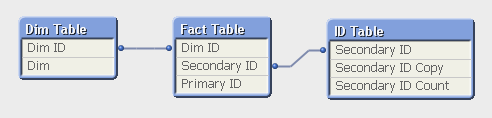
 

Data model.png


I also created a dimension ("Dim" in the “Dim Table”) with 26 values, also randomly assigned to the data in the fact table. Then I recorded the response times for three charts, each using “Dim” as dimension and one of the three expressions above. I made this for four different selections.
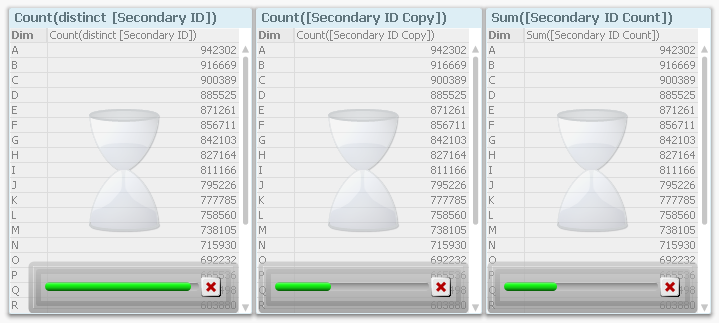
 

Progress bars.png


Then I remade all measurements using “Dim ID” as dimension, i.e. I moved also the dimension to the fact table. Finally, I loaded all the recorded data into QlikView and analyzed it.


The first obvious result is that the response time increases with the number of records in the fact table. This is hardly surprising…
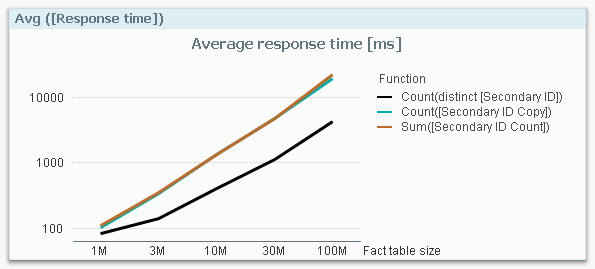
 

Avg response time.png


…so I need to compensate for this: I divide the response times with the number of fact table records and get a normalized response time in picoseconds:
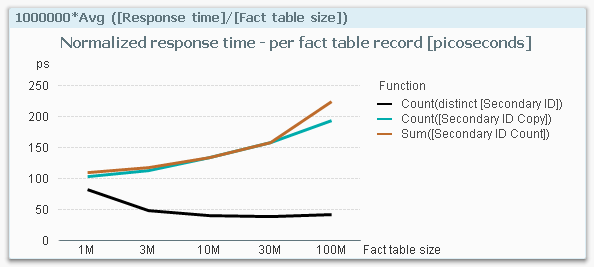
 

Avg response time normalized.png


This graph is extremely interesting. It clearly shows that if I use a Count(distinct…) on the fact table, I have a response time that is considerably smaller than if I make a count or a sum in a dimensional table. The table below shows the numbers.
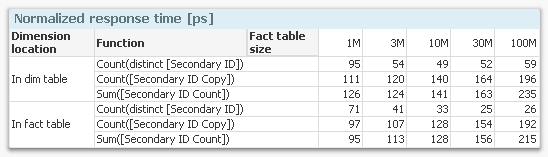
 

Comparison table.png


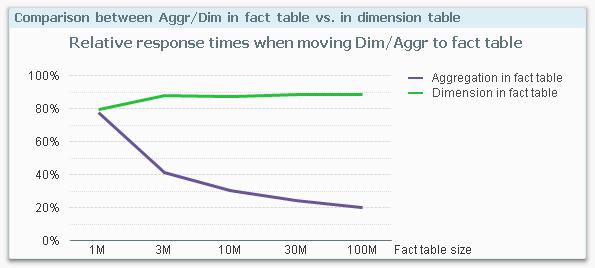
Finally, I calculated the ratios between the response times for having the dimension in the fact table vs. in a dimensional table, and the same ratio for making the aggregation in the fact table vs. in a dimensional table.
 

Comparison graph.png


This graph shows the relative response time I get by moving the dimension or the aggregation into the fact table. For instance, at 100M records, the response time from a fact table aggregation (i.e. a Count(distinct…)) is only 20% of an aggregation that is made in a dimensional table.


This is the behavior on my mock-up data on my four-core laptop with 16GB. If you make a similar test, you may get a slightly different result since the calculations depend very much on both hardware and the data model. But I still think it is safe to say that you should not spend time avoiding the use of Count(distinct…) on a field in the fact table.


In fact, you should consider moving your ID to the fact table if you need to improve the performance. Especially if you have a large fact table.


HIC

76 Comments
Not applicable

I believe interval match should do the trick

0 Likes
910 Views
robert99
Specialist III
Specialist III

Thanks for this. I believed distinct should not be used if possible (I think I read it somewhere on this site)

Did QV ever consider making distinct the default option (or have a tick box to let the user decide but with it set as the default option). As it is it is currently confusing as a total (eg Count (Call_Num) can be influenced by the dimensions used. But this does not apply if  a synthetic join is used

As shown in this example

http://community.qlik.com/thread/115345

0 Likes
910 Views
hic
Former Employee
Former Employee

The logic behind is quite simple and well defined:

  • Count(...) counts the number of instances, i.e. normally the number of possible records in the data table
  • Count(distinct ...) counts the number of distinct values, i.e. normally the number of possible records in the symbol table.

This is clear and I do not think changing the defaults would be an improvement.


In your case, you make a Count(...) on a key field, and that is ambiguous: In which data table should QlikView make the count? In earlier versions of QlikView, we didn't allow this - we only allowed Count(distinct ...) for key fields. But today QlikView has an algorithm that calculates the count in the table where the result is different from Count(distinct ...), so you may get results that are confusing.


The bottom line is anyway: If you have a key field, you should use Count(distinct ...)!


HIC

910 Views
robert99
Specialist III
Specialist III

Thanks Henric. This is clear now (I hope)

It's something that confused me. How does QlikView know what table to use. I at one stage hoped that I could include the table to use (in the expression).

But I will include say (Count (distinct Call_Num) or count (distinct (Call_Num & FSR_Num) whenever a field is included in more than one table from now one

I have included another field at time in a table to distinish one table from another one. For example if two tables have the same field (say Part_Num) and both table have Part_Nums that are not in the other one. I sometimes include another field in one table (eg PT with all the records set to PT) Then

Count (distinct PT & Part_Num) to get the total number of Parts in one table and exclude the Parts in the other table that are not in the table I want to count.

I surpose I could enter Part_Num twice as Part_Num and say Part_Num2 but this would take more space

0 Likes
910 Views
sujeetsingh
Master III
Master III

A controversial Post it seems.

But thank Henric  in spite beating behind the Bush one should try analysing it .

Thanks a lot again.

0 Likes
851 Views
vishalgoud
Creator III
Creator III

Hi Experts

You guys are really Awesome , am Looking For Conclusion with some Simple Explanation So that we will decide whether we have to use Count(Distinct) or not..

Our Application details:

App Size : 3 GB

Server RAM : 64 GB

Concurrent users : 10

Right now not using start schema Model.

Best regards

vishal

0 Likes
851 Views
Not applicable

Thank you so much! This is great!

0 Likes
851 Views
Not applicable

I have a performance issue with reloading, could anyone help?

Taking around 2.5 hours for a reload.

I have a count distinct but from reading this it seems this is not the problem. I think it may be all my joins....:S

Please see link here: to join or not to join, applymap, temptables. Optimisation

0 Likes
851 Views
Anonymous
Not applicable

The myth still lives on in the QlikView Help https://help.qlik.com/en-US/qlikview/12.0/Subsystems/Client/Content/application-performance-optimiza...

Below pasted in from the Help :

     Count(distinct fieldname) is generally speaking a performance consuming operation

0 Likes
851 Views
rwunderlich
Partner Ambassador/MVP

Bill,

Yes, the myth has been resurrected! What's even worse are the suggested "solutions" in that article, two of three which would give incorrect results.

0 Likes
851 Views
