Unlock a world of possibilities! Login now and discover the exclusive benefits awaiting you.


.png "Former Employee") hic
hic
- Subscribe to RSS Feed
- Mark as New
- Mark as Read
- Bookmark
- Subscribe
- Printer Friendly Page
- Report Inappropriate Content
Section Access is a QlikView feature that is used to control the security of an application. It is basically a part of the load script where you can define an authorization table, i.e. a table where you define who gets to see what. QlikView uses this information to reduce data to the appropriate scope when the user opens the application.
This function is sometimes referred to as Dynamic Data Reduction, as opposed to the loop-and-reduce of the Publisher, which is referred to as Static Data Reduction.
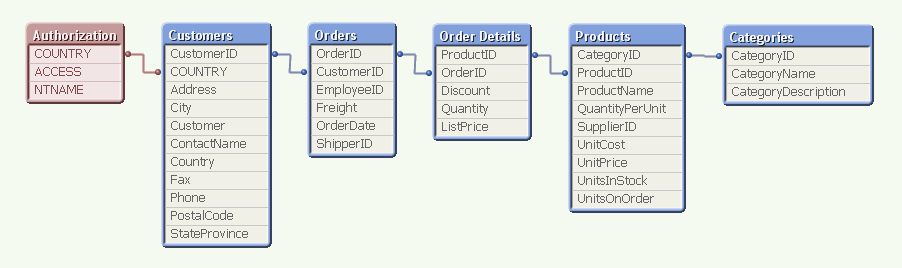
For example, above you have the authorization table in Section Access to the left, linking to the field COUNTRY. (In a real application, the authorization table is not visible in the data model.) This means that when a user opens the application, QlikView uses the user name (NTNAME) to establish which countries this user is allowed to see, and then makes the corresponding selection in the Customers table.
The selection propagates to all the other tables in the standard QlikView manner, so that the appropriate records in all tables are excluded, whereupon QlikView reduces the scope for this user to only the possible records. This way, the user will only see data pertaining to the countries to which he is associated.
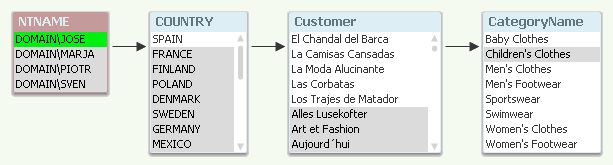
A good way to debug your Section Access is to temporarily remove the Section Access statement and run the script. The authorization table will then be visible in the data model and you can make selections in NTNAME.
Within Section Access you should define at least three fields: ACCESS, NTNAME and a third reducing field that links the authorization table with the real data. You may have additional fields also, like user roles or departments.
Some points around Section Access:
- All fields in Section Access must be upper case. Hence, the reducing field must be in upper case also in the data. Use the Upper() function and name the fields in upper case.
- Don’t use the fields USERID and PASSWORD, unless it is for testing or debugging. Proper authentication is achieved through NTNAME.
- NTNAME is the field used to match an authenticated user – also if you set up ticketing using other authentication mechanisms than Windows integrated security.
- NTNAME may contain names of groups as well as individual users.
- Make sure "Initial Data Reduction..." and "Strict Exclusion" are checked (Document properties - Opening). If the field value of the reducing field in Section Access doesn't exist in the real data, the will be no data reduction unless Strict Exclusion is used.
- If your users work off-line, i.e. download the physical qvw file, the security offered by Section Access has limited value: It does keep honest people honest, but it will not prevent a malicious user from seeing data which he shouldn't have access to, since the file is not encrypted. So for off-line usage I instead recommend the static data reduction offered by the Publisher, so that no files contain data the user isn't allowed to see.
- In most of our examples, an inline Load is used in Section Access. This is of course not a good place to keep an authorization table. Store it in a database and load it using a SELECT statement instead!
And finally
- Always save a backup copy when making changes to Section Access. It is easy to lock yourself out...
Section Access is a good, manageable and flexible way of allowing different access scopes within one document. And when used on a server, it is a secure authorization method.
Further posts related to this topic:
Data Reduction – Yes, but How?
Data Reduction Using Multiple Fields
Tips and tricks for section access in Qlik Sense (2.0+)
https://youtu.be/ObuetXgk2R8
You must be a registered user to add a comment. If you've already registered, sign in. Otherwise, register and sign in.