Unlock a world of possibilities! Login now and discover the exclusive benefits awaiting you.


.png "Former Employee") hic
hic
- Subscribe to RSS Feed
- Mark as New
- Mark as Read
- Bookmark
- Subscribe
- Printer Friendly Page
- Report Inappropriate Content
There are two Swedish car brands, Volvo and SAAB. Or, at least, there used to be... SAAB was made in Trollhättan and Volvo was – and still is – made in Gothenburg.
Two fictive friends – Albert and Herbert – live in Trollhättan and Gothenburg, respectively. Albert drives a Volvo and Herbert drives a SAAB.
If the above information is stored in a tabular form, you get the following three tables:

Logically, these tables form a circular reference: The first two tables are linked through City; the next two through Person; the last and the first through Car.
Further, the data forms an anomaly: Volvo implies Gothenburg; Gothenburg implies Herbert; and Herbert implies SAAB. Hence, Volvo implies SAAB – which doesn’t make sense. This means that you have ambiguous results from the logical inference - different results depending on whether you evaluate clockwise or counterclockwise.
If you load these tables into QlikView, the circular reference will be identified and you will get the following data model:
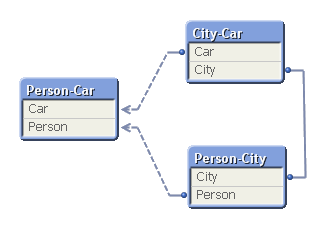
To avoid ambiguous results, QlikView marks one of the tables as “loosely coupled”, which means that the logical inference cannot propagate through this table. In the document properties you can decide which table to use as the loosely coupled table. You will get different results from the logical inference depending on which you choose.
So what did I do wrong? Why did I get a circular reference?
It is not always obvious why they occur, but when I encounter circular references I always look for fields that are used in several different roles at the same time. One obvious example is if you have a table listing external organizations and this table is used in several roles: as Customers, as Suppliers and as Shippers. If you load the table only once and link to all three foreign keys, you will most likely get a circular reference. You need to break the circular reference and the solution is of course to load the table several times, once for each role.
In the above data model you have a similar case. You can think of Car as “Car produced in the city” or “Car that our friend drives”. And you can think of City as “City where car is produced” or “City where our friend lives”. Again, you should break the circular reference by loading a table twice. One possible solution is the following:

In real life circular references are not as obvious as this one. I once encountered a data model with many tables where I at first could not figure out what to do, but after some analyzing, the problem boiled down to the interaction between three fields: Customers, Machines and Devices. A customer had bought one or several machines; a device could be connected to some of the machine types – but not to all; and a customer had bought some devices. Hence, the device field could have two roles: Devices that the customer actually had bought; and devices that would fit the machine that the customer had bought, i.e. devices that the customer potentially could buy. Two roles. The solution was to load the device table twice using different names.
Bottom line: Avoid circular references. But you probably already knew that…
Further reading on Qlik data modelling:
You must be a registered user to add a comment. If you've already registered, sign in. Otherwise, register and sign in.